Free Guide
Validating JSON in Python with jsonschema (and When You Don't Need It)
API responses are not guaranteed to match what your code expects. A field can be missing, a number can arrive as a string, or a nested object can change shape. JSON Schema gives you a way to catch that problem as soon as the response enters your program.
In Python, the jsonschema library lets you compare incoming JSON against a schema you define. The schema describes the shape of the data: which fields are required, what type each value should have, and which constraints matter for your code.
This guide shows how to define a JSON Schema, validate an API response, handle validation errors, and decide when a simpler check is better than full schema validation.
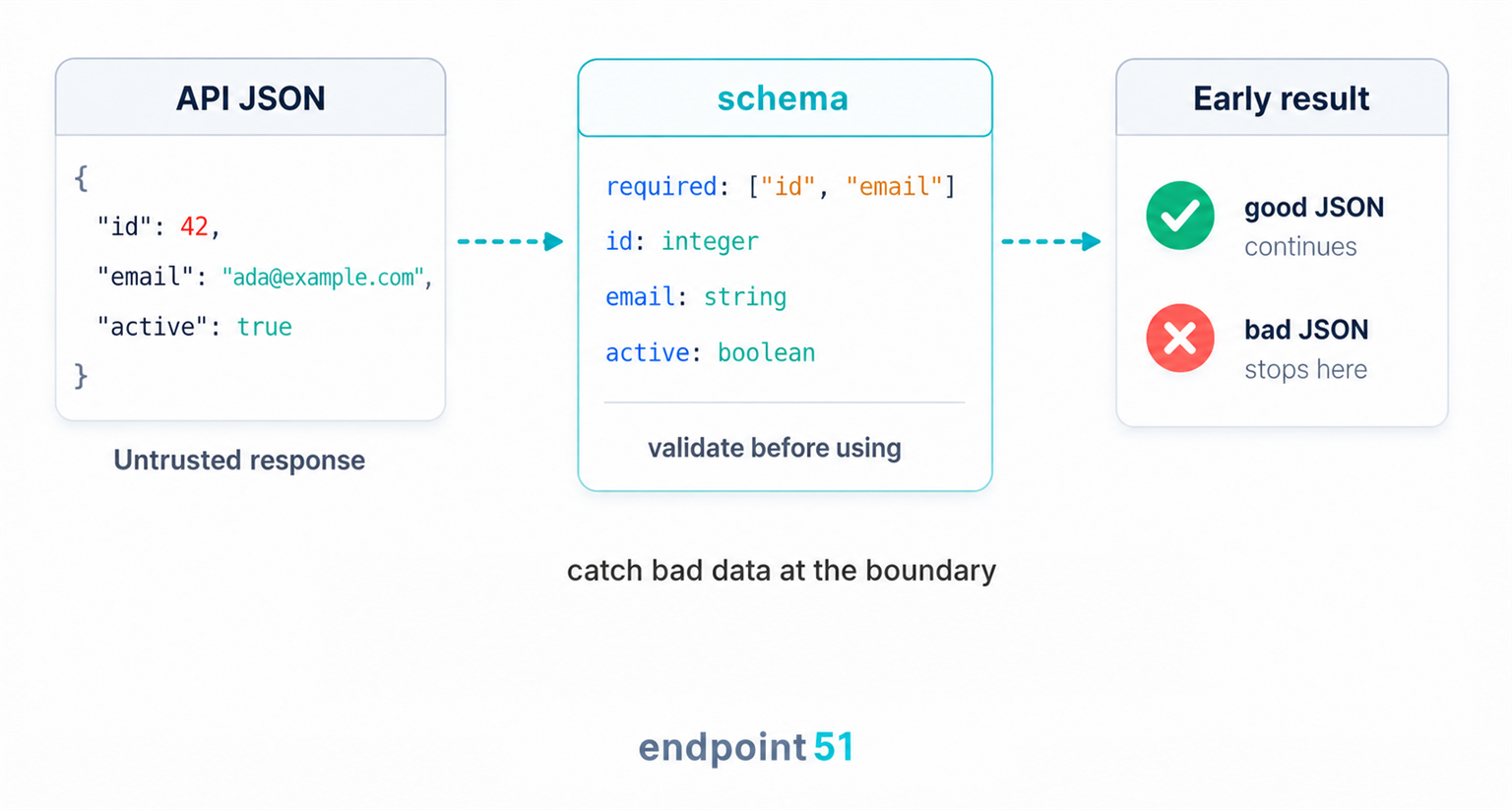
How a JSON Schema works
A schema covers the things that go wrong in practice: which keys must be present, what type each value should be, how nested objects and arrays are structured, and which values are allowed where the set is fixed.
The schema is compared against the actual JSON, and if it does not match, the validator raises a ValidationError with a message that explains what is wrong.
A schema is itself JSON, so in Python you write it as a plain dict (or keep it in a .json file and load it with json.load()). Its keywords describe what you expect, and the most fundamental is type:
{"type": "string"} # accepts "hello", rejects 42
From there you add keywords like properties and required to describe an object's fields and mark which must be present. An empty schema, {}, accepts anything; you tighten it one keyword at a time.
JSON Schema doesn't just work in Python. The same schema document can validate JSON in JavaScript, Go, or Ruby, which is part of why it is a good way to write down a contract that more than one service has to agree on. The jsonschema library is simply Python's implementation of that standard.
Your first schema
The library is not in the standard library, so install it first.
pip install jsonschema
Now imagine an API that returns a single user. Here is a sample response, as the dictionary you would get back from response.json().
data = {
    "id": 42,
    "email": "ada@example.com",
    "active": True,
}
A schema describing that shape is itself a Python dictionary. We say it is an object, list the properties we care about and their types, and mark the ones that must be present.
schema = {
    "$schema": "https://json-schema.org/draft/2020-12/schema",
    "type": "object",
    "properties": {
        "id": {"type": "integer"},
        "email": {"type": "string"},
        "active": {"type": "boolean"},
    },
    "required": ["id", "email"],
}
The schema says that a valid user is an object with an integer id, a string email, and a boolean active. The id and email keys must be present, but active is optional.
$schema is a meta keyword that declares which version of the JSON Schema standard this schema is written for. It is not required, but it helps tools and validators know how to interpret the schema.
Now we validate the data against the schema
from jsonschema import validate

validate(instance=data, schema=schema)
If the data matches, validate returns None and your program carries on. There is no "success" value to check, because success is simply the absence of an exception. If the data does not match, it raises, which is what the next section is about.
At this point, the schema has done one specific job: it has confirmed that the JSON matches the structure your code is about to rely on. It has checked the required keys, the expected types, and the overall shape of the response.
Where validation sits in a real API call
In a real API client, validation happens after the HTTP response has been received and parsed, but before the rest of your program starts using the data.
import requests
from jsonschema import validate, ValidationError

response = requests.get("https://api.example.com/users/42", timeout=10)
response.raise_for_status()

data = response.json()

try:
    validate(instance=data, schema=schema)
except ValidationError as err:
    raise ValueError(f"API returned an unexpected response: {err.message}") from err

print(data["email"])
The order matters. raise_for_status() catches HTTP failures such as 404 or 500. response.json() parses the response body. validate() checks the shape of the parsed data. Only after those steps does the code trust fields such as data["email"].
That is the boundary the hero image is showing: untrusted JSON enters, the schema checks the contract, and only valid data moves deeper into the application.
Catching validation failures
Because validate raises on bad data, you handle it the same way you handle any other expected failure: wrap it and catch the specific error. The exception type is ValidationError.
from jsonschema import validate, ValidationError

bad_data = {
    "id": "42",
    "email": "ada@example.com",
    "active": True,
}

try:
    validate(instance=bad_data, schema=schema)
except ValidationError as err:
    print("Invalid response:", err.message)
Here id is a string rather than an integer. When you run this, err.message spells out the failure in plain language, something like '42' is not of type 'integer'. That message is the whole point. Instead of a TypeError surfacing deep in code that assumed the data was fine, you get a precise complaint at the exact moment the data entered your program.
Validate at the boundary
Check data the moment it crosses into your program, right after the API call or webhook arrives, before any business logic touches it. Once a response has passed validation, the rest of your code can trust its shape and stop defending against it. This is the same idea as the semantic layer in our error-handling guide: a 200 can still carry the wrong shape, and validating at the boundary is how you catch that before it spreads.
The simple validate() helper raises on the first validation error it reports. If you want to collect every failure in one response, build a validator once and ask it to iterate over the errors.
from jsonschema import Draft202012Validator

validator = Draft202012Validator(schema)

bad_data = {"id": "42", "active": True}

for err in sorted(validator.iter_errors(bad_data), key=lambda e: list(e.path)):
    location = ".".join(str(part) for part in err.path) or "$"
    print(f"{location}: {err.message}")
That pattern is also better when you validate many payloads against the same schema. validate() is perfect for one-off examples, but it checks that the schema itself is valid before validating the instance. When the schema is fixed and the data changes, reusing a Draft202012Validator keeps the contract in one object and avoids doing setup work over and over.
The handler catches ValidationError specifically, not a bare except, so a bug in your own code nearby still surfaces as itself instead of being swallowed. What you do in the except block depends on the call: log the message and skip the record, fall back to a default, or surface a clear error and stop. The win is that the failure is now a planned branch with a readable reason, not a crash three steps downstream.
The schema pieces you will actually use
You do not need to memorise the whole JSON Schema standard. Most API response validation comes down to a small set of building blocks: types, required fields, nested objects, arrays, enums, and the occasional format check.
Here are the pieces worth knowing, each kept to the smallest example that shows it.
type checks the kind of value
The most basic constraint. The values are "string", "number", "integer", "boolean", "array", "object", and "null". Use "integer" for whole-number values such as IDs, counts, and page numbers. Use "number" for any JSON number, including decimal values such as prices, ratings, and measurements.
{"type": "string"}
One subtlety: JSON Schema treats 1 and 1.0 as the same integer value. The distinction is about whether the value is whole, not whether the original text happened to include a decimal point.
required lists the keys that must be present
Properties are optional by default. Listing a key in required says the object is invalid without it. This is the check that turns a silently missing field into an immediate, named error.
{
    "type": "object",
    "properties": {"id": {"type": "integer"}},
    "required": ["id"],
}
additionalProperties decides whether extra keys are allowed
Listing keys under properties does not forbid other keys. Extra fields are allowed by default, which is often what you want for third-party APIs that may add fields later. If you own the contract and want to reject anything unexpected, set additionalProperties to false.
{
    "type": "object",
    "properties": {"id": {"type": "integer"}},
    "required": ["id"],
    "additionalProperties": False,
}
Closed schemas can be brittle
additionalProperties: false is useful when you control both sides of the contract, but it can make external API clients break when the provider adds a harmless new field. For third-party responses, it is often safer to require the fields you need and ignore the rest.
properties describes a nested object
Because a property's value can itself be an object with its own properties, schemas nest to match nested JSON. Here a user has an address object with its own required field.
{
    "type": "object",
    "properties": {
        "address": {
            "type": "object",
            "properties": {"city": {"type": "string"}},
            "required": ["city"],
        }
    },
}
array with items validates every element
For a list, set "type": "array" and describe a single element under items. The validator applies that element schema to every entry, so one rule covers a list of any length.
{
    "type": "array",
    "items": {
        "type": "object",
        "properties": {"id": {"type": "integer"}},
        "required": ["id"],
    },
}
enum restricts a value to a fixed set
When a field can only be one of a known handful of values, enum rejects anything else. This catches a typo or an unexpected new status code before it flows into a branch that does not handle it.
{"enum": ["admin", "member", "guest"]}format needs an explicit checker
JSON Schema has a format keyword for strings that look like emails, dates, URLs, and similar values. In Python's jsonschema library, writing "format": "email" in the schema does not activate format validation by itself. Pass a FormatChecker when you want those checks to run.
from jsonschema import Draft202012Validator, FormatChecker

schema = {
    "type": "object",
    "properties": {
        "email": {"type": "string", "format": "email"},
    },
    "required": ["email"],
}

validator = Draft202012Validator(schema, format_checker=FormatChecker())
validator.validate({"email": "not an email"})
Some formats need optional dependencies, so install the format extra when your project relies on this feature: pip install "jsonschema[format]".
Combine these and you can describe most real responses: an object with required fields, some of which are nested objects or arrays of objects, with a few enums where the set is fixed, and optional format checks where strings need to follow a known shape. You rarely need more than this for boundary validation.
When you don't need jsonschema
A schema earns its keep when the data crosses a trust boundary: it comes from an external API, a webhook, a config file, or anywhere you cannot see or control how it was produced. That is data worth validating, because you genuinely do not know what will arrive.
For small, known, internal data, a schema is ceremony. If a function builds a dictionary three lines up and passes it to another function you also wrote, you already know its shape. Wrapping it in a schema adds a dependency and a layer of indirection to defend against a failure that is unlikely at that point in the program. A plain check, or a default with data.get("key", default), is clearer and reads better.
# Internal data you just built. A schema here is overkill.
timeout = config.get("timeout", 10)
if not isinstance(timeout, int):
    raise ValueError("timeout must be an integer")
Over-validating internal data is its own bug
Reaching for a schema on every dictionary adds a dependency and a wall of declaration for no real safety, and it trains readers to skim past validation as boilerplate. The signature is a schema guarding data your own code produced moments earlier, where no untrusted input ever enters. Reserve schema validation for data that crosses a trust boundary; for the rest, an explicit check or a sensible default says more in less space.
The rule of thumb is simple. If you cannot point to where the data came from and be sure of its shape, validate it. If you can, a couple of plain checks will usually say everything a schema would, with less machinery.
jsonschema vs pydantic
These two get compared constantly, and the comparison usually misses that they solve adjacent problems rather than the same one. Neither is better; they hand you different things.
jsonschema validates a raw dictionary against a declarative, language-neutral contract. You still have a plain dict afterwards, accessed with data["id"], and the schema is data you can store, share, or hand to a service written in another language. pydantic takes a different path: you declare a model class, and it parses the JSON into a typed Python object you access with user.id, coercing and validating as it goes unless you enable stricter validation. After pydantic you are working with an object that has attributes and type hints, not a dictionary.
| jsonschema | pydantic | |
|---|---|---|
| What you get back | The same dict, now trusted | A typed model object |
| Validation style | Declarative schema (data) | Python class with type hints |
| The contract | Language-neutral, shareable | Python-only |
| Best for | Validating arbitrary JSON against a shared contract | A typed model you use throughout your app |
Reach for jsonschema when the schema itself is the deliverable, or when you just want to confirm a dict is shaped right and keep working with the dict. Reach for pydantic (its current v2 line parses JSON into BaseModel subclasses) when you want a typed object with attribute access and editor autocomplete carried through your codebase.
If you build with FastAPI, you will probably meet pydantic first because FastAPI uses pydantic models for request bodies, response models, and generated docs. That does not make JSON Schema redundant. It is still a clean fit when you are validating a third-party payload, sharing a contract across languages, or checking raw JSON before it becomes part of your own application model.
Frequently asked questions
Should I use jsonschema or pydantic?
Use jsonschema when you want to validate a raw dictionary against a declarative, language-neutral contract, especially for third-party payloads or schemas shared across languages. Use pydantic when you want JSON parsed into a typed Python object with attribute access and type hints. FastAPI users will often use pydantic for their own request and response models, and may still use JSON Schema for external contracts.
Do I need to validate every API response?
No. Validate data that crosses a trust boundary, such as an external API, a webhook, or a config file, or anywhere a wrong shape would cause a confusing failure deep in your code. Trivial or internal data you produced yourself rarely needs a schema, and wrapping it in one adds a dependency and ceremony for no real safety. A plain check or a sensible default is clearer there.
Where should JSON validation live in my code?
At the boundary, right after the data enters your program: immediately after the API call returns or the webhook is received, before any business logic touches it. Validating there means the rest of your code can trust the shape and stop re-checking it. Scattering validation deep in business logic both duplicates the work and lets bad data travel further before anyone notices.
Does jsonschema check email formats automatically?
No. Adding "format": "email" to a schema is not enough on its own. In Python's jsonschema library, format validation only runs when you pass a FormatChecker to the validator. Some formats also need optional dependencies, installed with pip install "jsonschema[format]".