5. HTTP mechanics: methods, statelessness, JSON, status codes
Four mechanics make REST work: the HTTP methods that say what you want done, the statelessness rule that shapes how every request looks, the JSON format that carries the data, and the status codes that tell you whether anything worked.
HTTP methods: the verbs of APIs
Just like English has verbs (get, create, update, delete), HTTP has methods that describe what action you want to perform. You've already seen the four most common: GET retrieves data, POST creates new data, PUT updates existing data, and DELETE removes data.
For now, focus on GET. It's the most common method and the one you'll use first. GET requests are designed to retrieve data without changing server state, so they're usually the safest requests to experiment with. You'll learn the other methods in Chapter 5.
The HTTP method tells the API what you want to do. Without methods, every action would need a different URL: /get-posts, /create-post, /update-post, /delete-post. Instead, one resource pattern can work with different methods: GET /posts, POST /posts, PUT /posts/42, and DELETE /posts/42. That makes APIs cleaner and more logical.
Stateless communication
When your application makes a request to an API, the server treats that request as independent and does not rely on memory of previous interactions. This is known as stateless communication: every call must include the information needed to process it, such as credentials, identifiers, and request data.
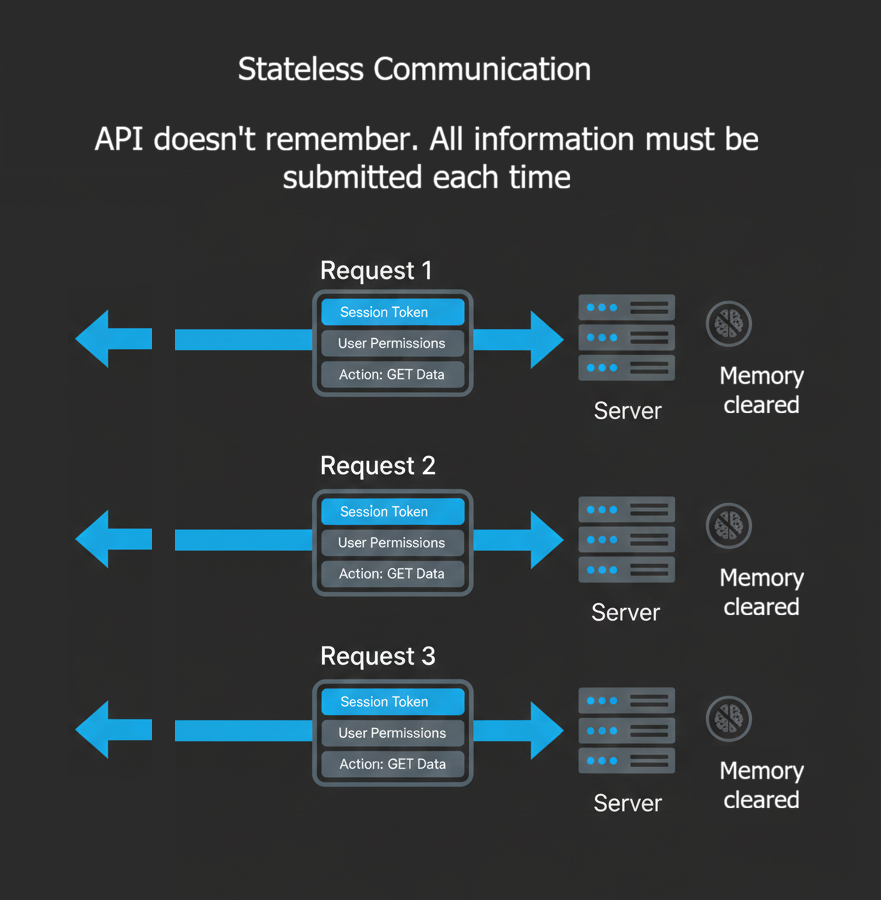
Three consequences of statelessness shape every API client you'll write:
- No memory between requests: the server doesn't remember who you are, what you asked for last time, or that you even called before. Every request starts from zero.
- Every request is self-contained: your API key, session token, user ID, and the action you want, all of it must be included every single time. Miss something, and the server can't help you.
- Why it's designed this way: stateless servers are simpler, faster, and easier to scale. If the server doesn't track millions of user sessions, any server in the cluster can handle any request. That's how APIs handle massive traffic.
JSON: the common language
APIs need to send data back and forth. How do you represent complex information such as weather conditions, user profiles, and product catalogues in a way that any programming language can understand?
The answer is JSON (JavaScript Object Notation). It's a simple text format for representing data that looks like this:
{
  "name": "John Smith",
  "age": 28,
  "email": "john@example.com",
  "active": true
}
JSON is remarkably simple. It has only a few basic rules:
- Objects: wrapped in curly braces
{ }, contain key-value pairs - Arrays: wrapped in square brackets
[ ], contain ordered lists - Strings: text wrapped in double quotes
"like this" - Numbers: written directly without quotes
42or3.14 - Booleans: either
trueorfalse - Null: represents "no value"
null
A real API response uses those building blocks to describe richer data:
{
  "location": {
    "city": "London",
    "country": "United Kingdom",
    "coordinates": {
      "latitude": 51.5074,
      "longitude": -0.1278
    }
  },
  "current": {
    "temperature": 19,
    "conditions": "Partly Cloudy",
    "humidity": 75,
    "wind_speed": 15
  },
  "forecast": [
    {
      "date": "2026-08-15",
      "high": 22,
      "low": 14,
      "conditions": "Partly Cloudy"
    },
    {
      "date": "2026-08-16",
      "high": 24,
      "low": 15,
      "conditions": "Sunny"
    }
  ]
}
Even without explanation, you can probably understand this data. That's the point of JSON: human-readable while being structured enough for computers to parse reliably.
Before JSON, APIs used XML (more complex), plain text (hard to parse), or binary formats (opaque without special tools). JSON struck the right balance, simple enough for humans to understand, structured enough for programs to process, and compact enough for efficient transmission. Now it's the default format for most modern web APIs.
Status codes: understanding responses
Every API response includes a status code, a three-digit number that tells you what happened. The codes are grouped into ranges:
| Range | Meaning | Common examples |
|---|---|---|
| 2xx Success | Request worked correctly | 200 OK, 201 Created, 204 No Content |
| 3xx Redirection | Go somewhere else, or use the copy you already have | 301 Moved Permanently, 302 Found, 304 Not Modified |
| 4xx Client error | You made a mistake in your request | 400 Bad Request, 401 Unauthorized, 404 Not Found |
| 5xx Server error | Server has a problem, not your fault | 500 Internal Server Error, 503 Service Unavailable |
A small handful of status codes will cover almost everything you'll see in practice:
- 200 OK: everything worked perfectly. This is what you want to see.
- 301 Moved Permanently: the resource has moved to a new URL. Most HTTP libraries follow redirects automatically, so you rarely need to handle these yourself.
- 400 Bad Request: your request has invalid syntax or missing parameters. Check your code.
- 401 Unauthorized: you need authentication. Provide an API key or login credentials.
- 404 Not Found: the URL doesn't exist. Check for typos in the endpoint.
- 429 Too Many Requests: you've exceeded rate limits. Slow down your requests.
- 500 Internal Server Error: the server crashed. This is their problem, not yours. Try again later.
Status codes are your first clue when debugging. A 4xx error means you need to fix your request. A 5xx error means you should wait for the service to recover. A 2xx code means you can proceed with processing the response.
That's the HTTP foundation you need for now. The next page closes the chapter with why all this connectivity matters, and a short quiz to lock it in.