Chapter 8: Weather Dashboard App
1. Coordinating multiple APIs
In this chapter you'll build a complete weather dashboard that coordinates two APIs. The first turns city names into coordinates; the second fetches the forecast for those coordinates. By the end you'll have a layered design where each API gets its own client built on Chapter 7's APIClient, a clean handoff between them, and a CLI loop that reads city names interactively and prints the forecast.
Real software rarely talks to one service. The pattern is almost always the same: one API's output is another API's input, and any step can fail. A weather dashboard is the worked example, but the pattern shows up everywhere -- e-commerce checkouts coordinate payment, inventory, and shipping the same way.
What you'll learn
- Read unfamiliar API documentation in four questions: what endpoint, what parameters, what response shape, what errors
- Build a layer in three phases: minimal request, optional parameters, hardened error handling
- Design clean interfaces so calling code only checks a single success signal
- Coordinate two APIs with validation gates so a failure in step one never reaches step two
- Read parallel-array responses like Open-Meteo's daily forecast
- Convert WMO weather codes into user-friendly descriptions
- Wrap the whole thing in a class with an interactive CLI loop that handles Ctrl+C cleanly
What you'll build
geocode_client.py— production geocoding layer built on Chapter 7'sAPIClientweather_client.py— production weather layer, same shape as the geocoderweather_codes.py— WMO weather-code lookup tableintegrate_weather.py— the two layers coordinated behind a single functionweather_dashboard.py— theWeatherDashboardclass with display helpers and an interactive CLI loop
You'll also need auth_module.py from Chapter 7. If you skipped that chapter, page 3 includes a stripped-down version that's enough for this chapter to run.
The coordination challenge
Weather applications face a fundamental mismatch between how users think and how APIs work. Users think in place names: "what's the weather in Dublin?" Weather APIs think in coordinates, and they want latitude and longitude to four decimal places. Something has to bridge the gap, and that something is a second API call. So the minimum viable weather dashboard is already a two-API app.
The same two-API pattern shows up everywhere. Authentication validates credentials, then a profile endpoint fetches account details. A payment processor authorizes the transaction, then the order API writes the purchase record. A search endpoint returns product IDs, then an inventory endpoint checks availability. The details change; the coordination shape (one API's output becomes the next API's input, and every step can fail) does not.
Understanding the data flow
The weather dashboard orchestrates two Open-Meteo APIs with distinct responsibilities. The geocoding API converts location names into coordinates. The forecast API returns current conditions and multi-day predictions for a specific latitude and longitude. Neither can do the other's job, and weather data requires coordinates that only geocoding can provide.
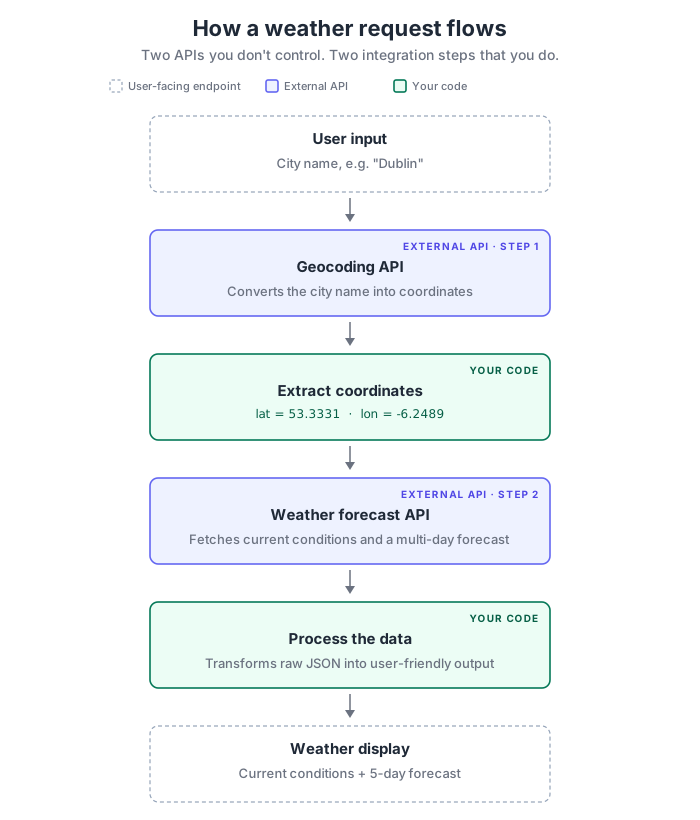
Two APIs you don't control sit in the middle. Your code owns the coordinate extraction between them and the data transformation at the end. Each of those four arrows is a place where things can go wrong, and the way you handle each one is what separates a demo from an application.
Four places it breaks
Multi-API workflows create multiple points where things can go wrong. Knowing these failure modes before you write code lets you design the right response at each point instead of scrambling when production surfaces the first one.
- User input. Empty submissions, typos, nonsense strings, cities that don't exist. These want clear feedback and a retry path.
- Geocoding. Network timeouts, rate limits, empty-result responses for unknown cities. Some of these are temporary (retry), others permanent (tell the user).
- Weather API. Service outage, invalid coordinates, incomplete response body. Even when geocoding succeeds, the forecast can still fail.
- Data processing. Missing fields, unexpected types, impossible values. Raw API responses need validation before they drive a display.
In a multi-API workflow, any failure stops the whole pipeline. If geocoding fails, the weather API never runs. If the weather response is malformed, the display never renders. The final output depends on every component succeeding, which is why professional integrations classify each failure as recoverable (retry the network) or terminal (the city doesn't exist) and respond in kind.
Designing clean interfaces
Each layer presents a clean interface to the layer above it. The geocoding layer returns coordinates or signals failure. The weather layer returns forecast data or signals failure. The contract every layer in this chapter implements is the same: real data on success, a single sentinel on failure (None, or a tuple of Nones), so the calling code only ever needs one check.
# Geocoding layer (built as a method on GeocodingClient on page 3)
def find_location(self, city_name):
    """
    Returns: (latitude, longitude, formatted_name) on success
             (None, None, None) on failure
    """

# Weather layer (built as a method on WeatherClient on page 4)
def get_weather_data(self, latitude, longitude):
    """
    Returns: weather_dict on success
             None on failure
    """

# Coordination (built as a free function on page 5)
def get_weather_for_city(city_name):
    """
    Returns: (weather_data, location_name) on success
             (None, None) on failure
    """
Three contracts, one shape. The calling code only ever asks "did I get data or a sentinel?" and moves on. The next four pages fill these signatures in.
How the chapter is laid out
The next page reads the Open-Meteo documentation systematically so the rest of the chapter has something concrete to implement. Then each API layer gets its own page: geocoding first, because the weather layer depends on its output. Then coordination, where the two layers meet behind a single function with validation gates between them. Then the dashboard page wraps everything in a class with display helpers and an interactive loop. The review page closes the chapter with a quiz and a forward reference into Chapter 9's error-handling patterns.
You'll also write a handful of small scratch scripts along the way (one per phase, to inspect what an API actually returns before building anything that depends on the shape). Those don't survive into the final dashboard. The five files in the build list above are the Chapter 8 files that do.