3. Routes, views, and responses
The introduction showed Flask in one small example. This page slows down on the pattern inside that example: a browser asks for a URL, Flask matches that URL to a route, the route runs a Python function, and the function returns a response.
The Flask loop
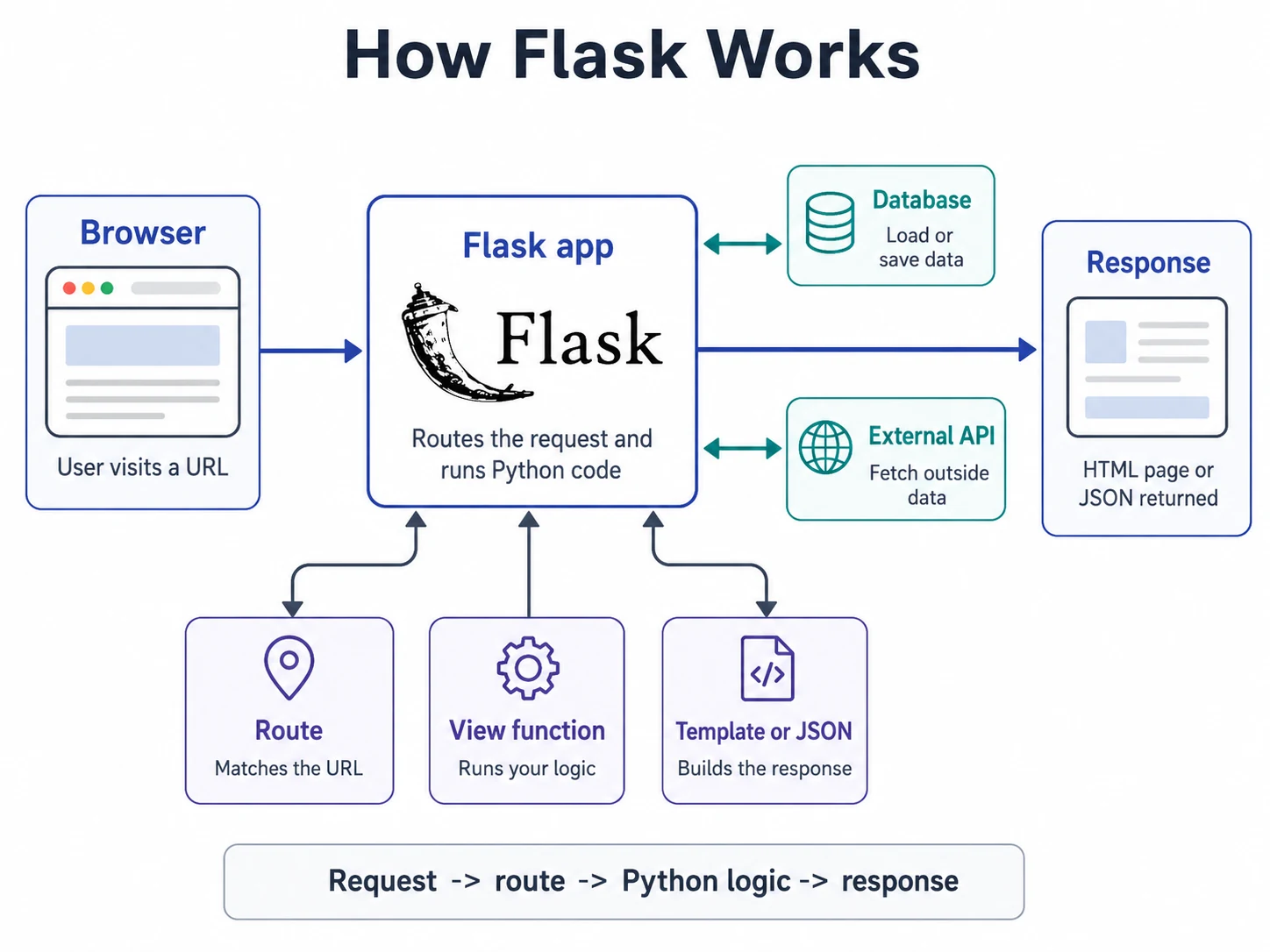
Every Flask page follows the same loop. The browser sends a request. Flask checks the routes registered on the app. The matching route runs a Python function. That function returns something Flask can send back to the browser.
- Request. The browser asks for a URL, such as
/or/status. - Route. Flask finds the
@app.route()rule that matches that URL. - View function. Flask runs the Python function attached to the route.
- Response. Flask sends the function's return value back to the browser.
What is a route?
A route is the link between a URL and a Python function. In Flask, you create that link with @app.route(). The decorator sits above the function it belongs to.
@app.route("/")
def home():
    return "Hello from the Music Time Machine!"
The route "/" means the home page. When the browser asks for the home page, Flask runs home(). The function name does not have to match the URL, but it should describe what the route does.
The view function
The Python function connected to a route is called a view function. Its job is to decide what should be sent back for that request.
At first, a view function can return a simple string. Later, the same kind of function might read from SQLite, call another helper function, prepare data for a template, redirect the browser, or return an error page.
@app.route("/latest")
def latest_tracks():
    tracks = load_latest_tracks()
    return render_template("latest.html", tracks=tracks)
In this example, latest_tracks() is the view function for /latest. The route says when it should run. The function body says what work it should do.
What counts as a response?
A response is what Flask sends back after a view function runs. The simplest response is a string, but Flask can also send HTML pages, JSON data, redirects, and status codes.
@app.route("/status")
def status():
    return {"app": "Music Time Machine", "status": "running"}


@app.route("/missing")
def missing():
    return "Not found", 404
The first function returns a dictionary, which Flask can turn into JSON. The second function returns a pair: the response body and the HTTP status code. You will use these return shapes more deliberately as the chapter moves from small examples to real pages.
Page response or data response?
Most routes in this chapter send back pages for a person to read in the browser. Some routes in later chapters send back data for JavaScript, a mobile app, or another service to consume.
from flask import render_template


@app.route("/")
def home():
    return render_template("home.html")


@app.route("/api/status")
def api_status():
    return {"app": "Music Time Machine", "status": "running"}
Both are normal Flask routes. The difference is the audience. home() returns a page for a person. api_status() returns structured data for code.
Once this loop is clear, the rest of Flask is easier to place. Routing decides which function runs. Templates decide how pages are built. Forms decide how user input reaches Python. Sessions decide what can be remembered between requests. You will install Flask and run code like this on the next page, so treat the snippets here as a map of the loop rather than something to type yet.