2. The asyncio mental model
Before theory, proof. You will write a minimal async function, run three API calls concurrently, and see the wall-clock collapse to the latency of the slowest single call. Once the demo is on screen, the rest of the page is the why: the event loop, coroutines, the silent-bug shape of a missing await, and the sync-vs-async cost formula that tells you when the complexity is worth it. The example reuses public endpoints (the GitHub root, httpbin.org/delay/1, JSONPlaceholder) so no API keys are needed for this page; the keystone build in Section 6 hits real news APIs.
The minimal async example
First, install httpx (async HTTP client):
pip install httpx
Create first_async.py:
import asyncio
import time
import httpx

async def fetch_url(url):
    async with httpx.AsyncClient() as client:
        response = await client.get(url, timeout=10)
        return len(response.text)

async def main():
    urls = [
        "https://api.github.com",
        "https://httpbin.org/delay/1",
        "https://jsonplaceholder.typicode.com/posts",
    ]

    start = time.time()

    # Run all three requests concurrently
    results = await asyncio.gather(*[fetch_url(url) for url in urls])

    elapsed = time.time() - start

    print(f"Fetched {len(results)} URLs concurrently")
    print(f"Response sizes: {results}")
    print(f"Total time: {elapsed:.2f} seconds")

if __name__ == "__main__":
    asyncio.run(main())
Run it:
python first_async.pyYou'll see output similar to:
Fetched 3 URLs concurrently
Response sizes: [4523, 3891, 15024]
Total time: 1.23 seconds
Three requests completed in ~1.2 seconds. The middle URL (httpbin.org/delay/1) deliberately delays one second; sequentially the three would take ~2+ seconds. The async version's wall-clock is roughly the latency of the slowest single call (the one-second delay endpoint), not the sum of the three.
What just happened
Let's break down the async pattern:
- async def: Declares
fetch_url()andmain()as async functions. - await: Pauses execution until
client.get()completes. While waiting, Python switches to other tasks. - asyncio.gather(): Runs all three
fetch_url()calls concurrently and collects results. - asyncio.run(): Starts the event loop and runs
main().
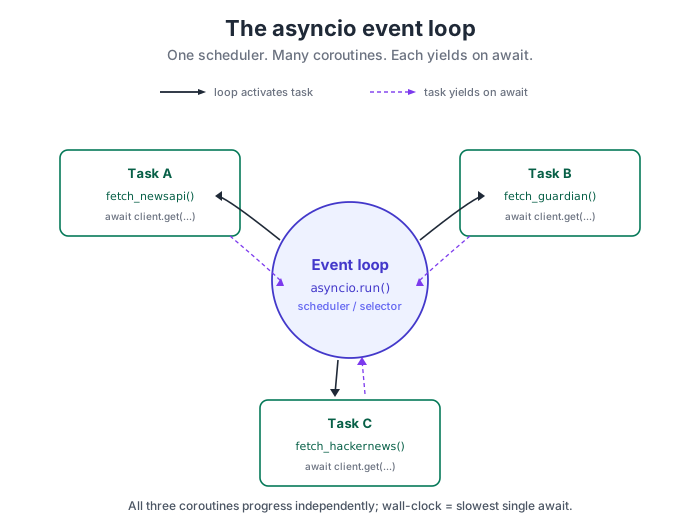
When fetch_url() hits await client.get(), it does not block. It yields control to asyncio's event loop, which then starts the next fetch_url() call. Both coroutines now sit waiting for network responses while the loop is free to handle other ready work or idle.
Once a response arrives, the loop resumes that specific fetch_url() right after its await. All three coroutines progress independently.
Compare to synchronous code
Here's the same task with synchronous requests:
import time
import requests

def fetch_url_sync(url):
    response = requests.get(url, timeout=10)
    return len(response.text)

urls = [
    "https://api.github.com",
    "https://httpbin.org/delay/1",
    "https://jsonplaceholder.typicode.com/posts",
]

start = time.time()

# Each request blocks until complete
results = [fetch_url_sync(url) for url in urls]

elapsed = time.time() - start

print(f"Fetched {len(results)} URLs sequentially")
print(f"Response sizes: {results}")
print(f"Total time: {elapsed:.2f} seconds")  # ~2.5 seconds
Sync version: ~2.5 seconds. Async version: ~1.2 seconds. The ratio is the cost of the one-second deliberate-delay endpoint dominating the wall-clock instead of being summed with the other two.
Real numbers: sync vs async
To see the problem clearly, imagine you are building a news aggregator that fetches headlines from three different APIs: NewsAPI, The Guardian, and Hacker News. Each API takes about 500 milliseconds to respond. Here is what happens with synchronous code:
import time
import requests

def fetch_newsapi():
    response = requests.get("https://newsapi.org/v2/top-headlines?country=us&apiKey=...")
    return response.json()

def fetch_guardian():
    response = requests.get("https://content.guardianapis.com/search?api-key=...")
    return response.json()

def fetch_hackernews():
    response = requests.get("https://hacker-news.firebaseio.com/v0/topstories.json")
    return response.json()

start = time.time()

# Each call blocks until it completes
newsapi_data = fetch_newsapi()      # Wait ~500ms
guardian_data = fetch_guardian()    # Wait ~500ms
hackernews_data = fetch_hackernews()  # Wait ~500ms

elapsed = time.time() - start
print(f"Fetched all sources in {elapsed:.2f} seconds")  # ~1.5 seconds
This code takes about 1.5 seconds because it waits for each request to complete before starting the next one. The total time is the sum of all individual request times.
Now imagine the same task with async code:
import asyncio
import time
import httpx

async def fetch_newsapi():
    async with httpx.AsyncClient() as client:
        response = await client.get("https://newsapi.org/v2/top-headlines?country=us&apiKey=...")
        return response.json()

async def fetch_guardian():
    async with httpx.AsyncClient() as client:
        response = await client.get("https://content.guardianapis.com/search?api-key=...")
        return response.json()

async def fetch_hackernews():
    async with httpx.AsyncClient() as client:
        response = await client.get("https://hacker-news.firebaseio.com/v0/topstories.json")
        return response.json()

async def main():
    start = time.time()

    # All calls start at the same time and run concurrently
    results = await asyncio.gather(
        fetch_newsapi(),
        fetch_guardian(),
        fetch_hackernews(),
    )

    elapsed = time.time() - start
    print(f"Fetched all sources in {elapsed:.2f} seconds")  # ~0.5 seconds
    return results

if __name__ == "__main__":
    asyncio.run(main())
This async version takes about 0.5 seconds, the time of the slowest request. All three API calls happen at the same time. Python switches between them while they are waiting for network responses, which is where almost all the time is spent.
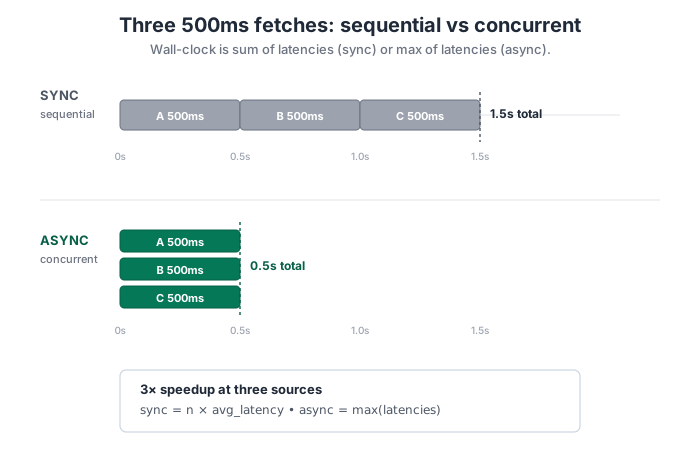
The improvement grows with the request count. Twenty APIs at ~500ms each: sync ~10 seconds; async still ~0.5 seconds. The formula is simple: sync time is the sum of all request times, async time is the maximum single request time. The cost framing in Section 1 names when this difference matters and when it does not; the demo above is the proof for the cases where it does.
Understanding asyncio and the event loop
Python's asyncio library manages asynchronous code using something called an event loop. The event loop is a scheduler that runs multiple tasks concurrently by switching between them whenever they are waiting for something.
Think of it like a waiter at a busy restaurant. Instead of taking one table's order, walking to the kitchen, waiting for the food, bringing it back, and only then moving to the next table, a good waiter takes orders from multiple tables, submits them all to the kitchen at once, and delivers food as it becomes ready. The waiter switches between tables efficiently instead of blocking on any single one.
await yields back to the loop.
In async Python, the event loop is the waiter and your tasks are the tables. When you use await, you are telling Python, "This will take a while, so work on something else and come back when this is ready." The event loop switches to another task, and returns to your code when the awaited operation completes.
You do not usually interact with the event loop directly. You write async def functions, use await for I/O operations, and call asyncio.run() to start the event loop. The library handles the rest.
The key insight is this: async is cooperative multitasking. Your code must explicitly yield control with await for the event loop to switch tasks. If you forget to use await on a slow operation, you will block the entire event loop and lose all the concurrency benefits.
Async/await syntax fundamentals
Python's async syntax is built around two keywords: async and await. Here is what they mean:
-
async def: Defines a coroutine function. When you call an async function, it returns a coroutine object that represents work to be done, but it does not run yet. -
await: Pauses the coroutine and waits for another coroutine to complete. While waiting, the event loop can run other tasks. You can only useawaitinside anasync deffunction.
Here is a minimal example that shows the basic pattern:
import asyncio

async def fetch_data():
    print("Starting fetch...")
    await asyncio.sleep(1)  # Simulate a slow network call
    print("Fetch complete!")
    return {"data": "example"}

async def main():
    result = await fetch_data()
    print("Got result:", result)

if __name__ == "__main__":
    asyncio.run(main())
In this code, fetch_data() is a coroutine. When you call it, you get a coroutine object. The await keyword actually runs the coroutine and waits for it to finish. asyncio.run(main()) starts the event loop and runs the main() coroutine.
The rules are simple but strict:
- You cannot use
awaitin a regular function. Only inasync deffunctions. - If you call an async function without
await, you get a coroutine object but nothing runs. - The top level entry point (usually
main()) is started withasyncio.run().
awaitThis is the error that catches everyone, and it is quiet -- your program runs to completion without an exception or traceback. Python does emit a RuntimeWarning: coroutine 'fetch_data' was never awaited to stderr, but in noisy output it is easy to miss; you usually notice when the output looks wrong or the wall-clock is suspiciously fast.
# WRONG: returns a coroutine object, nothing runs
result = fetch_data()

# CORRECT: actually executes the coroutine
result = await fetch_data()
Python returns a coroutine object instead of running the function; your code carries on as if the work happened. The async-aware tooling helps you upgrade the warning into a hard signal: python -W error::RuntimeWarning turns the never-awaited warning into a real exception at runtime, and mypy --strict flags it statically. The next section is where this trap costs you the most: when sync I/O sits inside async def, the event loop blocks and the concurrency collapses back to sequential.