6. Chapter review
Chapter 6 took you from "JSON parsing works when the data is well-formed" to "JSON parsing works regardless of what the API returns". The defensive techniques add lines of code, but each line maps to a specific failure mode you saw crash the naive version at the start of the chapter, and the combination is the difference between a script that passes a demo and a script that runs unattended in production.
The three-layer pattern
Every technique in this chapter is a variation on the same three-step check: existence, type, content. At every nesting level, ask three questions in order:
- Existence. Does the key exist? If not, return a shape-appropriate default with
.get(). - Type. Is the value what you expected? Check with
isinstance()before any type-specific operation. - Content. Is the value sensible? Range checks, length checks, emptiness checks before you use it.
Apply those three layers at every level and the six failure modes from the naive demo -- missing keys, null values, type variations, empty arrays, nested nulls, and schema variations -- stop being crashes and start being gracefully-handled defaults.
The same contrast that opened the chapter now reads differently. You've built every technique on the right-hand side; you know why each line is there:
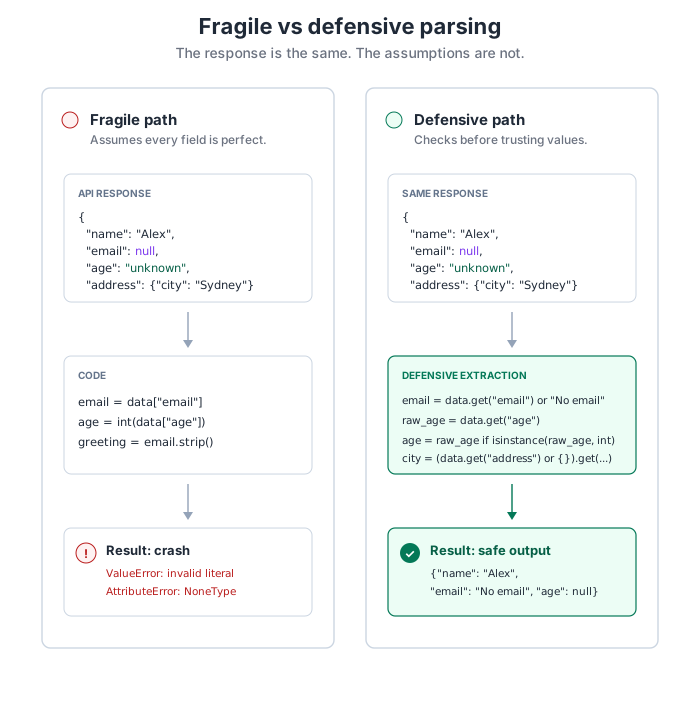
.get() with a default) and type (isinstance()). Content validation -- range, length, emptiness -- follows the same shape.
The habits worth making reflexive
Six small habits carry most of this chapter's weight once they become automatic:
- Reach for
.get()with a default before writing bracket notation on anything you didn't construct yourself. - Pick the default for its shape: an empty dict for nested objects you'll chain further
.get()calls on, an empty list for arrays you'll iterate, a string for something you'll display,Nonewhen absence needs to be distinguishable from a zero value. - Check
isinstance()before any type-specific operation, especially string methods and arithmetic. - Validate array type and length before indexing -- a string passes a length check but breaks your downstream code.
- Return consistent shapes from extraction functions so callers don't need to branch on whether a field exists.
- Inspect an unknown API's response before writing extraction code, using the debugging toolkit, not the docs, as the source of truth.
Checkpoint quiz
Use the quiz as a diagnostic, not a drill. If any answer requires thinking rather than recall, that's the section worth a second read.
Why should you use .get() instead of bracket notation when accessing JSON keys?
.get() returns None (or a default) if the key doesn't exist, preventing KeyError crashes. Bracket notation raises KeyError immediately when keys are missing, crashing your program.
What's the difference between using .get("age") and .get("age", 0)?
.get("age") returns None if key is missing. .get("age", 0) returns 0 instead. Use defaults that match how you'll use the data: 0 for calculations, "Unknown" for display, None when you need to distinguish "not provided" from "provided as empty".
How would you safely access data["user"]["profile"]["email"] if any level could be None?
Validate at each level: user = data.get("user", {}), then profile = user.get("profile", {}), then email = profile.get("email", "No email"). Use empty dicts {} as defaults for nested objects.
Why should you check isinstance(value, str) before calling value.upper()?
If value is None or a non-string type, calling .upper() raises AttributeError. Type checking ensures the value actually has the methods you're trying to call.
What checks should you perform before accessing results[0] from an API response?
Three checks: (1) Verify results is a list with isinstance(results, list), (2) Check length with len(results) > 0, (3) Optionally verify first item is expected type with isinstance(results[0], dict).
How can an age field documented as an integer cause crashes even when the key exists?
APIs sometimes return integers as strings ("25" instead of 25), or age might be None/null. Trying to do math on strings or None causes TypeError. Always validate type with isinstance() and convert safely.
What's the benefit of returning None from an extraction function vs returning "Unknown"?
None lets callers distinguish "data not provided" from "data provided as empty/zero". With None, you can show "Age not provided" vs "Age: 0". With "Unknown", you've already decided how to display it, and callers can't handle the two cases differently.
When debugging JSON parsing, what should you check before assuming your code is wrong?
First inspect the actual API response structure with debugging tools. Check if: (1) Response status is 200, (2) Content-Type is JSON, (3) Structure matches what you expected, (4) Key names are spelled correctly, (5) Nesting levels match documentation. Often the API doesn't match documentation.
Practice before moving on
Before heading into Chapter 7 (working with API keys and authentication), strengthen the defensive-extraction habit with a few small exercises:
- Fetch ten users at once from the Random User API and run them through
extract_user_with_type_validation. Confirm the success counter matches the batch size. - Add
debug_toolkit.pyanddebug_workflow.pyto a utilities folder you can import from future projects. - Revisit one of the Chapter 3 or 4 scripts and swap every bracket access for
.get()with a sensible default. Try breaking it deliberately with bad inputs and watch it survive. - For a change of scenery, point the toolkit at JSONPlaceholder's
/postsendpoint and build a type-safe extractor for its shape.
Looking forward
Chapter 7 adds a new wrinkle: the APIs you've been using have been open; the next set will want credentials. The defensive extraction patterns don't change -- a KeyError is a KeyError whether or not the request was authenticated -- but you'll layer credential-management concerns on top. The JSON parsing habits you've built here stay useful for the rest of the book and for every API you touch afterwards.