3. Validating and converting types
.get() handled missing keys, and extract_user_safely already showed the shape of the next defence: isinstance() checks before treating a value as a dict. This page generalises that pattern. The other half of the JSON-extraction problem is keys that are present but the wrong type: a documented integer that arrives as a string, an object field that comes back as null, a string field that's empty when downstream code expects content. You'll work through it in three passes: a single-field demo to see the shape, two string-handling helpers, then a complete extraction function combining everything.
Four common type-mismatch crashes
Before writing the defensive version, take a quick look at the four scenarios that trip up the most production code. Save this at the project root as type_mismatch_demo.py:
# Scenario 1: String instead of integer
user_data = {"age": "34"}  # String, not int
try:
    next_year_age = user_data["age"] + 1  # TypeError!
    print(f"Next year: {next_year_age}")
except TypeError as e:
    print(f"ERROR: Math error: {e}")

# Scenario 2: Null where you expect string
user_data = {"name": None}
try:
    name_upper = user_data["name"].upper()  # AttributeError!
    print(name_upper)
except AttributeError as e:
    print(f"ERROR: Method error: {e}")

# Scenario 3: List where you expect dict
user_data = {"location": ["Dublin", "Ireland"]}  # List, not dict
try:
    city = user_data["location"]["city"]  # TypeError!
    print(city)
except TypeError as e:
    print(f"ERROR: Access error: {e}")

# Scenario 4: Empty string in calculations
user_data = {"price": ""}  # Empty string
try:
    total = float(user_data["price"]) * 1.1  # ValueError!
    print(f"Total: {total}")
except ValueError as e:
    print(f"ERROR: Conversion error: {e}")
Run it from the project root:
$ python type_mismatch_demo.py
ERROR: Math error: can only concatenate str (not "int") to str
ERROR: Method error: 'NoneType' object has no attribute 'upper'
ERROR: Access error: list indices must be integers or slices, not str
ERROR: Conversion error: could not convert string to float: ''
None of these look like JSON problems at first glance. They look like Python errors. But each one traces back to the API returning a value that didn't match the documented type. This is why .get() alone isn't enough. You get the value, but the value still has to pass a type check before you can use it safely.
Validating with isinstance()
The defensive pattern is simple to say: before any type-specific operation (arithmetic, string methods, indexing), check that the value is the expected type with isinstance(). If it's not, either coerce it safely or fall back to a default. Here's that pattern applied to age, which is the field most likely to appear as int, string, float, or None across different endpoints.
Save this as safe_age.py:
def safe_get_age(user_data):
    """
    Extract age with type validation and conversion.
    Returns integer age or None if invalid.
    """
    age_value = user_data.get("age")

    # Handle None explicitly
    if age_value is None:
        return None

    # Already correct type
    if isinstance(age_value, int):

        # Validate reasonable range
        if 0 <= age_value <= 150:
            return age_value
        else:
            return None  # Invalid age value

    # Try converting string to int
    if isinstance(age_value, str):

        # Remove whitespace
        age_value = age_value.strip()

        # Check if it's a number
        if age_value.isdigit():
            age = int(age_value)
            if 0 <= age <= 150:
                return age

    # Handle float (round down)
    if isinstance(age_value, float):
        age = int(age_value)
        if 0 <= age <= 150:
            return age

    # Couldn't convert
    return None

# Test with various inputs
test_cases = [
    {"age": 25},          # Valid int
    {"age": "30"},        # String number
    {"age": "  45  "},    # String with whitespace
    {"age": 32.7},        # Float
    {"age": None},        # Null
    {"age": "unknown"},   # Invalid string
    {"age": -5},          # Negative
    {"age": 200},         # Too large
    {},                   # Missing key
]

print("=== Type Validation Tests ===\n")
for i, test_data in enumerate(test_cases, 1):
    age = safe_get_age(test_data)
    input_val = test_data.get("age", "missing")
    print(f"Test {i}: input={input_val!r:15} -> age={age}")
Run it from the project root:
$ python safe_age.py
=== Type Validation Tests ===

Test 1: input=25              -> age=25
Test 2: input='30'            -> age=30
Test 3: input='  45  '        -> age=45
Test 4: input=32.7            -> age=32
Test 5: input=None            -> age=None
Test 6: input='unknown'       -> age=None
Test 7: input=-5              -> age=None
Test 8: input=200             -> age=None
Test 9: input='missing'       -> age=None
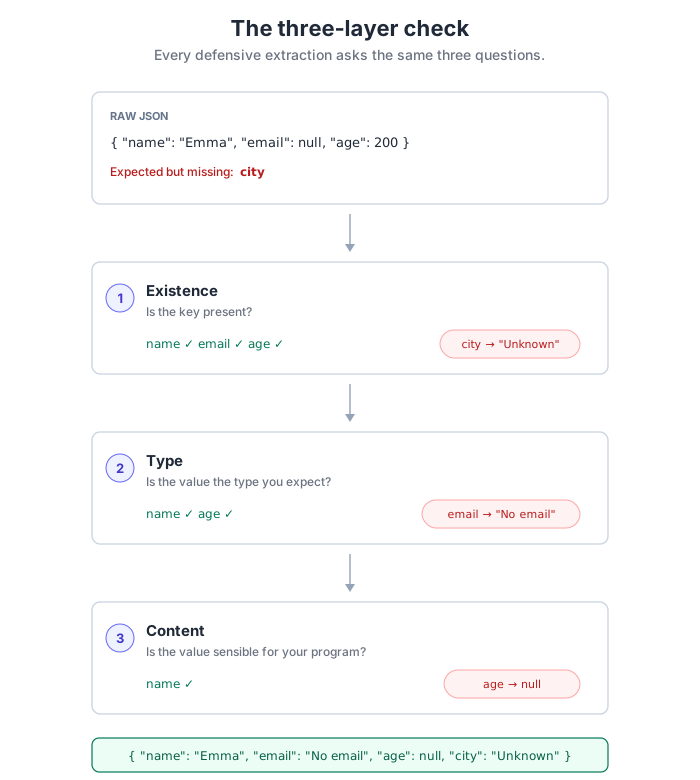
Nine wildly different inputs; one consistent output shape. That's the goal. Working through safe_get_age has just exposed the pattern that runs through every defensive extractor in this chapter, even when the prose doesn't spell it out: three layers, in this order: existence, type, content. Handle None first (existence). Then check each expected type before doing anything type-specific (type). Then validate the value itself, a negative age or age over 150 is a bad value even though the type is correct (content). The next two sections apply the same three-layer move to string fields and to a complete extraction function.
Safe string operations
Strings come with their own sharp edges. .upper(), .split(), and .strip() all crash when called on None or a non-string value, so they need the same guard: check the type, strip whitespace, check for emptiness, then normalise. Email and name fields are good worked examples because they're both prone to nulls, whitespace, and wrong-shape inputs (a name that comes back as a string instead of a {"first", "last"} object).
Save this as safe_strings.py:
def safe_get_email(user_data):
    """Extract and normalize email address safely."""
    email = user_data.get("email")

    # Validate it's a string
    if not isinstance(email, str):
        return "No email provided"

    # Clean whitespace
    email = email.strip()

    # Check not empty
    if not email:
        return "No email provided"

    # Normalize to lowercase
    email = email.lower()

    # Basic validation (real apps use regex)
    if "@" not in email or "." not in email:
        return "Invalid email format"

    return email

def safe_get_name(user_data):
    """Extract and format name safely."""
    name_obj = user_data.get("name", {})

    # Validate it's a dictionary
    if not isinstance(name_obj, dict):
        return "Unknown"

    first = name_obj.get("first", "")
    last = name_obj.get("last", "")

    # Validate both are strings
    if not isinstance(first, str):
        first = ""
    if not isinstance(last, str):
        last = ""

    # Clean whitespace
    first = first.strip()
    last = last.strip()

    # Build full name
    if first and last:
        return f"{first} {last}"
    elif first:
        return first
    elif last:
        return last
    else:
        return "Unknown"

# Test cases
test_users = [
    {"email": "alice@example.com", "name": {"first": "Alice", "last": "Smith"}},
    {"email": "  bob@example.com  ", "name": {"first": "  Bob  ", "last": ""}},
    {"email": None, "name": {"first": "Charlie"}},
    {"email": "invalid-email", "name": {"first": None, "last": "Davis"}},
    {"email": "", "name": "NotADict"},  # Wrong type
    {},  # Missing everything
]

print("=== Safe String Operations ===\n")
for i, user in enumerate(test_users, 1):
    name = safe_get_name(user)
    email = safe_get_email(user)
    print(f"User {i}:")
    print(f"  Name:  {name}")
    print(f"  Email: {email}")
    print()
Run it from the project root:
$ python safe_strings.py
=== Safe String Operations ===

User 1:
  Name:  Alice Smith
  Email: alice@example.com

User 2:
  Name:  Bob
  Email: bob@example.com

User 3:
  Name:  Charlie
  Email: No email provided

User 4:
  Name:  Davis
  Email: Invalid email format

User 5:
  Name:  Unknown
  Email: No email provided

User 6:
  Name:  Unknown
  Email: No email provided
Same three-layer pattern, applied to strings this time: check the type, clean the input (strip whitespace), check for emptiness, and only then apply any normalisation or format check. The order matters, you can't check "is this a valid email?" until you've first confirmed you have a string, and even then, stripping whitespace before checking emptiness prevents the annoying bug where a value looks non-empty but is just " ".
A complete type-safe extraction function
Now combine the three layers, existence, type, content, into a single extraction function that handles every edge case we've discussed. This supersedes extract_user_safely from the previous page: same role, expanded with the type checks we've just covered. The rest of the chapter (the batch processor on the next page, the debugging exercises after that) uses this version, and it's the function you'd actually ship: .get() everywhere, isinstance() before every type-specific operation, range checks on anything numeric, and a guaranteed return shape.
Save this as type_safe_user.py:
def extract_user_with_type_validation(user_data):
    """
    Extract user with complete type validation and conversion.

    Returns dict with guaranteed structure or None if fundamentally invalid.
    """

    # Validate input is a dictionary
    if not isinstance(user_data, dict):
        return None

    # Extract and validate name (nested dict)
    name_obj = user_data.get("name")
    if isinstance(name_obj, dict):
        first = name_obj.get("first", "")
        last = name_obj.get("last", "")

        # Ensure strings
        if not isinstance(first, str):
            first = ""
        if not isinstance(last, str):
            last = ""

        # Clean and build
        first = first.strip()
        last = last.strip()

        if first and last:
            full_name = f"{first} {last}"
        elif first:
            full_name = first
        elif last:
            full_name = last
        else:
            full_name = "Unknown"

        # Normalise empties to "Unknown" so the returned shape stays
        # consistent with extract_user_safely from the previous page.
        if not first:
            first = "Unknown"
        if not last:
            last = "Unknown"
    else:
        first = "Unknown"
        last = "Unknown"
        full_name = "Unknown"

    # Extract and validate email (string)
    email = user_data.get("email")
    if isinstance(email, str):
        email = email.strip().lower()
        if not email or "@" not in email:
            email = "No email provided"
    else:
        email = "No email provided"

    # Extract and validate age (int/string/float -> int)
    age_raw = user_data.get("dob", {}) if isinstance(user_data.get("dob"), dict) else {}
    age_value = age_raw.get("age")

    if isinstance(age_value, int) and 0 <= age_value <= 150:
        age = age_value
    elif isinstance(age_value, str) and age_value.strip().isdigit():
        age_int = int(age_value.strip())
        age = age_int if 0 <= age_int <= 150 else None
    elif isinstance(age_value, float) and 0 <= age_value <= 150:
        age = int(age_value)
    else:
        age = None

    # Extract and validate location (nested dict)
    location_obj = user_data.get("location")
    if isinstance(location_obj, dict):
        city = location_obj.get("city", "Unknown")
        country = location_obj.get("country", "Unknown")

        # Ensure strings
        if not isinstance(city, str) or not city.strip():
            city = "Unknown"
        else:
            city = city.strip()

        if not isinstance(country, str) or not country.strip():
            country = "Unknown"
        else:
            country = country.strip()
    else:
        city = "Unknown"
        country = "Unknown"

    # Return guaranteed structure
    return {
        "full_name": full_name,
        "first_name": first,
        "last_name": last,
        "email": email,
        "age": age,  # Can be None
        "city": city,
        "country": country,
        "location_full": f"{city}, {country}"
    }

if __name__ == "__main__":
    # Test with messy, real-world-like data
    test_cases = [

        # Perfect data
        {
            "name": {"first": "Alice", "last": "Smith"},
            "email": "alice@example.com",
            "dob": {"age": 30},
            "location": {"city": "Dublin", "country": "Ireland"}
        },

        # Type mismatches
        {
            "name": {"first": "Bob", "last": None},  # Null last name
            "email": "  bob@example.com  ",  # Needs cleaning
            "dob": {"age": "25"},  # String age
            "location": {"city": "", "country": "USA"}  # Empty city
        },

        # Missing nested objects
        {
            "name": None,  # Null instead of object
            "email": None,
            "dob": None,
            "location": ["City", "Country"]  # Wrong type (list)
        },

        # Empty/missing everything
        {},
    ]

    print("=== Type-Safe Extraction Tests ===\n")
    for i, test_data in enumerate(test_cases, 1):
        result = extract_user_with_type_validation(test_data)
        if result:
            print(f"Test {i}:")
            print(f"  Name:     {result['full_name']}")
            print(f"  Email:    {result['email']}")
            print(f"  Age:      {result['age'] if result['age'] is not None else 'Not provided'}")
            print(f"  Location: {result['location_full']}")
            print()
        else:
            print(f"Test {i}: Invalid data structure\n")
Run it from the project root:
$ python type_safe_user.py
=== Type-Safe Extraction Tests ===

Test 1:
  Name:     Alice Smith
  Email:    alice@example.com
  Age:      30
  Location: Dublin, Ireland

Test 2:
  Name:     Bob
  Email:    bob@example.com
  Age:      25
  Location: Unknown, USA

Test 3:
  Name:     Unknown
  Email:    No email provided
  Age:      Not provided
  Location: Unknown, Unknown

Test 4:
  Name:     Unknown
  Email:    No email provided
  Age:      Not provided
  Location: Unknown, Unknown
Four wildly different inputs, including one with every field as the wrong type, and all four produce a dict you can safely read from. Notice how age is None in the "Not provided" cases rather than the string "Unknown" -- that distinction lets the display code handle "genuinely unknown" differently from "user is 0 years old", which matters any time you do reporting, averaging, or conditional display.
Drawn as a pipeline, the function you just built is three sequential gates. Every field passes through each one, and every failure routes to a safe default. The combination is what guarantees a clean output regardless of what came in:
One thing worth calling out for readers already familiar with Python: it might feel strange to see this many isinstance() checks when Python culture generally prefers "ask forgiveness"--wrap the block in a try/except and catch errors. For local dictionary work that's fine. For deeply nested data from an untrusted source, explicit checks buy granular control: a missing key, a wrong type, and a null value all need different responses, and a single except TypeError can't tell them apart. The verbosity is the feature.