5. The .env file pattern
Environment variables in the shell solve the hardcoding problem, but they introduce a new one: every teammate needs to remember which variables exist, spell them correctly, and export them in every new terminal. The .env file pattern turns that coordination problem into a two-file convention, one file you commit as documentation, one file you don't.
A .env file is a plain text file that stores variables as NAME=value pairs. A library called python-dotenv reads it at startup and injects every pair into your program's environment, so os.getenv() keeps working exactly the way it did in the last section. It's the same mechanism you used in the shell, but automatic and per-project.
# Weather API credentials
OPENWEATHER_API_KEY=replace_with_your_openweather_key

# Database connection (for future chapters)
DATABASE_URL=postgresql://localhost/weather_db

# Email service credentials (for future features)
EMAIL_API_KEY=replace_with_your_email_service_key

# Debug mode for development
DEBUG=True
The file is simple, but it's powerful: one file holds all of the project's configuration. Every teammate creates their own .env with their own credentials, keeps it on their machine, and Git never sees it.
The three-file pattern
Professional projects use three files working together. One is your safety net, one is documentation, and one holds the actual secrets:
.gitignore(committed). Tells Git to ignore.env. This is your safety net, even if you try to commit.envby accident, Git refuses..env.example(committed). A template showing what variables are required, with placeholder values. Teammates copy it to.envand fill in their own credentials..env(never committed). Your actual credentials. Each developer creates this locally with their own keys and keeps it private. Git ignores it.
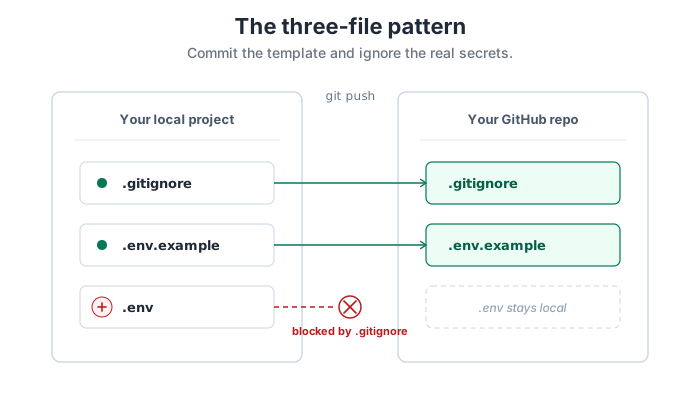
.gitignore documents the rule. .env.example is the template. .env never leaves your machine.
Create the three files in this order, safety net first, documentation second, real credentials last. That order matters: if you create .env before .gitignore, a single git add . can commit the key before the ignore rule exists to protect it. Let's build them one at a time, starting with .gitignore:
# Environment variables with actual credentials
.env

# Python cache files
__pycache__/
*.pyc
*.pyo

# Virtual environment
venv/
env/

# IDE settings
.vscode/
.idea/
*.swp

# OS files
.DS_Store
Thumbs.db
That file tells Git "never track .env", and throws in a few other common "don't commit this" patterns, Python cache, virtual environments, IDE settings, OS junk files, for good measure. Save it as .gitignore at the project root.
Next, the documentation file. Save this at the project root as .env.example:
# Copy this file to .env and fill in your actual credentials
# Never commit .env to Git!

# OpenWeatherMap API key
# Get one free at: https://openweathermap.org/api
OPENWEATHER_API_KEY=replace_with_your_openweather_key

# Optional: Other API keys you might add later
# NEWS_API_KEY=replace_with_your_news_api_key
# DATABASE_URL=your_connection_string_here
That file is safe to commit, it documents what keys a teammate needs without revealing your actual values. Save it as .env.example alongside .gitignore.
Now the one that holds the real key. Create a new file at the project root, save it as .env (no .example), and put your actual OpenWeatherMap key in place of the placeholder:
OPENWEATHER_API_KEY=replace_with_your_openweather_keyYours will look more like this (with your own key value, obviously):
OPENWEATHER_API_KEY=a7d4f2c8e1b9f3d6a8c4e7f2b5d8c3a9
Because you created .gitignore first, Git will refuse to track this file. You now have three files in your project root: .gitignore (committed, safe), .env.example (committed, safe because it has no real values), and .env (private, holds the real key, ignored by Git). When you push to GitHub, only the first two make the trip.
If you create .env first and then run git add . before .gitignore exists, the key is in Git's history the moment you commit, and rewriting history is never as clean as "never put it there in the first place". Stick to the order: .gitignore → .env.example → .env. The safety net goes up before anything sensitive exists to catch.
Loading .env in Python
The bridge between a .env file on disk and os.getenv() in your code is a small library called python-dotenv. When you call its load_dotenv() function at startup, it searches for a .env file, parses the key-value pairs, and injects them into the process environment. After that, os.getenv() works exactly the way it did in the previous section, it doesn't know or care that the variable came from a file rather than a shell.
Install the library first:
$ pip install python-dotenv
Save this as dotenv_auth.py at the project root. It's the same request you built in the last section, with one addition at the top, the load_dotenv() call that reads .env into the environment:
import os
import requests
from dotenv import load_dotenv

# Load environment variables from .env file
# This must happen before calling os.getenv()
load_dotenv()

def get_weather(city):
    """
    Fetch current weather data with proper credential management
    and comprehensive error handling.

    Returns tuple: (success: bool, data: str|None, message: str)
    """

    api_key = os.getenv("OPENWEATHER_API_KEY")

    if api_key is None:
        return (
            False,
            None,
            "API key not found. Add OPENWEATHER_API_KEY to your .env file."
        )

    # OpenWeatherMap keys are ~32 characters; anything much shorter is a typo.
    if len(api_key) < 10:
        return (
            False,
            None,
            "API key appears invalid (too short). Check OPENWEATHER_API_KEY value."
        )

    url = "https://api.openweathermap.org/data/2.5/weather"
    params = {
        "q": city,
        "appid": api_key,
        "units": "metric",
    }

    try:
        response = requests.get(url, params=params, timeout=10)

        if response.status_code == 401:
            return (
                False,
                None,
                "Authentication failed. Your API key may be invalid or not yet activated. "
                "New keys can take up to a couple of hours to activate."
            )

        elif response.status_code == 403:
            return (
                False,
                None,
                "Access forbidden. Your API key works but lacks permission for this operation."
            )

        elif response.status_code == 429:
            retry_after = response.headers.get("Retry-After", "unknown")
            return (
                False,
                None,
                f"Rate limit exceeded. Wait {retry_after} seconds before retrying."
            )

        elif response.status_code == 404:
            return (
                False,
                None,
                f"City '{city}' not found. Check spelling or try a different name."
            )

        elif not response.ok:
            return (
                False,
                None,
                f"Request failed with status code {response.status_code}"
            )

        content_type = response.headers.get("Content-Type", "")
        if "application/json" not in content_type:
            return (
                False,
                None,
                f"Expected JSON response but received {content_type}"
            )

        try:
            data = response.json()
        except ValueError as e:
            return (
                False,
                None,
                f"Invalid JSON in response: {e}"
            )

        main = data.get("main", {})
        weather_list = data.get("weather", [])

        if not isinstance(main, dict):
            return (False, None, "Response missing 'main' data")

        if not isinstance(weather_list, list) or len(weather_list) == 0:
            return (False, None, "Response missing 'weather' data")

        temp = main.get("temp", "Unknown")
        humidity = main.get("humidity", "Unknown")

        weather_info = weather_list[0]
        if not isinstance(weather_info, dict):
            return (False, None, "Invalid weather data structure")

        description = weather_info.get("description", "Unknown")

        result = f"{city}: {temp}°C, {description}, Humidity: {humidity}%"
        return (True, result, "Success")

    except requests.exceptions.Timeout:
        return (
            False,
            None,
            "Request timed out. The server took too long to respond."
        )

    except requests.exceptions.ConnectionError:
        return (
            False,
            None,
            "Connection error. Check your internet connection."
        )

    except requests.exceptions.RequestException as e:
        return (
            False,
            None,
            f"Request failed: {e}"
        )

if __name__ == "__main__":
    cities = ["Dublin", "London", "Paris", "InvalidCityName123"]

    for city in cities:
        success, data, message = get_weather(city)

        if success:
            print(f"OK {data}")
        else:
            print(f"ERROR {city}: {message}")
Run it and you'll see the same output env_auth.py produced in the last section. The difference is you didn't have to export anything in the shell first, load_dotenv() did that for you from .env.
The elegance is that your Python code doesn't change between environments. In local development, load_dotenv() reads from .env. In production, the platform (Heroku, Fly, Render, Railway, AWS, whichever) sets real environment variables directly and load_dotenv() finds nothing to load, which is fine because os.getenv() reads the platform's variables just the same. You're never locked into the .env file; it's just a convenience layer for local development.
The team workflow
The three-file pattern turns collaboration into a copy-and-fill exercise. A new teammate joining the project does this:
- Clone the repository. They get
.gitignoreand.env.example, not.env. - Copy
.env.exampleto.env. - Fill in their own API keys and run the project. It works, because their
.envis loaded automatically.
When the project needs a new key, the lead developer adds it to .env.example with a placeholder and commits. Everyone else pulls, sees the new required variable, adds their own value to their local .env, and moves on. No one shares credentials, no one commits secrets, and the documentation of what the project needs lives next to the code that needs it. Include a line in your README, "copy .env.example to .env and fill in your credentials", and onboarding becomes trivial.
What doesn't belong in a .env file
The pattern is excellent for API keys and database connection strings, but it's not a general-purpose secret store. Four categories that look like they belong but don't:
- Passwords for human accounts. Use a password manager.
.envis for programmatic credentials, not user credentials. - Credit-card numbers, SSNs, or PII. These shouldn't be in text files anywhere, even locally.
- Private encryption keys. Use your platform's secure storage (OS keychain, HSM, KMS), not a plaintext file.
- Production secrets.
.envis for your development laptop. Production uses a secrets manager (Doppler, AWS Secrets Manager, Vault, or the platform's built-in equivalent).
Rule of thumb: if leaking the value would hurt a person rather than just an API quota, it belongs somewhere stronger than a text file in a project folder.
You now have the full local-development credential loop: key in .env, .gitignore protecting it, load_dotenv() reading it, and os.getenv() accessing it from Python. The next section takes the same code and hardens it for production, fail-fast validation at startup, rate-limit handling, and packaging the whole thing as a module you can import wherever you need it.