6. Where validation lives
You have a working validation pipeline. The question this page answers is where to put it. Validation belongs at architectural boundaries (the points where data crosses from one system or layer to another), not scattered through the code in whichever function last needed to be sure a field existed. Get the placement right and downstream code simplifies; get it wrong and you either miss problems (too late) or repeat yourself (too often).
The code blocks below show placement, not full class implementations; assume the standard Open-Meteo client and dashboard from chapter 8 around them. The examples also use a module-level logger = logging.getLogger(__name__) and a custom ValidationError(Exception) class for raise-style failures.
Three boundaries, three concerns
Most applications have three natural boundaries where validation earns its keep. They run in order, each trusting the one before it, and each one carries a different part of the three-layer pattern from section 2.
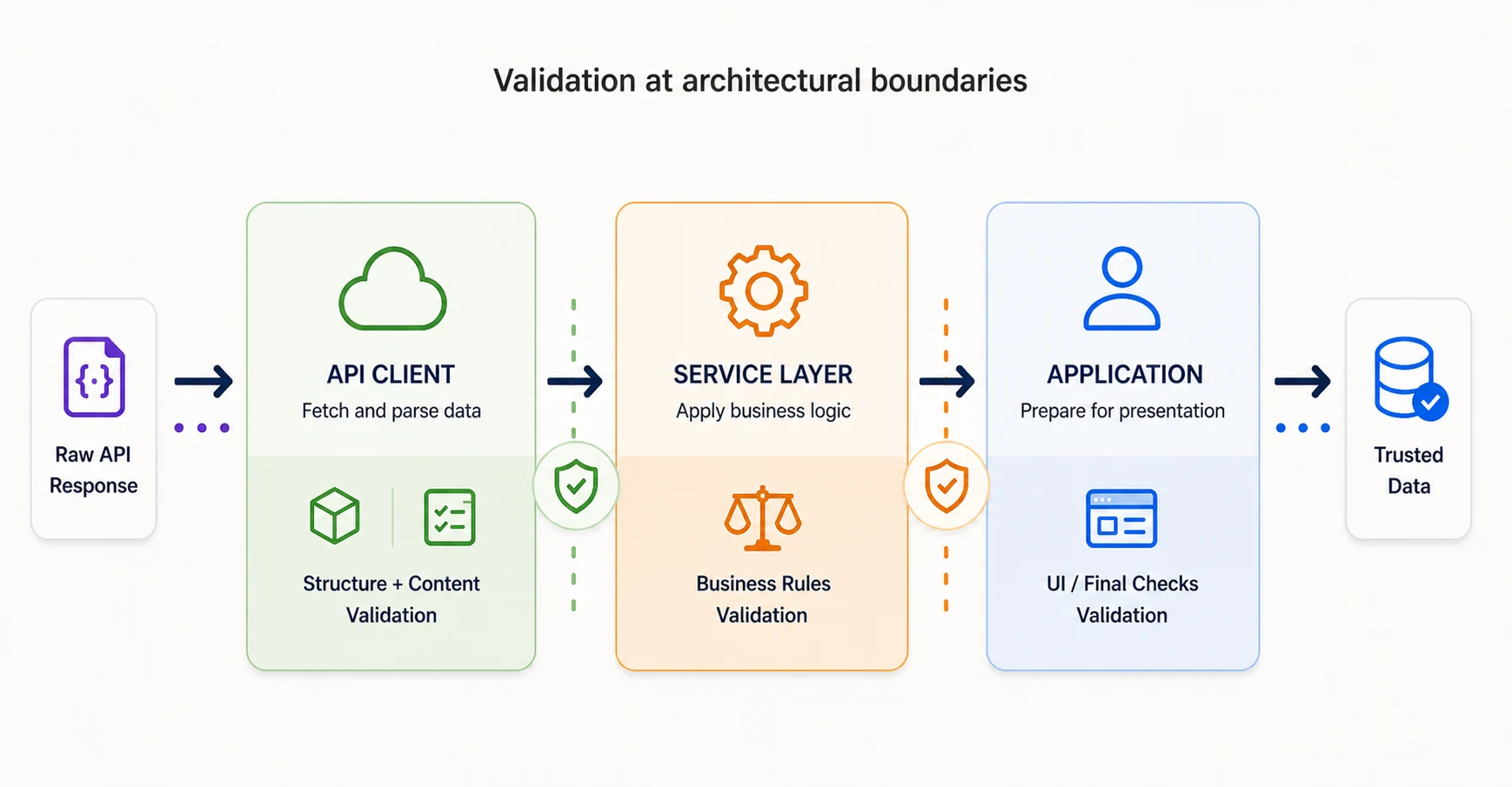
API client layer
When: immediately after the API response is parsed, before the client returns to its caller. What to validate: structure and content (layers 1 and 2). Why here: catching API provider issues at the point of entry stops them from spreading through the rest of the system. Everything downstream of the client can assume the response has the right shape and types.
from validators import validate_weather_structure, validate_weather_content


class WeatherAPIClient:
    """Open-Meteo client with structural and content validation."""

    def fetch_weather(self, latitude, longitude):
        response = requests.get(self.url, params=self.params(latitude, longitude))
        response.raise_for_status()
        data = response.json()

        # Layer 1: structure must pass before we can reach into the response.
        valid, error = validate_weather_structure(data)
        if not valid:
            raise ValidationError(error)

        # Layer 2: content checks against the structurally-valid response.
        valid, error = validate_weather_content(data["current"])
        if not valid:
            raise ValidationError(error)

        return data  # Downstream can trust the shape and the values.
validate_weather_structure and validate_weather_content are section 3's manual validators, kept separate here so the two layers are visible at the boundary. In production you'd substitute the layer-1-and-2 portion of section 5's hybrid validator; the placement argument is the same either way.
Service layer
When: before domain logic runs against the data. What to validate: business rules (layer 3). Why here: domain constraints are a service-layer concern, not a client concern -- the client does not know or care whether snow at 15°C matters to your application. A service that composes multiple clients is also the right place to enforce cross-source rules, such as checking that a geocoded location and a weather response agree on which city they refer to.
class WeatherService:
    """Service layer: composes clients, enforces business rules."""

    def get_current_conditions(self, latitude, longitude):
        # Structurally valid by contract with the client.
        weather_data = self.api_client.fetch_weather(latitude, longitude)

        current = weather_data["current"]
        valid, error = validate_weather_business_rules(current)
        if not valid:
            # Log and continue: weather business rules are advisory, not blocking.
            logger.warning(f"Business rule validation failed: {error}")

        return self.format_weather(weather_data)
Application layer
When: before data is displayed, stored, or sent to a downstream system. What to validate: application-specific requirements that are neither shape nor domain (UI constraints, storage limits, display logic). Why here: these rules depend on how the data will be used, not on what it is. The weather service does not know whether your UI has an "extreme cold" screen; the application layer does.
class WeatherDashboard:
    """Application layer: display-specific handling."""

    def display_weather(self, weather_data):
        current = weather_data["current"]
        temp = current["temperature_2m"]

        if temp < -50:
            # UI branches on a value that's valid data but needs special handling.
            return self.show_extreme_cold_warning()

        return self.render_current_weather(current)
Data gains trust as it flows through
The three boundaries form a staircase. Raw JSON enters the client and is checked for structure and content; a service-layer object walks out with those properties guaranteed. The service adds domain rules; an application-layer object walks out with those guaranteed too. The UI applies its own constraints. No layer repeats a check another layer has already done, and no layer skips a check a downstream layer is implicitly relying on. The whole system needs less defensive code because the contracts between layers are explicit.
Fail-fast or fail-graceful
When validation fails, two strategies present themselves. Fail-fast raises an exception (or returns a hard error) the moment the rule breaks, refusing to proceed with bad data. Fail-graceful logs the failure and continues with a fallback, partial data, or a reduced feature. Neither is universally correct -- the choice depends on whether the data is load-bearing.
| Data criticality | Strategy | Example |
|---|---|---|
| Essential for operation | Fail-fast (raise) | Payment amount, user authentication, geocoded coordinates |
| Important but not critical | Fail-graceful (log + fallback) | "Feels like" temperature, sunset time |
| Enhancement only | Fail-graceful (log + skip) | Weather icon, background image, optional metadata |
In code, that means reaching for both strategies in the same function when the response carries mixed-criticality fields. The weather response has a load-bearing temperature and an optional weather-code icon; fail-fast on the first, fail-graceful on the second.
from validators import validate_weather_business_rules

# WMO weather codes documented by Open-Meteo: 0-99.
KNOWN_WEATHER_CODES = set(range(0, 100))

# Uses the logger and ValidationError described in the framing note above.


def get_weather_with_validation(client, latitude, longitude):
    """Fetch weather with criticality-appropriate failure handling.

    `client` is the WeatherAPIClient from earlier. By the time it returns,
    structure and content (layers 1 and 2) have already passed.
    """
    data = client.fetch_weather(latitude, longitude)

    # Critical: temperature drives the entire UI. Fail fast on layer 3.
    current = data["current"]
    valid, error = validate_weather_business_rules(current)
    if not valid:
        raise ValidationError(f"Critical validation failed: {error}")

    # Enhancement: weather code picks an icon. Log and fall back.
    code = data["current"].get("weather_code")
    if code is not None and code not in KNOWN_WEATHER_CODES:
        logger.warning(f"Unknown weather code {code}; using default icon")
        data["current"]["weather_code"] = None

    return data
Testing validators systematically
Validators are code, and code without tests is guesswork. The useful thing about validator tests is that the test shape falls directly out of the three-layer structure: you write one test per layer for the failure it catches, a test confirming valid data passes, and a boundary-value test for each numeric range. The pattern is mechanical enough that a new validator gets its tests written in minutes.
from validators import validate_weather_data


def test_valid_data_passes():
    """Valid weather data should pass all three layers."""
    data = {
        "current": {
            "temperature_2m": 22.5,
            "relative_humidity_2m": 65,
            "wind_speed_10m": 12.3,
            "weather_code": 0,
        },
        "current_units": {},
    }
    valid, error = validate_weather_data(data)
    assert valid is True
    assert error is None


def test_missing_section_fails_layer_1():
    """Missing 'current' section should fail structural validation."""
    valid, error = validate_weather_data({"other_section": {}})
    assert valid is False
    assert "current" in error.lower()


def test_out_of_range_temperature_fails_layer_2():
    """Temperature of 150°C should fail content validation."""
    data = {"current": {"temperature_2m": 150}, "current_units": {}}
    valid, error = validate_weather_data(data)
    assert valid is False
    assert "temperature" in error.lower()


def test_snow_at_warm_temperature_fails_layer_3():
    """Snow code at 15°C should fail business-rule validation."""
    data = {"current": {"temperature_2m": 15, "weather_code": 71}, "current_units": {}}
    valid, error = validate_weather_data(data)
    assert valid is False
    assert "snow" in error.lower()


def test_boundary_values():
    """Temperatures at exactly the min and max of the valid range should pass."""
    for temp in (-100, 60):
        data = {"current": {"temperature_2m": temp}, "current_units": {}}
        valid, _ = validate_weather_data(data)
        assert valid is True, f"Temperature {temp} should be valid at the boundary"

    # Just outside the range: fail.
    data = {"current": {"temperature_2m": -100.1}, "current_units": {}}
    valid, _ = validate_weather_data(data)
    assert valid is False
Notice the assertions: each one checks that a keyword from the error message survives (current, temperature, snow). Error messages are interface, and you test them like any other interface. You do not need to test every possible invalid value. You need to test that each class of bad data is caught and that the error message is useful when it is.
With placement decided and tests in place, section 7 gets hands-on. Four exercises walk through building validators from scratch, converting them to schemas, fixing a real bug in the News Aggregator, and validating multi-day forecast data with cross-field rules.