Foreign keys and JOINs
Indexes helped when one table grew taller. Foreign keys help when one table starts carrying too many kinds of information. A weather reading should store the temperature and time; the location itself may have a city, country, timezone, latitude, longitude, and API id. Foreign keys let you store the location once, refer to it by id, and join the pieces back together when you need a full display row.
Splitting repeated data into two tables
As the application grows, location data becomes more structured: timezone, latitude, longitude, and API-specific city ids all belong to the location itself, not to an individual weather reading. Repeating all of that on every row is wasteful storage and a renaming hazard.
The relational move is to split the data by responsibility. Instead of storing one large location string inside every reading, create a dedicated locations table with one row per city. The old location text becomes structured columns like city, country, and timezone, while each weather reading stores only a location_id that points at the correct row.
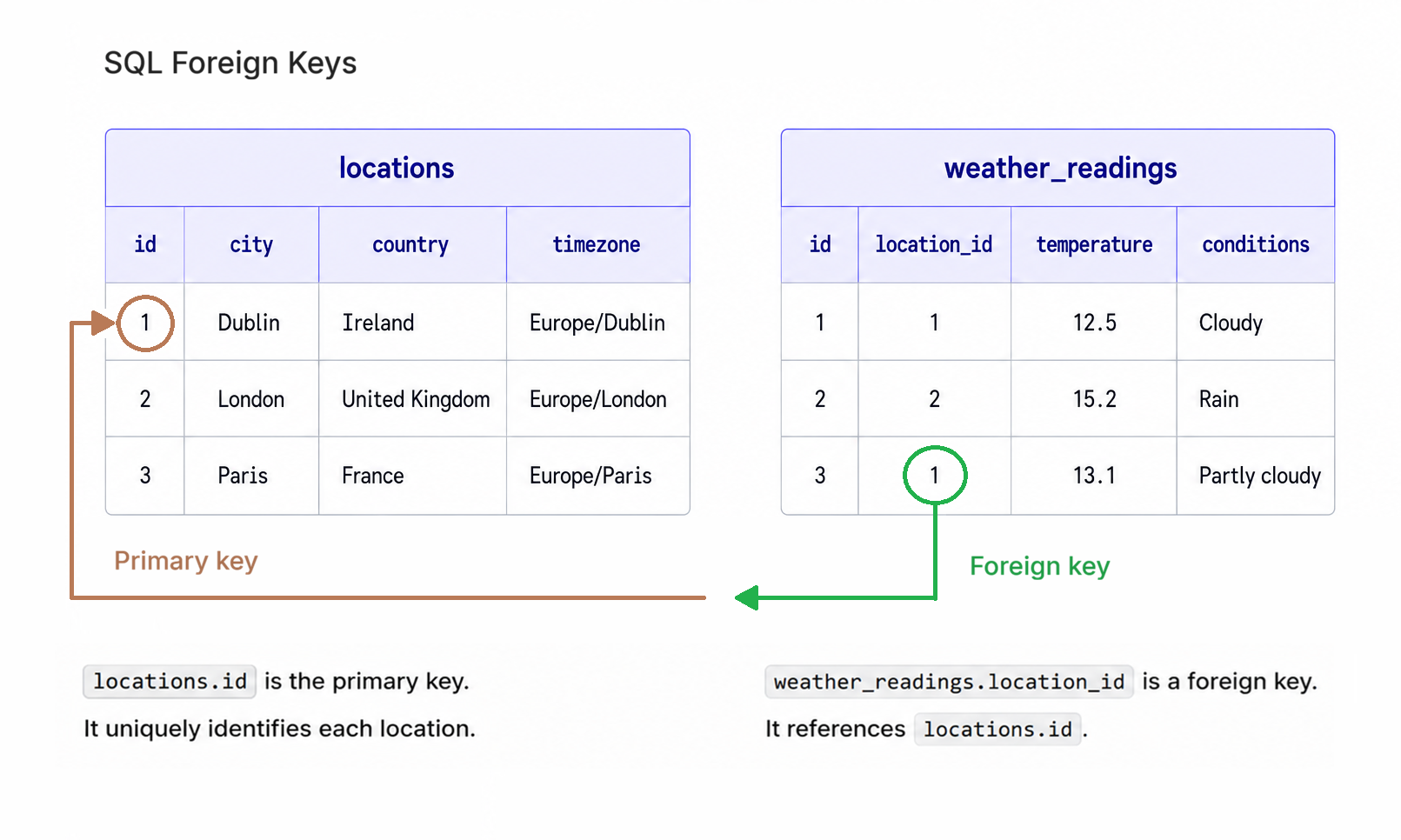
weather_readings.location_id is a foreign key. Each value points to an id (the primary key) in the locations table.
For this page, we'll work in a separate database file, weather_demo.db, so the two-table design below doesn't collide with the single-table weather.db you've already built. In a real project, changing weather.db from location TEXT to location_id INTEGER would need a small migration script (create the new tables, copy data across, swap them in); doing that work alongside the teaching would obscure the relationship, so we side-step it with a fresh file.
The "Two-table schema" below creates these two tables:
| id | city | country | timezone |
|---|---|---|---|
| 1 | Dublin | Ireland | Europe/Dublin |
| 2 | London | United Kingdom | Europe/London |
| 3 | Paris | France | Europe/Paris |
| id | location_id | temperature | conditions | recorded_at |
|---|---|---|---|---|
| 1 | 1 | 12.5 | cloudy | 2026-05-05 14:30:22 |
| 2 | 2 | 15.2 | rain | 2026-05-05 14:35:10 |
| 3 | 1 | 13.1 | partly cloudy | 2026-05-06 09:15:44 |
The readings no longer copy the city name. They store location_id, and that number points to the matching row in locations. The schema below tells SQLite about that relationship.
locationsstores facts about places. Dublin appears once.weather_readingsstores facts about readings. Each row points to a location by id.- The foreign key protects the link. A reading cannot point at a location that does not exist.
Enforcing the relationship with a foreign key
Save this as weather_demo_schema.sql. It defines both tables and adds the foreign-key rule that connects weather_readings.location_id to locations.id.
-- The lookup table: one row per city.
CREATE TABLE IF NOT EXISTS locations (
    id        INTEGER PRIMARY KEY,
    city      TEXT NOT NULL,
    country   TEXT NOT NULL,
    timezone  TEXT,
    UNIQUE (city, country)
);

-- The fact table: one row per reading, location identified by id.
CREATE TABLE IF NOT EXISTS weather_readings (
    id            INTEGER PRIMARY KEY,
    location_id   INTEGER NOT NULL,
    temperature   REAL,
    conditions    TEXT,
    recorded_at   DATETIME DEFAULT CURRENT_TIMESTAMP,
    FOREIGN KEY (location_id) REFERENCES locations(id)
);
Run the schema against weather_demo.db
The Python code below creates a new SQLite database file called weather_demo.db if it does not already exist, then runs the schema against it. Because the schema file contains more than one SQL statement, executescript() is the most convenient way to run it from Python. Save this helper as create_weather_demo_db.py in the same folder as weather_demo_schema.sql:
import sqlite3

with open("weather_demo_schema.sql", encoding="utf-8") as f:
    schema = f.read()

with sqlite3.connect("weather_demo.db") as conn:
    conn.execute("PRAGMA foreign_keys = ON")
    conn.executescript(schema)

print("Created weather_demo.db with locations and weather_readings tables.")
Run it once from the project root:
python create_weather_demo_db.py
Foreign keys are off by default in SQLite for backwards-compatibility reasons. The FOREIGN KEY clause creates the relationship in the schema; PRAGMA foreign_keys = ON tells SQLite to enforce that relationship while this connection is open. In production code, turn it on at the start of each connection before inserting or updating related rows.
The seed data below adds three locations, then adds a handful of readings so the JOIN demos below have something to query. The readings look up each location_id from the locations table instead of assuming specific id numbers:
INSERT OR IGNORE INTO locations (city, country, timezone) VALUES
    ('Dublin',  'Ireland',         'Europe/Dublin'),
    ('London',  'United Kingdom',  'Europe/London'),
    ('Paris',   'France',          'Europe/Paris');

DELETE FROM weather_readings;

INSERT INTO weather_readings (location_id, temperature, conditions, recorded_at) VALUES
    (
        (SELECT id FROM locations WHERE city = 'Dublin' AND country = 'Ireland'),
        12.5,
        'cloudy',
        '2026-05-05 14:30:22'
    ),
    (
        (SELECT id FROM locations WHERE city = 'London' AND country = 'United Kingdom'),
        15.2,
        'rain',
        '2026-05-05 14:35:10'
    ),
    (
        (SELECT id FROM locations WHERE city = 'Dublin' AND country = 'Ireland'),
        13.1,
        'partly cloudy',
        '2026-05-06 09:15:44'
    );
Run that seed against weather_demo.db before continuing: paste it into the sqlite3 CLI, or run it from Python with conn.executescript(). Without rows in the tables, the JOIN demos below will return nothing.
With PRAGMA foreign_keys = ON, SQLite enforces the rule that every value in weather_readings.location_id must refer to an existing locations.id. If your code tries to insert a reading for location_id = 999 and there is no matching location, SQLite rejects the row instead of letting an orphaned reference into the database.
Combining tables again with JOIN
Splitting the data creates one new problem: a weather reading now contains location_id = 1, not Dublin, Ireland. That is good for storage, but not enough for display. When you want the full reading alongside the city and country, you ask SQLite to combine the matching rows at query time.
JOIN is the SQL clause that does that stitching. Save the following as join_demo.py at the project root (in the same folder as weather_demo.db):
import sqlite3

with sqlite3.connect("weather_demo.db") as conn:
    cursor = conn.execute("""
        SELECT
            locations.city,
            locations.country,
            weather_readings.temperature,
            weather_readings.conditions,
            weather_readings.recorded_at
        FROM weather_readings
        JOIN locations ON weather_readings.location_id = locations.id
        ORDER BY weather_readings.recorded_at DESC
        LIMIT 5
    """)
    for city, country, temp, conditions, recorded_at in cursor:
        print(f"{recorded_at} | {city}, {country}: {temp}°C, {conditions}")
Run it from the project root:
python join_demo.pyYou will see:
2026-05-06 09:15:44 | Dublin, Ireland: 13.1°C, partly cloudy
2026-05-05 14:35:10 | London, United Kingdom: 15.2°C, rain
2026-05-05 14:30:22 | Dublin, Ireland: 12.5°C, cloudy
The JOIN ... ON clause says: for each row in weather_readings, find the row in locations where weather_readings.location_id = locations.id. The result is not a new table on disk. It is a temporary combined result that has columns from both tables, which the for loop above iterates row by row.
Use the table.column form when a query mentions more than one table. It makes the query easier to read and avoids ambiguity when both tables have a column with the same name, such as id.
Keeping unmatched rows with LEFT JOIN
The plain JOIN is technically an INNER JOIN. It returns only rows where both sides have a match. For weather readings, that usually means "only readings that have a valid location."
That is not always the question you want to ask. Suppose you want a count of readings for every city, including cities you have added to locations but have not fetched yet. An INNER JOIN would drop cities with zero readings because there is no matching row on the readings side. LEFT JOIN keeps every row from the left table whether or not it has a match.
Save this as left_join_demo.py alongside join_demo.py:
import sqlite3

with sqlite3.connect("weather_demo.db") as conn:
    # Every city, even ones with no readings yet (LEFT JOIN keeps the
    # locations side; readings columns come back as NULL when no match).
    cursor = conn.execute("""
        SELECT locations.city, COUNT(weather_readings.id) AS reading_count
        FROM locations
        LEFT JOIN weather_readings ON locations.id = weather_readings.location_id
        GROUP BY locations.id
        ORDER BY reading_count DESC
    """)
    for city, count in cursor:
        label = "reading" if count == 1 else "readings"
        print(f"{city}: {count} {label}")
Run it the same way:
python left_join_demo.py
Cities with zero readings still show up in the result with count = 0:
Dublin: 2 readings
London: 1 reading
Paris: 0 readings
Use LEFT JOIN when the question is "everything from the left table, with the right-table information if it exists." Use INNER JOIN when the question is "only rows that have both sides."
When splitting tables is worth it
Splitting data across tables is not automatically better. Normalisation is a tool, not a virtue. It buys you consistency and richer relationships, but it also makes inserts and queries more complex. For the simple cache shape from the inserting rows page (weather_cache, one row per location, with ON CONFLICT(location) DO UPDATE), location TEXT directly on the row is simpler and perfectly reasonable.
The two-table version earns its keep when:
- The same logical entity is referenced from many rows (one city, thousands of readings; one artist, millions of plays).
- The entity has its own attributes you want to query independently (a country code, a timezone, an API id).
- You need to enforce that references stay valid (foreign keys catch typos and orphans).
For one-off lookups where the entity has no other attributes, denormalised storage (one column on the main table) wins on simplicity. For entities that appear repeatedly and carry their own meaning, a separate table keeps the model honest. The Spotify project in Chapter 16 uses a similar split: track metadata lives once, and separate snapshot rows reference those tracks over time. Artist and album names stay denormalised with the track metadata, since the project does not query them as their own entities.
Next we'll move from raw SQL into working with SQLite from Python: connections, cursors, parameterised queries, transactions, context managers, and the row factory that turns tuples back into dictionaries.