Indexes
As weather_readings grows, a quiet problem appears: SQLite has more rows to inspect. With ten rows, checking each one is invisible. With a million rows, a query like WHERE location = ? can become part of your app's waiting time. An index gives SQLite a shortcut.
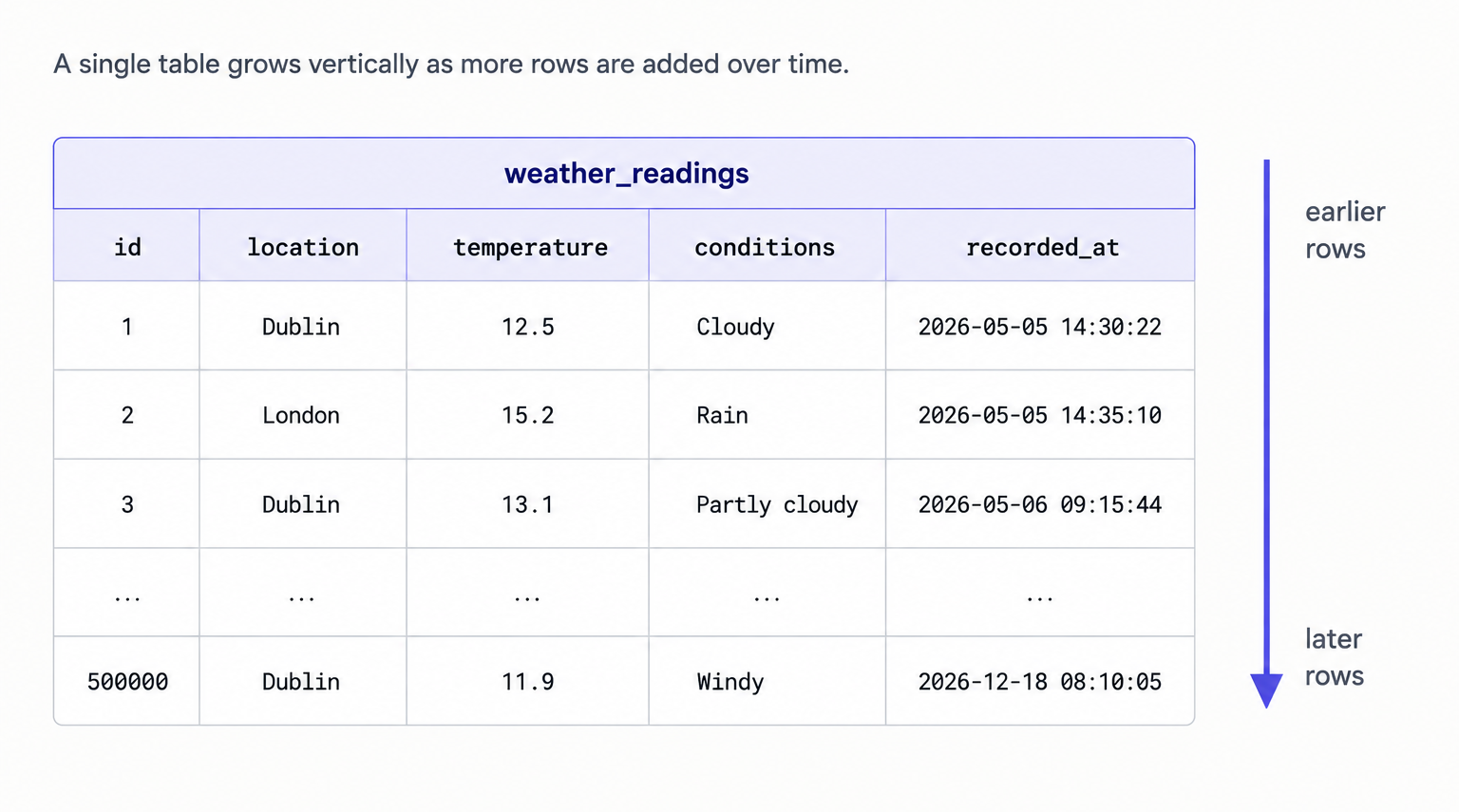
Databases grow vertically as tables collect more rows. The bigger the table, the more painful an unindexed lookup becomes. To see the vertical row growth in practice, here is weather_readings after the app has been collecting readings for a while:
| id | location | temperature | conditions | recorded_at |
|---|---|---|---|---|
| 1 | Dublin | 12.5 | cloudy | 2026-05-05 14:30:22 |
| 2 | London | 15.2 | rain | 2026-05-05 14:35:10 |
| 3 | Dublin | 13.1 | partly cloudy | 2026-05-06 09:15:44 |
| ... | ... | ... | ... | ... |
| 500000 | Dublin | 11.9 | windy | 2026-12-18 08:10:05 |
The question that matters: how does SQLite find the Dublin rows quickly without checking half a million rows one by one? That's the work of an index. Everything on this page runs against the weather.db database you've been building throughout the chapter.
Why lookups slow down
Every WHERE location = ? against an unindexed column starts as a scan. SQLite checks row 1, then row 2, then row 3, and keeps going until it has inspected the table. With ten rows, that is invisible. With a million rows, the wait becomes part of your application's behaviour.
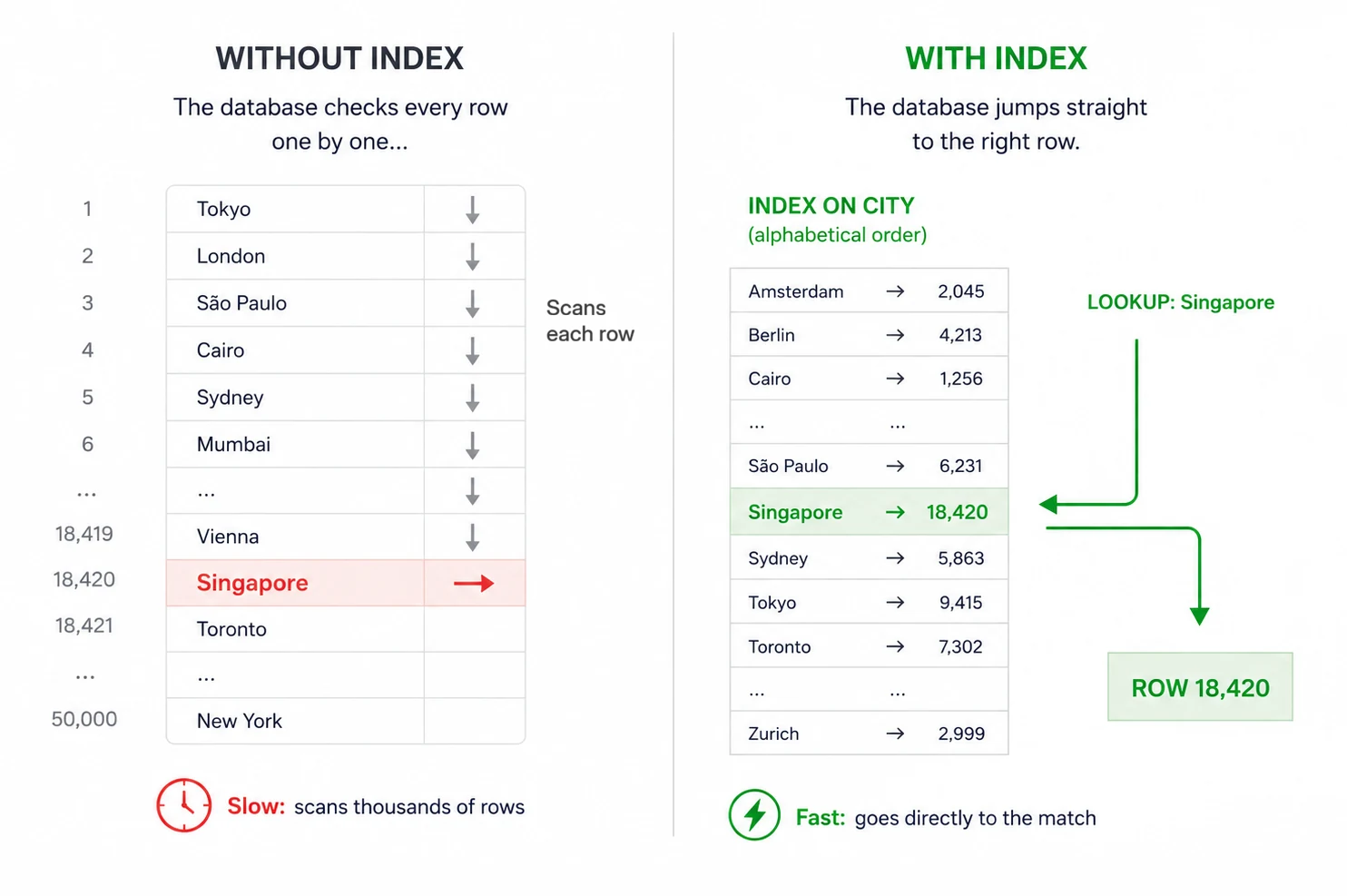
When you create an index in SQLite, it builds and maintains a second hidden structure alongside the table, stored inside the database file itself. This structure acts as a sorted lookup map for one or more columns, allowing SQLite to find matching rows without scanning every row in the table.
The rule of thumb: create an index for columns you filter on (WHERE) or sort by (ORDER BY) repeatedly. Indexes can speed up reads dramatically; the trade-off is extra disk space and slightly slower writes, because SQLite must keep the index updated as rows change.
CREATE INDEX is the SQL that adds one of these lookup structures to an existing table.
Your Python code for the SELECT query doesn't change either way. You still write the same WHERE location = ? query; SQLite automatically decides whether to use an index when it plans the query.
Adding an index
The fastest way to see what an index changes is to compare SQLite's query plan before and after the index exists.
Check the plan with EXPLAIN QUERY PLAN
The SQL statement EXPLAIN QUERY PLAN asks SQLite to show how it intends to execute a query before running it.
It is both a debugging tool and a learning tool. Instead of returning your actual data rows, SQLite returns a description of the strategy it plans to use, including:
- whether it scans the table row by row
- whether it uses an index
- which index it picks if multiple are eligible
Run these individual SQL statements against weather.db so you can see the plan change for yourself.
Step 1. Run EXPLAIN QUERY PLAN while no index exists on location.
EXPLAIN QUERY PLAN
SELECT temperature, conditions, recorded_at
FROM weather_readings
WHERE location = 'Dublin';
The output shows that SQLite has to walk the table top to bottom. SCAN means row-by-row read:
QUERY PLAN
`--SCAN weather_readings
Step 2. Create the index. Your application only needs to do this once as setup; it does not recreate the index before every query.
CREATE INDEX IF NOT EXISTS idx_weather_location
    ON weather_readings(location);
Step 3. Run the same EXPLAIN QUERY PLAN from Step 1 again:
QUERY PLAN
`--SEARCH weather_readings USING INDEX idx_weather_location (location=?)
SEARCH ... USING INDEX is the shortcut: SQLite looks the value up in the sorted index structure instead of inspecting every row. The exact wording varies between SQLite versions, but the distinction is the important part: SCAN means "walk the table"; SEARCH ... USING INDEX means "use the shortcut."
If you run the same statement through Python with conn.execute(), SQLite returns the plan as tuple rows instead of the tree-style output shown by the command-line tool. The key words to look for are still SCAN and SEARCH.
The trade-off is that the index takes up disk space and adds a little work to each INSERT, because SQLite has to update both the table and the index. That cost is usually tiny for application databases, but it is the reason you do not index every column by reflex. The final section returns to the rule of thumb.
Indexing the cache query
The single-column index above is a teaching step. The cache will use a better composite index because its real freshness query uses more than one column. It looks up the latest reading for one location. A single-column index on location helps SQLite find Dublin's rows, but SQLite may still need an extra sorting step on recorded_at (ORDER BY) to find the newest one.
SELECT temperature, conditions, recorded_at
FROM weather_readings
WHERE location = ?
ORDER BY recorded_at DESC
LIMIT 1;
A composite index stores entries in the order this query wants: grouped by location, then newest-first within each location.
CREATE INDEX IF NOT EXISTS idx_weather_location_recorded_at
    ON weather_readings(location, recorded_at DESC);
Read (location, recorded_at DESC) from left to right. SQLite first groups rows by location, then sorts each by recorded_at in descending order.
Conceptually, the index entries are ordered like this:
Dublin   2026-05-06 09:15:44
Dublin   2026-05-05 14:30:22
London   2026-05-05 14:35:10
Paris    2026-05-04 11:20:01
That means SQLite can jump straight to Dublin's section of the index and immediately encounter the newest reading first, which matches:
WHERE location = ? ORDER BY recorded_at DESC LIMIT 1. The final cache class uses this shape for its freshness check, so the index above is the key to keeping that lookup fast as the table grows.
This composite index also handles location-only lookups because location is the leading column. In a real application you would usually keep the composite index and skip the separate idx_weather_location index unless a measured query plan showed both were useful.
When an index earns its keep
The rule-of-thumb from earlier plays out concretely for weather_readings. The composite index on (location, recorded_at DESC) earns its keep because the application's hot query is "the latest row for this location". It supports the final cache class's freshness check and the daily-averages query, both of which filter on location and care about recorded_at. Other columns (temperature, conditions, anything you add later) may show up in occasional reports but are not the main lookup path, so they don't earn an index.
If a query starts feeling slow as the table grows, the first thing to check is whether its WHERE and ORDER BY columns match an index. If they don't, run EXPLAIN QUERY PLAN from the demo above to see whether SQLite is doing a SCAN when it could be using a SEARCH instead.
Indexes solve the speed problem that comes with vertical row growth. They don't touch the repetition problem: the same location text living on every row, with no canonical record of what that location actually is. That's the other half of the toolkit, and it's the subject of the next page: splitting related data into separate tables and stitching them back together with foreign keys and JOINs.