5. Professional portfolio presentation
Section 4 ended with a deployed Music Time Machine on a public Railway URL. That's the asset; this section is the wrapper. A great project that's poorly documented gets ignored. A good project with strong presentation gets interviews. The five materials this section walks you through, README, screenshots, a demo video, an architecture diagram, and an optimized GitHub repository profile, are what turns the deployed URL from "a thing I built" into something a recruiter actually clicks, watches, and remembers.
The README is the highest-leverage piece. Most developers write chronological READMEs that explain what they did in the order they did it. Recruiters don't read chronologically; they scan for a live URL, a screenshot, and three or four signals about the technical level of the project before deciding whether to keep reading. The structure below puts those signals first.
Write a README that gets interviews
Your README is the first thing recruiters see. Most developers write chronological READMEs that explain what they did. Professional READMEs follow a problem-solution-technical structure that shows why the project matters.
Use this template for your Music Time Machine README:
# Music Time Machine
**Live Demo:** [your-app.up.railway.app](https://your-app.up.railway.app)
A personal music analytics platform that rediscovers forgotten favorites and tracks
listening evolution over time using Spotify's API.

## The Problem
Spotify shows what you listened to yesterday or last month, but doesn't help you
rediscover music you loved a year ago. Their recommendation algorithm pushes new
music instead of reconnecting you with forgotten favorites. Your listening history
exists but remains inaccessible for long-term analysis.
## The Solution
Music Time Machine tracks your Spotify listening history over time, generates
algorithmic playlists that surface forgotten gems, and visualizes how your musical
taste evolves. It's the tool Spotify doesn't build because their business model
prioritizes discovery over historical reconnection.
## Key Features
- **Forgotten Gems**: Automatically identifies tracks you loved 90-365 days ago but
haven't heard recently, creating playlists of genuinely forgotten favorites
- **Monthly Snapshots**: Captures your top tracks each month, creating a musical
diary you can revisit years later
- **Playlist Manager**: Generates playlists from saved snapshot history, including
forgotten gems, recent discoveries, and your current rotation
- **Evolution Analytics**: Charts how your listening patterns change over time with
interactive visualizations
## Technical Highlights
- **OAuth 2.0 Implementation**: Secure Spotify authentication using the
Authorization Code flow (confidential client) via Spotipy
- **SQLite Time-Series Database**: Optimized schema with proper indexing for
historical queries spanning months of data
- **RESTful API Integration**: Handles Spotify API rate limits, retries, and error
recovery gracefully
- **Production Deployment**: Deployed on Railway with persistent volumes,
environment-based configuration, and automated CI/CD
- **Test Coverage**: 91% coverage with pytest, including mocks for external APIs
and time-dependent tests using freezegun
## Tech Stack
**Backend:** Python 3.11, Flask, Flask-WTF, Spotipy, SQLite
**Frontend:** HTML5, CSS3, JavaScript, Chart.js
**Testing:** pytest, pytest-cov, freezegun
**Deployment:** Railway, Gunicorn
**Development:** Git, GitHub Actions
## Architecture

The application follows a three-tier architecture: Flask handles HTTP requests,
SQLite provides persistence, and Spotify's API serves as the data source. OAuth
tokens live in server-signed Flask sessions, are never written to the database,
and never appear in logs. Time-series queries use indexed timestamps
for efficient historical lookups.
## Lessons Learned
**OAuth is harder in production:** Local redirect URIs work instantly. Production
requires HTTPS, careful URI matching, and understanding ephemeral vs persistent
storage for tokens. Testing OAuth failures taught me more than successful flows.
**SQLite scales further than expected:** With proper indexing and query optimization,
SQLite handles months of listening history (10,000+ tracks) without performance
issues. The "use PostgreSQL immediately" advice doesn't apply to every project.
**Testing time-dependent code requires strategy:** Using freezegun to freeze time
in tests made temporal logic testable and deterministic. Without it, monthly
snapshot generation tests would fail randomly based on the current date.
## Local Development Setup
1. Clone the repository
2. Create virtual environment: `python -m venv venv`
3. Install dependencies: `pip install -r requirements.txt`
4. Copy `.env.example` to `.env` and add Spotify credentials
5. Run: `python app.py`
6. Visit `http://localhost:5000`
See [CONTRIBUTING.md](CONTRIBUTING.md) for detailed development instructions.
## License
MIT License - see [LICENSE](LICENSE) for detailsWhy this structure works
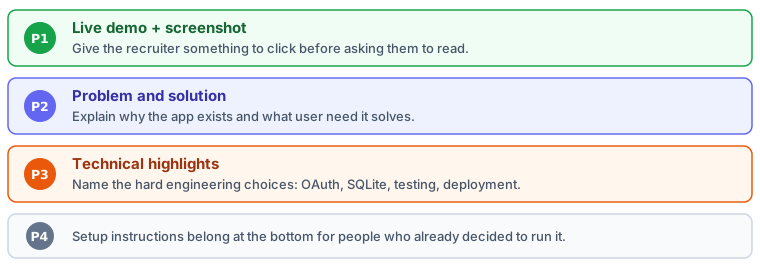
Live demo first: Recruiters click before they read. Put your deployed URL at the very top so it's impossible to miss.
Problem-solution framing: "The Problem" shows you understand user needs. "The Solution" demonstrates you solve real problems, not just implement features.
Technical Highlights section: Recruiters scan for technologies they recognize. Bullet points make scanning easy. Each point connects a technology to a specific benefit.
Lessons Learned section: This is what separates junior from experienced developers. It shows reflection, growth, and honest assessment of challenges faced. Recruiters love this section.
What to Include:
- Live demo URL in the first line (make it bold and impossible to miss)
- One screenshot showing your application's main interface
- Problem statement (2-3 sentences explaining the gap your app fills)
- 4-5 key features with brief descriptions focusing on user value
- Technical highlights connecting technologies to benefits
- Architecture diagram (simple, one page, shows major components)
- Lessons learned (2-3 honest reflections about challenges and growth)
What to Skip:
- Installation instructions as the first section (they go at the bottom)
- Exhaustive feature lists (nobody reads 20 bullet points)
- Technical jargon without context (explain why, not just what)
- Apologies or disclaimers ("This is just a learning project...")
- Future features you haven't built yet (focus on what exists now)
Create professional screenshots
Screenshots make your README scannable and help recruiters visualize your work. Create 3-4 high-quality screenshots showing your application's main features.
Tools and Setup:
Use your browser's built-in screenshot tools or dedicated software:
- macOS: Cmd+Shift+4 for region capture, Cmd+Shift+5 for full window
- Windows: Snipping Tool or Win+Shift+S
- Browser extensions: Full Page Screen Capture (Chrome/Edge) or Awesome Screenshot
- CleanShot X (macOS): Professional tool with annotations and scrolling capture
What to Capture:
- Dashboard Overview. Your home page showing the main interface with real data. Include charts, statistics, and key navigation elements. This screenshot goes at the top of your README as the primary visual.
- Feature in Action. Show the Forgotten Gems playlist generation or analytics dashboard with interactive charts. Capture the interface mid-use, not empty states.
- Mobile View. Open your deployed URL on your phone or use Chrome DevTools device emulation. Shows attention to responsive design.
Screenshot Quality Checklist:
- Use consistent window size (1280x800 or 1440x900 works well)
- Capture with real data, not empty states or placeholder text
- Hide personal information (full names, email addresses, sensitive data)
- Use your deployed URL in the browser address bar (shows it's live)
- Clean up browser tabs, bookmarks bars, and desktop backgrounds
- Ensure good contrast and readable text (check at 50% zoom)
Storing screenshots
Create a docs/screenshots/ directory in your repository. Save screenshots as dashboard.png, analytics.png, etc. Use descriptive names and PNG format for best quality.
Reference them in your README with relative paths: . This ensures images display correctly on GitHub and when others fork your repository.
Record a 2-3 minute demo video
A demo video lets recruiters experience your application without clicking through every feature. A well-narrated 2-3 minute walkthrough is more effective than any amount of written description.
Recording Tools:
- Loom: Free browser-based recording with easy sharing. Records screen + webcam simultaneously if desired.
- QuickTime (macOS): File > New Screen Recording. Simple and built-in.
- OBS Studio: Free, powerful, cross-platform. Overkill for simple demos but excellent for polish.
- Zoom: Start a meeting, share screen, record locally. Works if you already use Zoom.
Demo Script Structure (2-3 minutes total):
- Introduction (15 seconds). "This is Music Time Machine, a personal analytics platform for Spotify that tracks listening history and generates algorithmic playlists. Let me show you the key features."
- Authentication Flow (20 seconds). "I'll authenticate with Spotify using OAuth 2.0. Notice the secure redirect to Spotify's authorization page, then back to our application with an access token."
- Main Feature Demo (60 seconds). "The Forgotten Gems feature analyzes my long-term listening history and identifies tracks I loved months ago but haven't heard recently. Here's a playlist it generated automatically." (Click generate, show results, play 5 seconds of a track)
- Secondary Features (40 seconds). "The analytics dashboard shows how my musical taste evolved over time using Chart.js visualizations. This data comes from SQLite queries indexed by timestamp." (Hover over charts, show interactivity)
- Technical Highlight (25 seconds). "Behind the scenes, the application handles Spotify's rate limits, retries failed requests, and stores everything in SQLite with proper normalization. It's deployed on Railway with persistent volumes for database storage."
Narration Tips:
- Script your narration beforehand. Reading from notes sounds more polished than improvising.
- Speak at a moderate pace. Technical demos benefit from deliberate pacing.
- Pause briefly when transitioning between features to give viewers time to process.
- Use natural language, not technical jargon, unless you're highlighting specific technologies.
- Keep your mouse movements slow and deliberate. Fast, jerky movements are hard to follow.
Upload and Share:
- Upload to YouTube (unlisted or public) or Loom for easy sharing
- Add the video link to your README near the top, ideally right after the live demo URL
- Include it in your portfolio website and LinkedIn projects section
- Send the link directly to recruiters with context: "Here's a 3-minute demo of my Music Time Machine project"
Create an architecture diagram
Architecture diagrams show how your application's pieces fit together. Keep it simple: one page, major components only, clear data flows.
Tools for Creating Diagrams:
- Excalidraw: Free, browser-based, hand-drawn aesthetic that looks professional
- draw.io (diagrams.net): Free, comprehensive, integrates with GitHub
- Lucidchart: Professional diagramming tool with templates
- Figma: Design tool that works great for architecture diagrams
What to Include in Your Music Time Machine Diagram:
- User Interface Layer. Browser → Flask routes → HTML templates. Show the request/response cycle.
- Application Layer. Flask application with OAuth handler, playlist generator, analytics processor. Show these as distinct components.
- Data Layer. SQLite database with key tables (users, tracks, playlists). Show relationships.
- External Services. Spotify API with OAuth flow. Show authentication separate from data fetching.
- Deployment Infrastructure. Railway platform, persistent volume, environment variables. Show what's unique about production.
Save and reference in README: Export as PNG (1920x1080 or similar), save to docs/diagrams/architecture.png, and reference in your README's Architecture section.
Diagram Best Practices
Use consistent shapes: rectangles for components, cylinders for databases, clouds for external services, arrows for data flow. Label every arrow with what data flows ("OAuth token", "track metadata", "playlist ID"). Use 3-5 colors maximum. Make text large enough to read when viewed at 75% zoom.
Optimize your GitHub repository
Your repository is more than code storage. It's a portfolio showcase. These small optimizations make a big difference in how recruiters perceive your professionalism.
Repository Description:
Click "Settings" in your repository, then edit the description at the top. Write a one-sentence summary:
"Personal music analytics platform with OAuth, SQLite, and production deployment tracking Spotify listening history"
Topics/Tags:
Add relevant tags so your repository appears in GitHub searches: spotify-api, flask, oauth2, sqlite, portfolio-project, python, data-visualization
Pin Your Repository:
Visit your GitHub profile, click "Customize your pins," and select this repository. Pinned repositories appear at the top of your profile, ensuring recruiters see your best work first.
Add Website URL:
In repository settings, add your Railway deployment URL to the "Website" field. This creates a prominent link at the top of your repository for one-click access to the live application.
Include LICENSE:
Add a license file (MIT License works for most projects). Click "Add file" > "Create new file," name it LICENSE, and GitHub offers a template picker. This shows you understand open-source conventions.
Regular Commits with Clear Messages:
Your commit history tells a story. Write clear commit messages: "Add OAuth token refresh logic" instead of "fix stuff" or "updates." This demonstrates professional version control habits.
The first-impression checklist
When a recruiter opens your repository, they should see: (1) Professional README with live demo link, (2) Clear repository description and tags, (3) Clean file structure, (4) No secrets in code or commit history, (5) Recent commit activity showing active maintenance.
These five elements take 15 minutes to set up and dramatically improve how recruiters perceive your technical professionalism.