6. Planning your migration
Migration is not just copying rows. You'll learn to analyse a SQLite schema, map every type to the right PostgreSQL equivalent, and follow a four-phase workflow that keeps backups, schema, data, and validation in safe order.
Migrating from SQLite to PostgreSQL isn't just about copying data. You need to analyse your schema, map data types, test queries, and validate results. A good migration plan minimises downtime and prevents data loss.
This section walks through the planning process using a simple weather cache as an example. The same principles apply to any database migration, from small single-table applications to complex multi-table systems.
The four-phase workflow
Database migration follows a predictable four-phase workflow. Understanding this structure helps you avoid common mistakes like migrating data before the schema is ready, or deploying code before testing is complete. Each phase builds on the previous one, creating a safe path from SQLite to PostgreSQL.
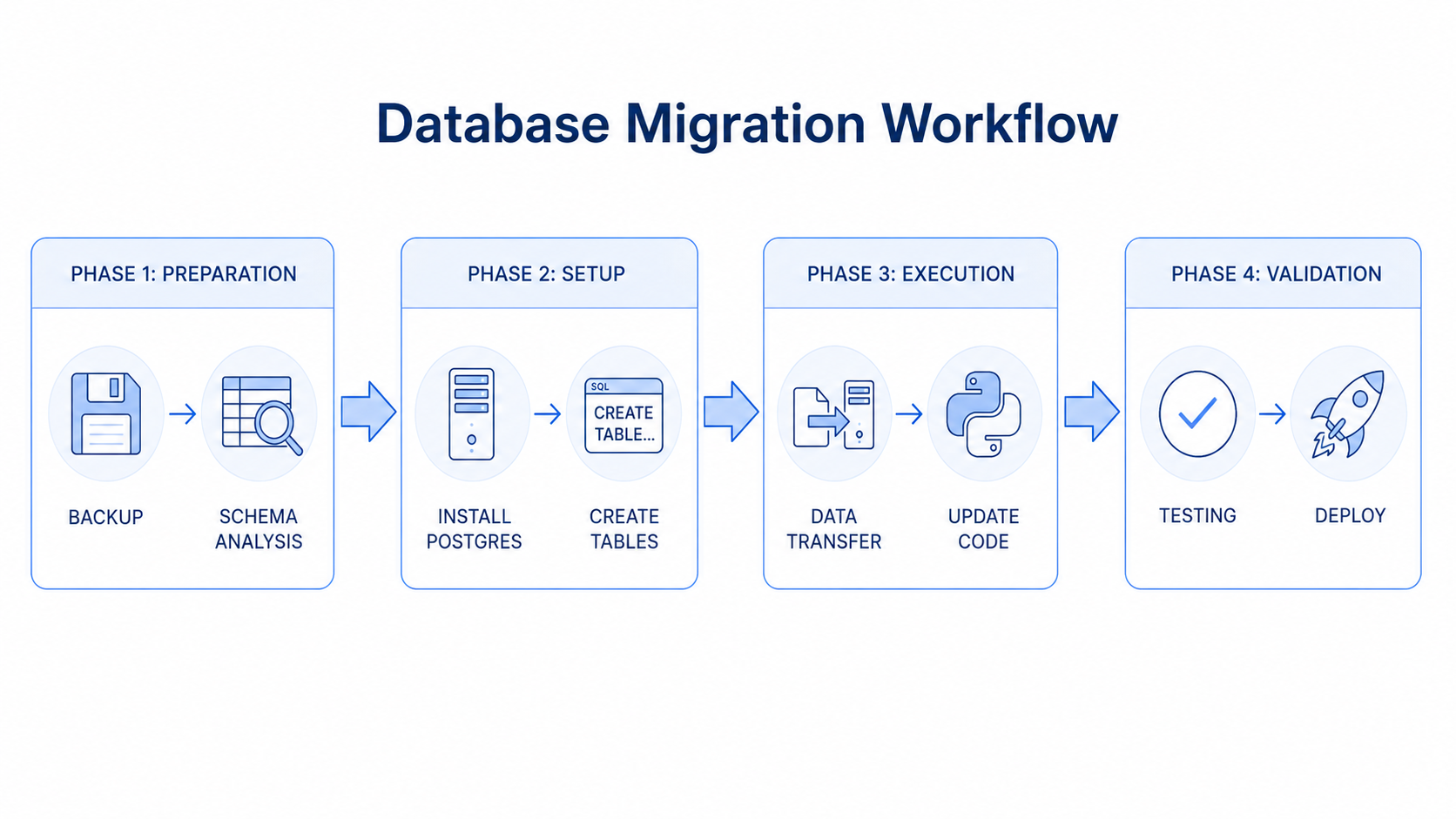
Phase 1: Preparation. Back up your SQLite database and analyse its schema. You document every table, column, constraint, and index. This phase prevents data loss and ensures you understand what you're migrating.
Phase 2: Setup. Install PostgreSQL and create the new schema with appropriate data types. You map SQLite types to PostgreSQL equivalents and create tables, indexes, and constraints. The PostgreSQL database stays empty until Phase 3.
Phase 3: Execution. Transfer data from SQLite to PostgreSQL and update your application code. You write migration scripts that handle type conversions, then modify your Python code to use psycopg2 instead of sqlite3. This is where the actual migration happens.
Phase 4: Validation. Test the migrated database and deploy to production. You verify data integrity, test query performance, and confirm your application works identically with PostgreSQL. Only after validation passes do you deploy.
Analysing your current schema
Start by understanding your existing SQLite schema. You need to know what tables exist, what columns they have, what data types they use, and what constraints are defined. Save this as audit_sqlite_schema.py at the project root:
import sqlite3

# Connect to your SQLite database
conn = sqlite3.connect('weather.db')
cursor = conn.cursor()

# List all tables
cursor.execute("""
    SELECT name FROM sqlite_master
    WHERE type='table'
""")
tables = cursor.fetchall()
print("Tables:", [t[0] for t in tables])

# For each table, get its schema
for table_name, in tables:
    print(f"\nSchema for {table_name}:")
    cursor.execute(f"PRAGMA table_info({table_name})")
    columns = cursor.fetchall()

    for col in columns:
        col_id, name, type_, not_null, default, is_pk = col
        print(f"  {name}: {type_}", end='')
        if is_pk:
            print(" PRIMARY KEY", end='')
        if not_null:
            print(" NOT NULL", end='')
        if default:
            print(f" DEFAULT {default}", end='')
        print()

conn.close()
Run it from the project root:
python audit_sqlite_schema.pyYou'll see something like:
Tables: ['weather_history']

Schema for weather_history:
  id: INTEGER PRIMARY KEY
  location: TEXT NOT NULL
  temperature: REAL
  conditions: TEXT
  timestamp: TEXT NOT NULL
This output tells you everything about your schema: table names, column names, data types, and constraints. You'll use this information to design your PostgreSQL schema.
Data type mapping: SQLite to PostgreSQL
SQLite has a flexible type system with only a few core types. PostgreSQL has strict types with many specialised options. Here's how to map common SQLite types to appropriate PostgreSQL types:
| SQLite type | PostgreSQL type | Notes |
|---|---|---|
INTEGER PRIMARY KEY AUTOINCREMENT |
SERIAL PRIMARY KEY |
Auto-incrementing integer ID |
INTEGER |
INTEGER or BIGINT |
Use BIGINT for large numbers |
REAL |
NUMERIC or DOUBLE PRECISION |
NUMERIC for exact decimals, DOUBLE PRECISION for floats |
TEXT |
TEXT or VARCHAR(n) |
VARCHAR when you want length limits |
BLOB |
BYTEA |
Binary data storage |
TEXT (for timestamps) |
TIMESTAMP WITH TIME ZONE |
Proper timestamp type with timezone support |
TEXT (for JSON) |
JSONB |
Native JSON with indexing and querying |
For the weather cache, here's how each column maps:
| Column | SQLite | PostgreSQL | Why |
|---|---|---|---|
id |
INTEGER PRIMARY KEY |
SERIAL PRIMARY KEY |
Standard auto-increment pattern |
location |
TEXT NOT NULL |
VARCHAR(100) NOT NULL |
City names rarely exceed 100 chars |
temperature |
REAL |
NUMERIC(5, 2) |
Exact decimals for temperature (e.g., 12.34) |
conditions |
TEXT |
TEXT |
Unlimited length for descriptions |
timestamp |
TEXT NOT NULL |
TIMESTAMP WITH TIME ZONE NOT NULL |
Proper timestamp type with timezone |
The migration checklist
Before starting the actual migration, work through the checklist below. The four-phase workflow above is the conceptual frame; this is the operational ten-step expansion of it that gets you from "live SQLite app" to "live PostgreSQL app" without losing data.
- Back up your SQLite database. Copy your
.dbfile to a safe location. If anything goes wrong during migration, you can restore from this backup. Never migrate without a backup. - Document your schema. Write down all tables, columns, indexes, and constraints. Include sample queries your application runs. This documentation helps you verify the PostgreSQL version works identically.
- Set up PostgreSQL. Install PostgreSQL locally, create a new database, and verify you can connect from Python. Test the connection before proceeding.
- Create the PostgreSQL schema. Write
CREATE TABLEstatements for PostgreSQL with appropriate data types. Start with an empty database and run these statements to create the structure. - Write the data migration script. Create a Python script that reads from SQLite and writes to PostgreSQL. Handle type conversions (especially timestamps). Test with small amounts of data first.
- Migrate the data. Run your migration script on the full database. Monitor for errors. Verify row counts match between SQLite and PostgreSQL.
- Update application code. Change connection strings from
sqlite3topsycopg2. Update placeholder syntax from?to%s. Add explicit commits. Test each database operation. - Test thoroughly. Run your test suite (you have tests, right?). Manually test critical features. Compare query results between SQLite and PostgreSQL versions. Verify data integrity.
- Test performance. Test query performance with realistic data volumes. Check connection handling under load. Verify concurrent operations work correctly.
- Plan the deployment. Document how to deploy the PostgreSQL version to production. Include database server setup, credential management, and rollback procedures.
Testing is not optional. Database migrations can lose data or break functionality in subtle ways. Thorough testing catches these issues before they reach production. Test edge cases: empty strings, NULL values, maximum field lengths, timestamps in different timezones, and concurrent operations.
With the schema audited, the type map drawn, and the checklist in hand, you're ready for the hands-on migration. Next, you'll execute one end to end on the weather cache: schema, data, code, and tests.