3. Your first FastAPI application
FastAPI feels like writing typed Python functions and getting a documented HTTP service for free. This page walks through your first app: the on-paper design of the surface, the install, and the smallest possible running endpoint with auto-generated Swagger docs at /docs.
Five decisions before you write code
Before sketching URLs, it helps to think through the shape of the API from the caller's point of view. The caller does not care how elegant your internal code is. They care whether the API is easy to understand, reliable to call, and clear when something fails.
-
Resources: Decide what nouns your API exposes. For a news API, resources might include
articles,sources, andcategories. -
Actions: Use HTTP methods to describe intent.
GETreads data,POSTcreates data,PUTorPATCHupdates data, andDELETEremoves data. - Inputs: Decide which values belong in the URL path, which belong in the query string, which belong in headers, and which belong in a JSON request body.
- Responses: Decide what JSON shape the client can rely on. The response should include enough information to be useful without leaking internal implementation details.
- Errors: Decide how failures are reported. A useful error response should explain what failed and, where possible, how the caller can fix the request.
Resource naming conventions
URL structure communicates your API's organization. Well-named resources make your API intuitive. Poorly named resources create confusion and require extensive documentation.
- Use plural nouns for collections.
/articlesrepresents the collection of all articles.GET /articlesretrieves multiple articles.POST /articlescreates a new article in the collection. Consistent pluralization makes endpoints predictable. - Use IDs for specific resources.
/articles/123identifies article 123.GET /articles/123retrieves this specific article.DELETE /articles/123removes it. The ID in the URL clearly indicates you're operating on one specific resource, not the collection. - Nest related resources logically.
/categories/technology/articlesretrieves articles in the technology category. The URL structure mirrors the relationship: articles belong to categories. This makes the hierarchy clear without requiring query parameters. - Use query parameters for filtering.
/articles?source=guardian&category=technologyfilters articles by source and category. Query parameters are perfect for optional filters, sorting, and pagination. The base resource remains/articleswhile query parameters refine what's returned. - Keep URLs lowercase with hyphens.
/api-keysis standard REST convention. Not/ApiKeysor/api_keys. Hyphens separate words in URLs. Underscores can be hard to see when URLs are underlined in documentation.
GET    /articles                     # List all articles
GET    /articles/123                 # Get specific article
GET    /articles?category=tech       # Filter articles
GET    /categories                   # List categories
GET    /categories/tech/articles     # Articles in category
POST   /articles                     # Create new article
PUT    /articles/123                 # Replace article 123
DELETE /articles/123 # Delete article 123GET /getArticles # Action in URL (should be GET /articles)
GET /article_list # Underscore and non-standard naming
POST /createArticle # Action in URL (should be POST /articles)
GET /articles/get/123 # Redundant 'get' in path
GET /ARTICLES # Uppercase (violates conventions)
GET /fetch-tech-news-items # Overly specific, not RESTfulDesigning the API's interface
Before writing any FastAPI code, the interface is worth sketching as a flat list: every endpoint, the method, the parameters, the response shape. The sketch surfaces inconsistencies before they're encoded in code, and gives you something to compare each route against as you write it.
Here's the sketch for the news aggregator API we'll spend the rest of the chapter building:
# Article Endpoints
GET    /articles                   # List articles (limited, not paginated)
  Query params:
    - category: Filter by category (optional)
    - source: Filter by source (newsapi, guardian) (optional)
    - limit: Maximum results to return (default: 20, max: 100)
  Returns: List of articles with cache status

GET    /articles/{article_id}      # Get specific article
  Returns: Single article object or 404

# Admin Endpoints (require admin API key in production)
POST   /admin/api-keys             # Generate new API key
  Body: {"name": "key description", "tier": "basic"}
  Returns: {"api_key": "generated_key", "key_id": 123}

DELETE /admin/api-keys/{key_id}    # Revoke API key
  Returns: 204 No Content

# Health Check
GET    /health                     # Health check endpoint
  Returns: {"status": "healthy", "timestamp": "..."}
This interface follows the conventions above: plural nouns for collections, path parameters for IDs, query parameters for filters, methods chosen by intent. With the shape settled, we install FastAPI and stand up the first route.
Installation and setup
Create a new directory for the News Aggregator API and set up a virtual environment. FastAPI requires Python 3.10+ for modern type hints.
mkdir news-aggregator-api
cd news-aggregator-api
python -m venv venv
source venv/bin/activate  # On Windows: venv\Scripts\activate

pip install fastapi uvicorn[standard] sqlalchemy psycopg2-binary python-dotenv requests- fastapi. The web framework itself. Provides routing, validation, and the OpenAPI generation that powers
/docs. - uvicorn[standard]. The ASGI server that runs the app. The
[standard]extras pull in the production-grade event loop and WebSocket support. - sqlalchemy. The SQL toolkit and ORM. Handles the PostgreSQL connection pool, model definitions, and query building from section 5 onwards.
- psycopg2-binary. The PostgreSQL driver SQLAlchemy uses under the hood.
- python-dotenv. Loads
.envfiles intoos.environso the API key and database URL stay out of source. - requests. The HTTP client for calling NewsAPI and the Guardian from the aggregator (Chapter 11's familiar tool).
Your first FastAPI endpoint
Create main.py with a minimal FastAPI application to verify everything works.
from fastapi import FastAPI
from datetime import datetime, timezone

app = FastAPI(
    title="News Aggregator API",
    description="Unified interface for multiple news sources",
    version="1.0.0"
)

@app.get("/")
def root():
    return {
        "message": "News Aggregator API",
        "version": "1.0.0",
        "docs_url": "/docs"
    }

@app.get("/health")
def health_check():
    return {
        "status": "healthy",
        "timestamp": datetime.now(timezone.utc).isoformat()
    }
The FastAPI() constructor takes the metadata that ends up at the top of /docs; title, description, and version are what a developer sees when they land there. The two @app.get(...) decorators register routes, and when a request matches the path, FastAPI calls the decorated function and serialises whatever it returns as JSON. The /health endpoint is the standard monitoring shape: a small response that proves the process is alive and includes a timestamp the caller can sanity-check.
Run the server with uvicorn:
uvicorn main:app --reload

# Output:
# INFO:     Uvicorn running on http://127.0.0.1:8000 (Press CTRL+C to quit)
# INFO:     Started reloader process
# INFO:     Application startup complete.
main:app tells uvicorn to look for the app object in main.py.
--reload enables auto-reload. Uvicorn watches for file changes and restarts the server automatically. Perfect for development, but never use in production.
Your API is now running on http://localhost:8000. Visit that URL in your browser and you'll see the welcome message JSON. Visit http://localhost:8000/health for the health check response.
Now visit http://localhost:8000/docs. FastAPI generated an interactive API documentation page from your two route definitions, with no extra wiring on your part:
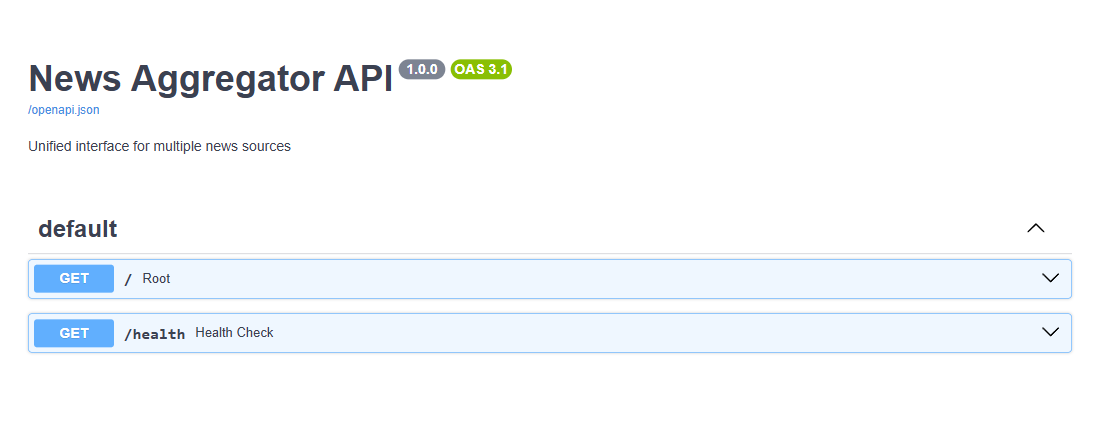
This page is regenerated from your route signatures every time the app starts, so it can't drift from the implementation. Add a query parameter and it shows up in the docs; change a response model and the schema there reflects it. There's no separate document to keep in sync.
Next, in section 4, you will extend main.py with path parameters, query parameters, and Pydantic models for request bodies and responses.