Free Guide
OAuth 2.0 in Python: The Authorization Code Flow Explained
OAuth lets an app use part of your account without ever seeing your password. You approve access on the provider's own page, the provider redirects back with a short-lived code, and your app exchanges that code for a scoped access token.
This guide explains the authorization code flow in Python: the four roles, the redirect, the code-for-token exchange, state, PKCE, refresh tokens, and the errors you are most likely to hit.
The problem OAuth solves
Without OAuth, the naive solution is to give an app your Spotify email and password. That gives the app everything your account can do, and those credentials leak if the app is breached.
OAuth replaces password sharing with scoped, revocable tokens. You authenticate with Spotify, approve a limited request, and the app receives a token for that approved access only.
The four roles
The OAuth spec talks about four parties, and the jargon is easier once you map each name to who it actually is in the Spotify example. The user is you. The app is the client. Spotify's login system issues the tokens, and Spotify's API holds the data.
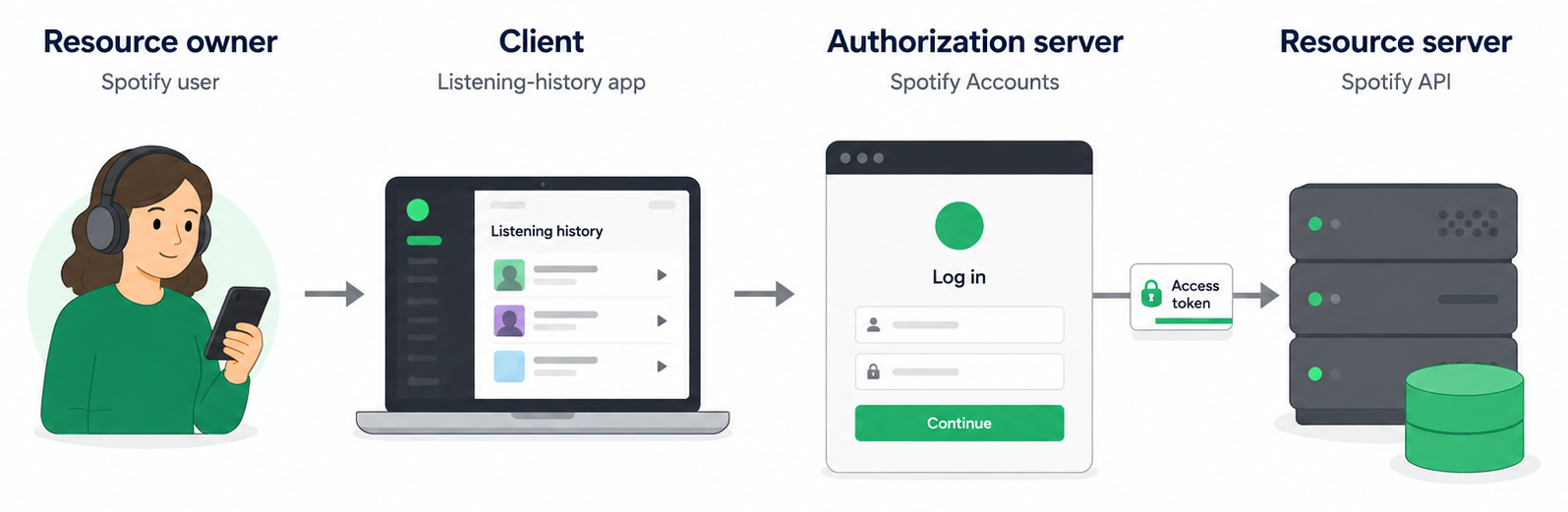
| Role | Who it is | Spotify example |
|---|---|---|
| Resource owner | The human who owns the data and grants access | You, the Spotify user |
| Client | The app that wants to act on your behalf | The listening-history app |
| Authorization server | Authenticates you and issues tokens | accounts.spotify.com |
| Resource server | Holds the data and accepts the token | api.spotify.com |
The useful distinction is between the last two. One server issues the token; the other accepts that token and returns the data.
How the app gets access without your password
Instead of giving your Spotify password to the app, the app sends your browser to Spotify's own login and approval page, where you log in and approve the scope of access you are granting.
After you approve the request, Spotify sends your browser back to the app using a pre-registered return URL called a redirect URI. That return trip includes a short-lived authorization code.
How Spotify does this is by appending the authorization code to the end of your registered redirect URI. If your redirect URI is https://your-app.com/callback, the browser returns to a URL shaped like this: https://your-app.com/callback?code=splat-7291-xyz&state=xyz123.
That code is visible in the browser URL during the return trip, which is why it is not the access token. It is short-lived and useful only as the next step in the exchange.
The app then exchanges that code for an access token. In modern OAuth flows, that exchange should include the PKCE code_verifier. For a confidential server-side app, it may also use the prearranged client_secret.
The token is what lets the app call the API. Your password stays with Spotify.
Here's the full flow
Before the flow can run, you must register your app in the provider's developer dashboard. You provide the exact redirect URI where users should be sent after approval, and the provider issues a public client_id. Server-side apps may also receive a confidential client_secret, while native apps, CLIs, and browser apps usually rely on PKCE instead.
Once that setup exists, the authorization code flow looks like this.
- Send the user to the authorization URL. The app redirects the browser to the authorization server with a query string containing
response_type=code, yourclient_id, theredirect_uri, thescopeyou are requesting, a randomstatevalue, and a PKCEcode_challenge. - The user logs in and approves. On the provider's own page, the user signs in and sees what access the app is requesting. The user can approve or deny the request.
- The provider redirects back. If the user approves, the authorization server sends the browser back to your registered
redirect_uriwith?code=...&state=...appended. - Exchange the code for tokens. Your app sends the code to the token endpoint with
grant_type=authorization_code, the sameredirect_uri, yourclient_id, and the original PKCEcode_verifier. Confidential server-side apps may also authenticate with aclient_secret. The provider returns anaccess_tokenand, often, arefresh_token. - Call the API. The app calls the resource server with the access token in an
Authorization: Bearer <access_token>header.
The code you write is mostly the authorization redirect, the callback route, the token exchange, and the API request that uses the token.
Building the authorization URL
Step two is just a URL with a carefully built query string. The app does not call this endpoint itself; it sends the user's browser to it. We build the URL in Python and hand it to a redirect.
import base64
import hashlib
import secrets
from urllib.parse import urlencode

AUTH_URL = "https://accounts.example.com/authorize"
CLIENT_ID = "your-client-id"
REDIRECT_URI = "http://127.0.0.1:8080/callback"


def make_pkce_pair():
    code_verifier = secrets.token_urlsafe(64)
    digest = hashlib.sha256(code_verifier.encode("ascii")).digest()
    code_challenge = base64.urlsafe_b64encode(digest).rstrip(b"=").decode("ascii")
    return code_verifier, code_challenge


# A fresh random value per request, stored in the session for later.
state = secrets.token_urlsafe(16)
code_verifier, code_challenge = make_pkce_pair()

# In a real web route, store these in the user's session before redirecting:
# session["oauth_state"] = state
# session["code_verifier"] = code_verifier

params = {
    "response_type": "code",
    "client_id": CLIENT_ID,
    "redirect_uri": REDIRECT_URI,
    "scope": "playlist-read-private",
    "state": state,
    "code_challenge": code_challenge,
    "code_challenge_method": "S256",
}

authorization_url = f"{AUTH_URL}?{urlencode(params)}"
print(authorization_url)
The important values are response_type=code, your client_id, the exact redirect_uri, the requested scope, a random state value you store so you can check it on return, and the PKCE code_challenge. Store the original code_verifier server side too, because you need it during the token exchange.
Handling the callback and exchanging the code
After the user approves, the provider redirects the browser to your redirect_uri with the code attached. This is the route you have to build. It reads the code, checks the state, and trades the code for a token from your server. Here it is as a minimal Flask route.
import os
import secrets

import requests
from flask import Flask, request, session, abort

app = Flask(__name__)
app.secret_key = os.environ["FLASK_SECRET_KEY"]

TOKEN_URL = "https://accounts.example.com/api/token"
CLIENT_ID = "your-client-id"
CLIENT_SECRET = "your-client-secret"
REDIRECT_URI = "http://127.0.0.1:8080/callback"


@app.route("/callback")
def callback():
    error = request.args.get("error")
    code = request.args.get("code")
    returned_state = request.args.get("state")
    expected_state = session.pop("oauth_state", None)
    code_verifier = session.pop("code_verifier", None)

    if error:
        abort(400, f"Authorization failed: {error}")

    if not code:
        abort(400, "Authorization callback did not include a code.")

    # Reject the callback if the state does not match what we sent.
    if not returned_state or not expected_state:
        abort(400, "Missing OAuth state.")

    if not secrets.compare_digest(returned_state, expected_state):
        abort(400, "State mismatch. Possible CSRF attempt.")

    if not code_verifier:
        abort(400, "Missing PKCE code verifier.")

    token_response = requests.post(
        TOKEN_URL,
        data={
            "grant_type": "authorization_code",
            "code": code,
            "redirect_uri": REDIRECT_URI,
            "client_id": CLIENT_ID,
            "code_verifier": code_verifier,
            "client_secret": CLIENT_SECRET,
        },
        timeout=10,
    )
    token_response.raise_for_status()
    tokens = token_response.json()

    access_token = tokens["access_token"]
    refresh_token = tokens.get("refresh_token")
    return "Authorized. Access token acquired."
The token request is a server-side POST, not a browser redirect. It includes the original PKCE code_verifier, which proves this is the same app instance that started the login. It returns JSON containing an access_token, usually an expiry time, and often a refresh_token.
Using the access token
With the token in hand, calling the resource server is the easy part. The token goes in an Authorization header, prefixed with the word Bearer and a space.
import requests

headers = {"Authorization": f"Bearer {access_token}"}

response = requests.get(
    "https://api.example.com/v1/me/playlists",
    headers=headers,
    timeout=10,
)
response.raise_for_status()
playlists = response.json()
From here on, the API call is ordinary HTTP. The resource server validates the token, checks the scopes, and returns the data.
Access tokens and refresh tokens
Access tokens are deliberately short-lived, often an hour. That limits the damage if one leaks: a stolen token expires on its own. But you do not want to send the user back through the login flow every hour, which is what the refresh token is for.
The refresh token is a longer-lived credential returned alongside the access token. When the access token expires, your server POSTs to the same token endpoint with grant_type=refresh_token and the refresh token, and receives a fresh access token without any user interaction. The flow runs once; the refresh keeps it alive.
import requests

token_response = requests.post(
    "https://accounts.example.com/api/token",
    data={
        "grant_type": "refresh_token",
        "refresh_token": refresh_token,
        "client_id": CLIENT_ID,
        "client_secret": CLIENT_SECRET,
    },
    timeout=10,
)
token_response.raise_for_status()
new_access_token = token_response.json()["access_token"]
Because the refresh token is long-lived and powerful, it deserves the same care as a password: store it server side, never expose it to the browser, and revoke it if you suspect it has leaked.
The state parameter
state protects the callback from CSRF. Generate a random value before the redirect, store it in the user's session, send it in the authorization URL, and reject the callback unless the returned value matches. After checking it, remove it from the session so the same callback cannot be replayed. A callback that contains a code but fails the state check did not come from a flow your app started.
Redirect URIs must match exactly
The redirect_uri must match the dashboard exactly: same scheme, host, port, and path. http://localhost:5000/callback and http://127.0.0.1:5000/callback are different strings even if they reach the same machine. If you see redirect_uri_mismatch, copy the registered URI into your code character for character.
PKCE for modern code flows
Mobile apps, single-page apps, and CLI tools cannot safely store a client_secret. PKCE protects them with a one-time secret per login flow. Current OAuth security guidance also recommends PKCE for confidential clients when the provider supports it, because it binds the authorization response to the token exchange.
The client creates a random code_verifier, sends its SHA-256 hash as the code_challenge, then sends the original verifier during the token exchange. A stolen authorization code is useless without the matching verifier.
import base64
import hashlib
import secrets

# A high-entropy random string, kept for the token exchange.
code_verifier = secrets.token_urlsafe(64)

# The challenge is the URL-safe base64 of the SHA-256 hash, no padding.
digest = hashlib.sha256(code_verifier.encode("ascii")).digest()
code_challenge = base64.urlsafe_b64encode(digest).rstrip(b"=").decode("ascii")

# Send code_challenge + "S256" in the auth request; send code_verifier at exchange.
Confidential server-side apps that already authenticate with a client_secret may still be accepted without PKCE by some providers, but PKCE adds protection at little cost, and the trend across providers is to recommend it for every client regardless of type. If you are starting fresh, add it unless your provider explicitly tells you not to.
Authorization code or client credentials?
Choose the flow by asking who the app is acting for. The authorization code flow is for an app acting on behalf of a person. It sends that person to the provider to sign in and approve access, then returns them to the app with a code.
The client credentials flow is for machine-to-machine access, where the application acts as itself and no person signs in. A background service might use it to call an API owned by the same organisation. There is no browser redirect or consent screen; the client authenticates directly with the token endpoint. Do not use client credentials when the API call needs access to a particular user's account.
| Question | Authorization code | Client credentials |
|---|---|---|
| Who is represented? | A signed-in user | The application itself |
| Browser and consent? | Yes | No |
| Typical use | Accessing a user's account | Service-to-service automation |
The rest of this guide stays with the authorization code flow. If your provider supports client credentials, follow its documentation for the token endpoint, scopes, and client-authentication method rather than adapting the browser-based script below.
The script you can grab
Here is the flow assembled into one runnable script. It uses Python's built-in http.server to catch the redirect, requests for HTTP, and PKCE by default. Replace the constants at the top with your provider's values.
import base64
import hashlib
import json
import secrets
import time
import webbrowser
from http.server import BaseHTTPRequestHandler, HTTPServer
from pathlib import Path
from urllib.parse import parse_qs, urlencode, urlparse

import requests


# Replace these with values from your provider's developer dashboard.
AUTHORIZATION_ENDPOINT = "https://accounts.example.com/oauth/authorize"
TOKEN_ENDPOINT = "https://accounts.example.com/oauth/token"
CLIENT_ID = "replace-with-your-client-id"
CLIENT_SECRET = ""  # Leave blank for PKCE-only public clients.
REDIRECT_URI = "http://127.0.0.1:8080/callback"
SCOPES = ["read:profile", "read:data"]
API_TEST_URL = "https://api.example.com/v1/me"

TOKEN_FILE = Path("oauth-tokens.json")
REQUEST_TIMEOUT = (3.05, 27)


class OAuthCallbackHandler(BaseHTTPRequestHandler):
    def do_GET(self):
        query = parse_qs(urlparse(self.path).query)

        self.server.auth_code = query.get("code", [None])[0]
        self.server.returned_state = query.get("state", [None])[0]
        self.server.error = query.get("error", [None])[0]

        if self.server.error:
            status = 400
            message = f"Authorization failed: {self.server.error}"
        else:
            status = 200
            message = "Authorization complete. You can close this tab."

        self.send_response(status)
        self.send_header("Content-Type", "text/plain; charset=utf-8")
        self.end_headers()
        self.wfile.write(message.encode("utf-8"))

    def log_message(self, format, *args):
        return


def make_pkce_pair():
    """Return a PKCE code_verifier and its S256 code_challenge."""
    code_verifier = secrets.token_urlsafe(64)
    digest = hashlib.sha256(code_verifier.encode("ascii")).digest()
    code_challenge = base64.urlsafe_b64encode(digest).rstrip(b"=").decode("ascii")
    return code_verifier, code_challenge


def build_authorization_url(state, code_challenge):
    params = {
        "response_type": "code",
        "client_id": CLIENT_ID,
        "redirect_uri": REDIRECT_URI,
        "scope": " ".join(SCOPES),
        "state": state,
        "code_challenge": code_challenge,
        "code_challenge_method": "S256",
    }
    return f"{AUTHORIZATION_ENDPOINT}?{urlencode(params)}"


def wait_for_callback():
    parsed = urlparse(REDIRECT_URI)
    host = parsed.hostname or "127.0.0.1"
    port = parsed.port or 80

    server = HTTPServer((host, port), OAuthCallbackHandler)
    server.auth_code = None
    server.returned_state = None
    server.error = None

    server.handle_request()

    if server.error:
        raise RuntimeError(f"Authorization failed: {server.error}")
    if not server.auth_code:
        raise RuntimeError("Authorization callback did not include a code.")

    return server.auth_code, server.returned_state


def normalize_tokens(token_response, previous_tokens=None):
    tokens = dict(previous_tokens or {})
    tokens.update(token_response)

    if "expires_in" in token_response:
        tokens["expires_at"] = int(time.time()) + int(token_response["expires_in"])

    return tokens


def save_tokens(tokens):
    TOKEN_FILE.write_text(json.dumps(tokens, indent=2), encoding="utf-8")


def load_tokens():
    if not TOKEN_FILE.exists():
        return None
    return json.loads(TOKEN_FILE.read_text(encoding="utf-8"))


def exchange_code_for_tokens(code, code_verifier):
    data = {
        "grant_type": "authorization_code",
        "code": code,
        "redirect_uri": REDIRECT_URI,
        "client_id": CLIENT_ID,
        "code_verifier": code_verifier,
    }

    if CLIENT_SECRET:
        data["client_secret"] = CLIENT_SECRET

    response = requests.post(
        TOKEN_ENDPOINT,
        data=data,
        headers={"Accept": "application/json"},
        timeout=REQUEST_TIMEOUT,
    )
    response.raise_for_status()

    tokens = normalize_tokens(response.json())
    save_tokens(tokens)
    return tokens


def authorize_in_browser():
    state = secrets.token_urlsafe(24)
    code_verifier, code_challenge = make_pkce_pair()
    authorization_url = build_authorization_url(state, code_challenge)

    print("Opening browser for OAuth approval...")
    webbrowser.open(authorization_url)

    code, returned_state = wait_for_callback()

    if returned_state != state:
        raise RuntimeError("State mismatch. Refusing to exchange the code.")

    return exchange_code_for_tokens(code, code_verifier)


def token_is_expired(tokens):
    # Refresh one minute early so a token does not expire mid-request.
    return time.time() >= tokens.get("expires_at", 0) - 60


def refresh_tokens(tokens):
    refresh_token = tokens.get("refresh_token")
    if not refresh_token:
        return authorize_in_browser()

    data = {
        "grant_type": "refresh_token",
        "refresh_token": refresh_token,
        "client_id": CLIENT_ID,
    }

    if CLIENT_SECRET:
        data["client_secret"] = CLIENT_SECRET

    response = requests.post(
        TOKEN_ENDPOINT,
        data=data,
        headers={"Accept": "application/json"},
        timeout=REQUEST_TIMEOUT,
    )

    if response.status_code in (400, 401):
        print("Refresh token was rejected. Starting a fresh browser login.")
        return authorize_in_browser()

    response.raise_for_status()
    fresh_tokens = normalize_tokens(response.json(), previous_tokens=tokens)
    save_tokens(fresh_tokens)
    return fresh_tokens


def get_valid_tokens():
    tokens = load_tokens()

    if not tokens:
        return authorize_in_browser()
    if token_is_expired(tokens):
        return refresh_tokens(tokens)

    return tokens


def api_get(url):
    tokens = get_valid_tokens()
    headers = {"Authorization": f"Bearer {tokens['access_token']}"}

    response = requests.get(url, headers=headers, timeout=REQUEST_TIMEOUT)

    if response.status_code == 401:
        tokens = refresh_tokens(tokens)
        headers = {"Authorization": f"Bearer {tokens['access_token']}"}
        response = requests.get(url, headers=headers, timeout=REQUEST_TIMEOUT)

    response.raise_for_status()
    return response.json()


if __name__ == "__main__":
    data = api_get(API_TEST_URL)
    print(json.dumps(data, indent=2))
Run it like this:
python -m pip install requests
python oauth_script.py
The first run opens your browser and writes oauth-tokens.json. Later runs reuse that file and refresh the token when they can. Add oauth-tokens.json to .gitignore: it is a credential file.
oauth-tokens.jsonWhat the script is doing
The five parts you have already met, now assembled into one file:
- PKCE.
make_pkce_pair()creates the one-timecode_verifierand its hashedcode_challenge. - State.
authorize_in_browser()generates the randomstateand checks it comes back unchanged. - Loopback redirect.
wait_for_callback()runs a one-shot local server on127.0.0.1:8080to catch the redirect. - Code exchange.
exchange_code_for_tokens()trades the code for an access token and a refresh token. - Refresh.
get_valid_tokens()reuses saved tokens and refreshes them before they expire.
Common OAuth errors and how to read them
OAuth errors look cryptic until you map each one to the step that produced it. Ask first: did it fail before login, on the callback, during the token exchange, or while calling the API? These are the ones you will actually meet.
| Error | Usually means | Fix |
|---|---|---|
redirect_uri_mismatch | The redirect URI sent by Python does not exactly match the dashboard. | Copy the registered URI into REDIRECT_URI character for character. |
invalid_client | The client ID or client authentication is wrong. | Check CLIENT_ID, secret handling, and whether the token endpoint expects Basic auth. |
invalid_grant | The code expired, was already used, the verifier is wrong, or the refresh token was revoked. | Run the flow again and make sure the same code_verifier reaches the token exchange. |
invalid_scope | One or more scopes are misspelled or not allowed for the app. | Use the provider's exact scope names and enable the API in the dashboard if required. |
401 Unauthorized | The access token is missing, expired, revoked, or sent to the wrong API. | Refresh the token, then confirm the API URL belongs to the same provider and app. |
403 Forbidden | The token is valid but does not have permission for that operation. | Request the right scope, re-approve, and try again. |
Don't hand-roll this in production
The script is useful for learning and personal tools, but it is not what you should ship to other people. Production apps should use a maintained OAuth library for state checks, PKCE, refresh logic, token storage, and provider-specific edge cases.
- Authlib for full OAuth and OpenID Connect support.
- requests-oauthlib if you want OAuth added to the
requestsstyle you already know. - spotipy if you are working specifically with Spotify.
The book's free Chapter 14 covers OAuth against a live API in exactly this spirit: understand the flow, then build it with the right tools rather than from scratch.
Frequently asked questions
What is the difference between OAuth and a password?
A password unlocks your entire account, and sharing it with an app gives that app the power to do anything you can. OAuth never shares your password. You authenticate on the provider's own page and approve a specific, limited request, and the app receives a scoped token instead. That token can be revoked at any time without changing your password, and the app only ever has the access you granted, not the keys to everything.
What is the difference between an access token and a refresh token?
An access token is a short-lived key, often valid for about an hour, that you put in the Authorization header to call the API. A refresh token is a longer-lived credential used to obtain new access tokens when the current one expires, by posting to the token endpoint with grant_type=refresh_token. The refresh token lets you keep calling the API without sending the user through the login flow again.
Do I need PKCE for a server-side web app?
Use PKCE if your provider supports it. PKCE was designed for public clients that cannot store a secret, such as mobile apps, single-page apps, and CLI tools, but current OAuth security guidance also recommends it for confidential server-side apps because it binds the authorization response to the token exchange. Some older providers still treat PKCE as optional for server-side apps, but for new work it is a good default.
What is the difference between authorization code and client credentials?
The authorization code flow lets an application act on behalf of a signed-in user, so it includes a browser redirect and the user's approval. The client credentials flow lets an application act as itself, usually for service-to-service automation, so no user signs in. Use authorization code when you need a person's account data or permissions; use client credentials only when the API grants access directly to the application.
Can I use OAuth from a plain Python script?
Yes. Register the script as a native, desktop, installed, or public client if the provider offers that option, then use the authorization code flow with PKCE: open the user's browser for approval, listen on a loopback redirect URI such as http://127.0.0.1:8080/callback, and exchange the returned code for tokens from Python. The script above does exactly this with nothing but requests and the standard library.