8. Complete application assembly
The four layers exist on a shared foundation; nothing yet wires them together. This section adds the two final files that turn a pile of modules into a runnable program: a config.py that loads API keys and timeouts from the environment, and a weather_dashboard.py coordinator that wraps the workflow you built in §6 inside a lifecycle: boot, loop, shutdown.
The diagram below is the shape of weather_dashboard.py's lifecycle. Don't try to memorise it; it's a map of the section, and each box becomes a code block in the pages that follow.
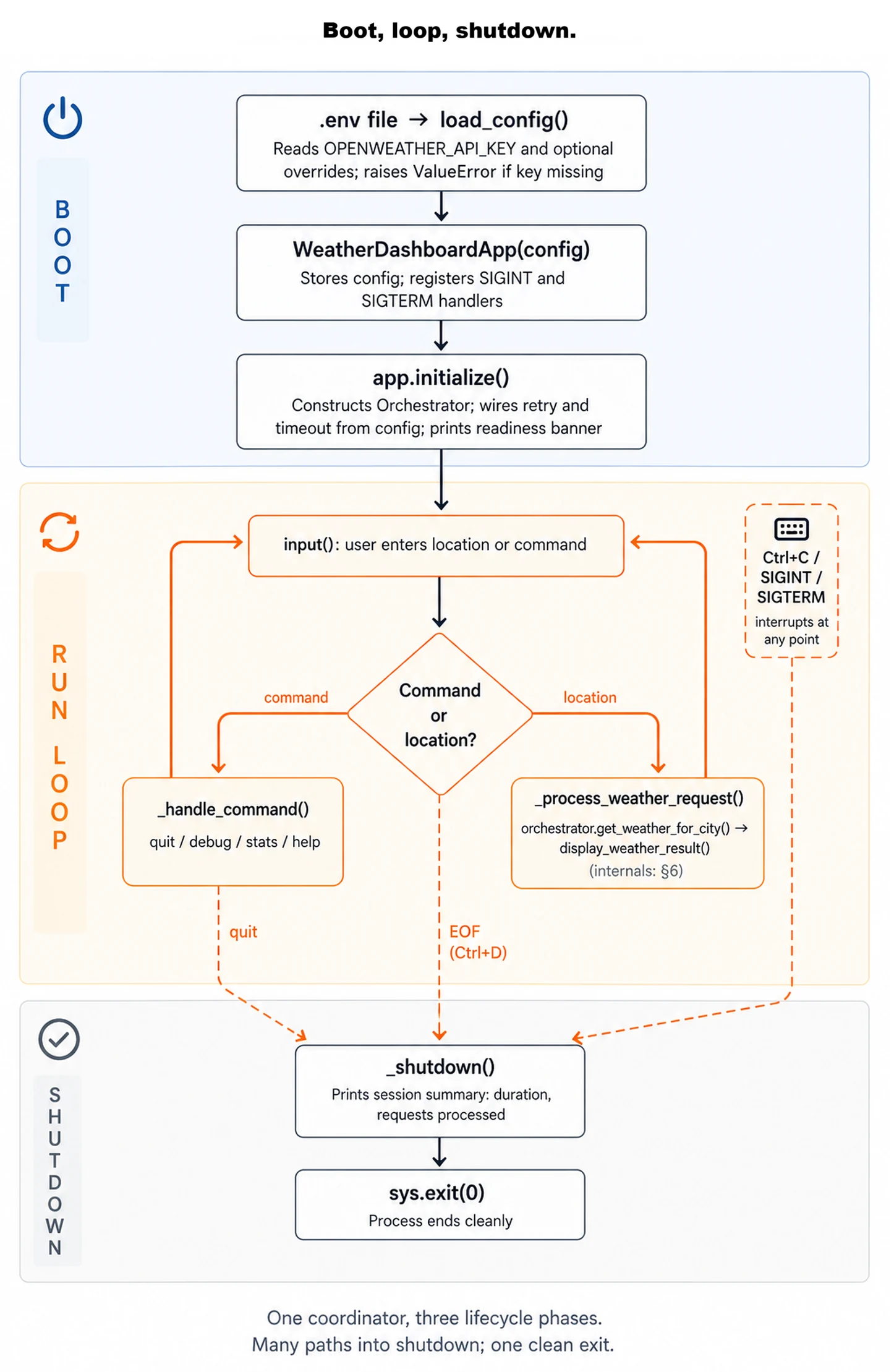
input() after either path; shutdown converges from four sources (the quit command, Ctrl+C/SIGINT, Ctrl+D/EOF, and SIGTERM) into one clean exit. The _process_weather_request() box is where §6's hub-and-spoke runs.
config.py: every tunable knob in one place
Configuration that isn't separated from code becomes configuration that isn't changeable. Save the loader at the project root as config.py:
"""
Configuration management for weather dashboard.

Centralizes all configuration values and provides environment-based overrides.
"""
import os
from dataclasses import dataclass

try:
    from dotenv import load_dotenv
    load_dotenv()
except ImportError:
    # python-dotenv is optional; if missing, fall back to shell-exported env
    pass

@dataclass
class WeatherDashboardConfig:
    """Configuration for production weather dashboard."""

    # API Configuration
    api_key: str
    geocoding_url: str = "https://api.openweathermap.org/geo/1.0/direct"
    weather_url: str = "https://api.openweathermap.org/data/2.5/weather"

    # Retry Configuration (from Chapter 9)
    max_retries: int = 3
    base_timeout: float = 10.0
    base_delay: float = 1.0
    max_delay: float = 60.0

    # Validation Configuration
    min_input_length: int = 2
    max_input_length: int = 100

    # Display Configuration
    show_debug_info: bool = False
    max_alternative_locations: int = 3

    @classmethod
    def from_environment(cls):
        """
        Create configuration from environment variables.

        Returns:
            WeatherDashboardConfig with values from environment

        Raises:
            ValueError: If required environment variables are missing
        """
        api_key = os.getenv('OPENWEATHER_API_KEY')
        if not api_key:
            raise ValueError(
                "Missing required environment variable: OPENWEATHER_API_KEY\n"
                "Set it with: export OPENWEATHER_API_KEY='your_key_here'"
            )

        # Optional overrides from environment
        max_retries = int(os.getenv('WEATHER_MAX_RETRIES', '3'))
        base_timeout = float(os.getenv('WEATHER_TIMEOUT', '10.0'))
        show_debug = os.getenv('WEATHER_DEBUG', 'false').lower() == 'true'

        return cls(
            api_key=api_key,
            max_retries=max_retries,
            base_timeout=base_timeout,
            show_debug_info=show_debug
        )

def load_config():
    """
    Load configuration with error handling.

    Returns:
        WeatherDashboardConfig instance
    """
    try:
        return WeatherDashboardConfig.from_environment()
    except ValueError as e:
        print(f"\n[FAIL] Configuration Error: {e}\n")
        raise
The try-import block at the top applies the load_dotenv() pattern centrally, so it's applied once, in config.py, instead of per-script. It reads the project's .env file and copies every NAME=value pair into the process environment, so os.getenv() finds them as if they'd been shell-exported. Every script that imports config picks up .env automatically, no shell exports required. The try/except keeps the file importable if python-dotenv isn't installed; in that case, shell-exported variables still work.
Now one file holds every tunable knob: API key, base URLs, timeouts, retry counts, debug flag. Environment-specific deployment, secret management, and feature flags all reduce to "edit .env." When the deployment chapters in Part V (27-29) push this code to AWS, the only piece that changes is what's in .env; the configuration loader stays.
weather_dashboard.py: lifecycle, not logic
weather_dashboard.py is the entry point, the file you'll run with python weather_dashboard.py. It loads the config, builds the orchestrator and the display module, runs the CLI loop, and handles a clean Ctrl+C exit. Save it at the project root, alongside config.py:
"""
Production Weather Dashboard - Main Application

Wires config, the orchestrator, and the display module into an
interactive CLI session.
"""
import sys
import signal
from datetime import datetime

# Import all layers
from config import load_config
from orchestrator import WeatherOrchestrator
from display import display_weather_result

class WeatherDashboardApp:
    """
    Main application coordinator for weather dashboard.

    Manages application lifecycle: initialization, interactive loop, shutdown.
    """

    def __init__(self, config):
        """
        Initialize application with configuration.

        Args:
            config: WeatherDashboardConfig instance
        """
        self.config = config
        self.orchestrator = None
        self.running = False
        self.request_count = 0
        self.start_time = None

        # Setup signal handlers for graceful shutdown
        signal.signal(signal.SIGINT, self._signal_handler)
        signal.signal(signal.SIGTERM, self._signal_handler)

    def initialize(self):
        """
        Initialize all application components.

        Returns:
            bool: True if initialization successful, False otherwise
        """
        print("\n Production Weather Dashboard")
        print("=" * 70)
        print("Initializing components...")

        try:
            # Initialize orchestrator with all layers
            self.orchestrator = WeatherOrchestrator(self.config.api_key)

            # Configure orchestrator with config values
            self.orchestrator.api_client.max_retries = self.config.max_retries
            self.orchestrator.api_client.base_timeout = self.config.base_timeout

            print("[OK] API client initialized")
            print("[OK] Geocoding processor initialized")
            print("[OK] Weather processor initialized")
            print("[OK] Business logic coordinator initialized")
            print("[OK] Presentation layer ready")

            if self.config.show_debug_info:
                print("\n[WARN] Debug mode enabled")

            print("\nReady to process weather requests!")
            return True

        except Exception as e:
            print(f"\n[FAIL] Initialization failed: {e}")
            return False

    def run(self):
        """
        Run interactive weather dashboard session.

        Manages the main application loop and user interaction.
        """
        if not self.initialize():
            return

        self.running = True
        self.start_time = datetime.now()

        print("\n" + "=" * 70)
        print("INSTRUCTIONS")
        print("=" * 70)
        print("Enter city names, coordinates, or locations:")
        print(" • City: 'London' or 'San Francisco, CA'")
        print(" • With country: 'Paris, France' or 'Tokyo, Japan'")
        print(" • Coordinates: '51.5074,-0.1278'")
        print("\nCommands:")
        print(" • 'quit' or 'exit' - Exit the application")
        print(" • 'debug' - Toggle debug information")
        print(" • 'stats' - Show session statistics")
        print(" • 'help' - Show this help message")
        print("=" * 70 + "\n")

        while self.running:
            try:
                # Get user input
                user_input = input(" Enter location (or command): ").strip()

                # Handle empty input
                if not user_input:
                    print("Please enter a location or command.\n")
                    continue

                # Handle commands
                if self._handle_command(user_input):
                    continue

                # Process weather request
                self._process_weather_request(user_input)

            except EOFError:
                # Handle Ctrl+D (EOF)
                print("\n")
                self._shutdown()
                break

            except Exception as e:
                print(f"\n[FAIL] Unexpected error: {e}")
                print("Please try again.\n")

    def _process_weather_request(self, user_input):
        """
        Process a weather request through the complete workflow.

        Args:
            user_input: User's location input
        """
        # Track request
        self.request_count += 1
        request_start = datetime.now()

        print() # Blank line for spacing

        # Show processing indicator for longer requests
        if self.config.show_debug_info:
            print(f" Processing request #{self.request_count}...")

        # Execute workflow through orchestrator
        result = self.orchestrator.get_weather_for_city(user_input)

        # Display result through presentation layer
        display_weather_result(result)

        # Show debug information if enabled
        if self.config.show_debug_info:
            self._display_debug_info(result, request_start)

        print() # Blank line for spacing

    def _handle_command(self, user_input):
        """
        Handle special commands.

        Args:
            user_input: User's input string

        Returns:
            bool: True if input was a command, False otherwise
        """
        command = user_input.lower()

        # Quit commands
        if command in ['quit', 'exit', 'q']:
            self._shutdown()
            return True

        # Toggle debug mode
        if command == 'debug':
            self.config.show_debug_info = not self.config.show_debug_info
            status = "enabled" if self.config.show_debug_info else "disabled"
            print(f"\n Debug mode {status}\n")
            return True

        # Show statistics
        if command == 'stats':
            self._display_statistics()
            return True

        # Help command
        if command == 'help':
            self._display_help()
            return True

        return False

    def _display_debug_info(self, result, request_start):
        """Display detailed debug information about the request."""
        request_duration = (datetime.now() - request_start).total_seconds()

        print("\n DEBUG INFORMATION")
        print("-" * 70)
        print(f"Request duration: {request_duration:.3f}s")
        print(f"Workflow status: {result.status.value}")

        metadata = result.processing_metadata
        print(f"Processing steps: {len(metadata.get('steps', []))}")

        for step in metadata.get('steps', []):
            step_name = step.get('step', 'unknown')
            step_duration = step.get('duration', 0)
            step_status = step.get('status', 'unknown')
            print(f" • {step_name}: {step_duration:.3f}s ({step_status})")

        if result.warnings:
            print(f"Warnings: {len(result.warnings)}")

        print("-" * 70)

    def _display_statistics(self):
        """Display session statistics."""
        if not self.start_time:
            print("\nNo statistics available yet.\n")
            return

        session_duration = (datetime.now() - self.start_time).total_seconds()

        print("\n" + "=" * 70)
        print(" SESSION STATISTICS")
        print("=" * 70)
        print(f"Session started: {self.start_time.strftime('%Y-%m-%d %H:%M:%S')}")
        print(f"Session duration: {session_duration:.1f}s")
        print(f"Requests processed: {self.request_count}")

        if self.request_count > 0:
            time_per_request = session_duration / self.request_count
            print(f"Session time per request: {time_per_request:.2f}s")
            print(" (wall clock; includes idle time between prompts)")

        print("=" * 70 + "\n")

    def _display_help(self):
        """Display help information."""
        print("\n" + "=" * 70)
        print(" HELP")
        print("=" * 70)
        print("\nLocation Formats:")
        print(" • City name: 'London', 'Paris', 'Tokyo'")
        print(" • City with state: 'San Francisco, CA'")
        print(" • City with country: 'London, UK', 'Paris, France'")
        print(" • Coordinates: 'latitude,longitude' (e.g., '51.5074,-0.1278')")
        print("\nCommands:")
        print(" • quit/exit - Exit the application")
        print(" • debug - Toggle detailed debug information")
        print(" • stats - Show session statistics")
        print(" • help - Show this help message")
        print("=" * 70 + "\n")

    def _shutdown(self):
        """Perform graceful shutdown."""
        self.running = False

        print("\n" + "=" * 70)
        print(" SHUTTING DOWN")
        print("=" * 70)

        if self.start_time:
            session_duration = (datetime.now() - self.start_time).total_seconds()
            print(f"Session duration: {session_duration:.1f}s")
            print(f"Requests processed: {self.request_count}")

        print("\nThank you for using Weather Dashboard!")
        print("=" * 70 + "\n")

    def _signal_handler(self, signum, frame):
        """Handle interrupt signals gracefully."""
        print("\n") # New line after ^C
        self._shutdown()
        sys.exit(0)

def main():
    """
    Main entry point for weather dashboard application.

    Handles configuration loading and application lifecycle.
    """
    try:
        # Load configuration
        config = load_config()

        # Create and run application
        app = WeatherDashboardApp(config)
        app.run()

    except ValueError as e:
        # Configuration error
        print(f"Cannot start application: {e}")
        sys.exit(1)

    except KeyboardInterrupt:
        # User interrupted during startup
        print("\n\nStartup interrupted. Exiting.")
        sys.exit(0)

    except Exception as e:
        # Unexpected error during startup
        print(f"\n[FAIL] Fatal error: {e}")
        sys.exit(1)

if __name__ == "__main__":
    main()
The coordinator is intentionally thin. Notice that _process_weather_request is one line of real work, self.orchestrator.get_weather_for_city(user_input), wrapped in tracking and display. Every method on this class either manages lifecycle (initialize, run, _shutdown, _signal_handler) or routes input (_handle_command, _display_help, _display_statistics). Nothing here knows what weather data looks like, how to call OpenWeatherMap, or how to format a forecast. That's the test: if any of those concerns leaked in here, the layering broke.
Running the complete application
Set the API key, run the app, and walk through a typical session:
$ cp .env.example .env
$ # edit .env to add your real OPENWEATHER_API_KEY
$ python weather_dashboard.py

  Production Weather Dashboard
======================================================================
Initializing components...
[OK] API client initialized
[OK] Geocoding processor initialized
[OK] Weather processor initialized
[OK] Business logic coordinator initialized
[OK] Presentation layer ready

Ready to process weather requests!

======================================================================
INSTRUCTIONS
======================================================================
Enter city names, coordinates, or locations:
  • City: 'London' or 'San Francisco, CA'
  • With country: 'Paris, France' or 'Tokyo, Japan'
  • Coordinates: '51.5074,-0.1278'

Commands:
  • 'quit' or 'exit' - Exit the application
  • 'debug' - Toggle debug information
  • 'stats' - Show session statistics
  • 'help' - Show this help message
======================================================================

 Enter location (or command): London

======================================================================
  WEATHER FOR LONDON, ENGLAND, GB
======================================================================

  CURRENT CONDITIONS
   Temperature: 15.3°C
   Feels like: 12.5°C
   Description: Light Rain
   Humidity: 72%
   Pressure: 1013 hPa
   Wind: 12.5 km/h from SW
   Visibility: 8.5 km

 DATA QUALITY
   Updated: 2026-05-01 14:23:45
   UTC offset: UTC+01:00
   Quality: 92% (Excellent)
======================================================================

 Enter location (or command): debug

 Debug mode enabled

 Enter location (or command): Tokyo

 Processing request #2...

======================================================================
  WEATHER FOR TOKYO, TOKYO, JAPAN
======================================================================

  CURRENT CONDITIONS
   Temperature: 18.2°C
   Description: Clear Sky
   Humidity: 45%
   Pressure: 1015 hPa
   Wind: 8.3 km/h from E

 DATA QUALITY
   Updated: 2026-05-01 23:24:15
   UTC offset: UTC+09:00
   Quality: 95% (Excellent)
======================================================================

 DEBUG INFORMATION
----------------------------------------------------------------------
Request duration: 1.234s
Workflow status: success
Processing steps: 5
  • input_validation: 0.001s (success)
  • geocoding_api: 0.456s (success)
  • location_processing: 0.012s (success)
  • weather_api: 0.623s (success)
  • weather_processing: 0.008s (success)
----------------------------------------------------------------------

 Enter location (or command): stats

======================================================================
 SESSION STATISTICS
======================================================================
Session started: 2026-05-01 14:23:30
Session duration: 125.3s
Requests processed: 2
Session time per request: 62.65s
 (wall clock; includes idle time between prompts)
======================================================================

 Enter location (or command): quit

======================================================================
 SHUTTING DOWN
======================================================================
Session duration: 145.8s
Requests processed: 2

Thank you for using Weather Dashboard!
======================================================================
The loop has three command modes plus location entry. debug toggles the verbose timing block; stats prints session counters mid-run; quit ends cleanly. Anything else is treated as a location and fires the workflow. The session statistics block at shutdown is what you'd want in production for capacity planning, and it costs almost nothing: just a counter and two timestamps the coordinator already had in scope.
If your run diverges from this session, the most likely culprit is configuration. If Configuration Error: Missing required environment variable: OPENWEATHER_API_KEY fires before the boot banner, the key isn't reaching config.py: check that you copied .env.example to .env (rather than editing the example in place), or, if you're using shell exports, that echo $OPENWEATHER_API_KEY shows the key in this shell. If the boot succeeds but every weather request returns [FAIL] UNABLE TO GET WEATHER DATA with category unknown, the key value is invalid; visit OpenWeatherMap and verify it's active.
Project file structure
The layout below mirrors the layered architecture one-for-one: each layer is a file, supporting modules live alongside, tests sit in their own folder. Build this on disk so the imports in every code block above resolve:
weather_dashboard/
│
├── weather_dashboard.py # Application entry point and CLI loop
├── config.py # Configuration loaded from environment
│
├── errors.py # From Chapter 9: categorise + retry + message helpers
├── json_helpers.py # From Chapter 10: safe_get + try_fields + normalize
├── validators.py # From Chapter 12: structure + content + range checks
│
├── input_validator.py # User-input validation (city names, coordinates)
├── weather_api_client.py # API client layer: resilient HTTP
├── geocoding_processor.py # Processing layer: validate geocoding response
├── weather_processor.py # Processing layer: validate weather response
├── orchestrator.py # Business logic layer: sequence and partial-success
├── display.py # Presentation layer: render the WorkflowResult
├── models.py # Shared dataclasses (Location, WeatherData, WorkflowResult)
│
├── tests/ # Test suite
│ ├── test_components.py # Unit tests for individual components
│ ├── test_integration.py # Integration tests for layer interactions
│ └── test_end_to_end.py # End-to-end tests against the live API
│
├── requirements.txt # Python dependencies
├── .gitignore # Keeps .env out of source control
└── .env.example # Environment variable template (committed)
Three flat files round out the project. requirements.txt declares the runtime dependencies, .gitignore keeps .env out of source control, and .env.example documents the environment variables a fresh checkout needs to set:
requests>=2.31.0
python-dotenv>=1.0.0 # Loads .env at startup (see config.py)
.env
# Weather Dashboard Configuration
# Copy this file to .env and fill in your values

# Required: OpenWeatherMap API Key
OPENWEATHER_API_KEY=your_api_key_here

# Optional: Override default settings
# WEATHER_MAX_RETRIES=3
# WEATHER_TIMEOUT=10.0
# WEATHER_DEBUG=false
These three files form the standard environment-variable pattern for local projects. The split serves a specific purpose: .env.example is committed as a template documenting what variables your project needs (so a teammate cloning the repo knows exactly what to set), .env is your local copy with real values that .gitignore keeps out of source control, and .gitignore carries the rule that enforces the split. Because config.py calls load_dotenv() on import, every script that imports config picks up the values automatically. Shell exports still work too: load_dotenv() doesn't override variables that are already in the environment.
The four layers are now wired together by two new files in this section; the coordinator at the top is the thinnest of the lot. That's not because it does the least work; it's because every layer below it did the work for it. §4's APIResult made try/except unnecessary at the call site. §5's processors made field validation unnecessary at the call site. §6's WorkflowResult made status branching unnecessary at the call site. By the time the coordinator gets a result, there's nothing left to do but hand it to the display. The layering paid for itself.
The four layers are now wired together end-to-end. Section 9 adds the safety net that lets you keep changing them: a unit-then-integration-then-end-to-end test pyramid you can run before any commit.