9. Handle token lifetime and revocation
A token that works today may not work tomorrow. Users revoke access, providers expire tokens, refresh tokens rotate, and APIs return 401s. Production OAuth code needs a plan for all of those cases.
The GitHub OAuth App flow in this chapter is useful for learning the mechanics, but it is not the best example for refresh-token behavior. GitHub's short-lived user tokens and refresh tokens belong mainly to GitHub Apps when expiring user access tokens are enabled. Treat this page as the provider-general pattern you will see again with APIs that issue expiring access tokens and refresh tokens.
Access tokens and refresh tokens
An access token is what your app sends with API requests. Because it can act on the user's behalf, many providers keep it short-lived.
A refresh token is not sent to normal API endpoints. It is used at the token endpoint to request a new access token without sending the user through the full authorization flow again.
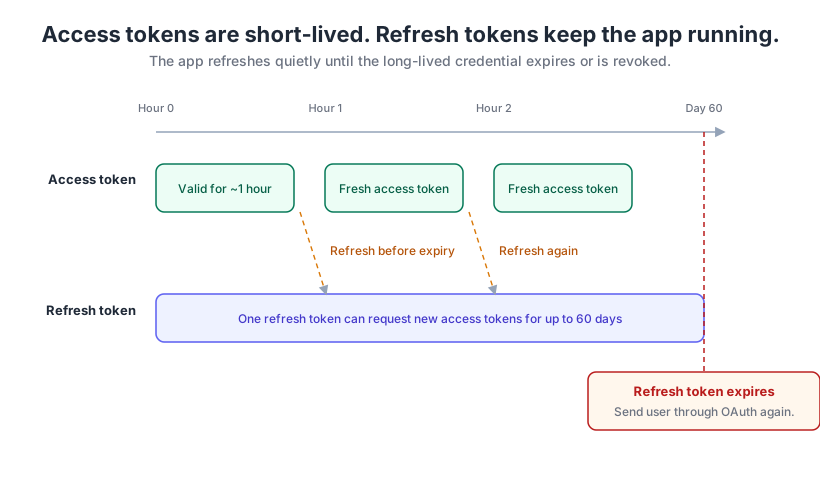
The lifecycle pattern
- The user authorizes the app.
- The provider returns an access token and, for many providers, a refresh token.
- Your app stores token metadata, including when the access token expires.
- Before an API request, your app checks whether the access token is expired or close to expiring.
- If needed, your app uses the refresh token to request a new access token.
- If refresh fails, your app clears stored tokens and asks the user to reconnect.
A concrete timeline
Imagine a provider that issues one-hour access tokens and sixty-day refresh tokens. At hour 0 the user authorizes the app, and your backend stores both tokens securely. During the first hour, normal API calls succeed with the access token in the Authorization header.
Near hour 1, your app should refresh proactively instead of waiting for a request to fail in front of the user. A five-minute safety buffer is common: if the token expires at 10:00, treat it as needing refresh at 9:55. After refresh, API calls continue with the new access token.
At day 60, if the refresh token itself expires or the user revokes access, refresh fails. That is not a retry-forever problem. It is a reconnect problem.
A token manager pattern
This class is a pattern, not GitHub-specific code and not a script to run in the GitHub OAuth App demo. Use this shape with providers that return expires_in and refresh_token values.
from datetime import datetime, timedelta, timezone

import requests


class TokenManager:
    def __init__(self, client_id, client_secret, token_endpoint):
        self.client_id = client_id
        self.client_secret = client_secret
        self.token_endpoint = token_endpoint
        self.access_token = None
        self.refresh_token = None
        self.expires_at = None

    def store_tokens(self, access_token, refresh_token=None, expires_in=3600):
        self.access_token = access_token
        if refresh_token:
            self.refresh_token = refresh_token
        self.expires_at = datetime.now(timezone.utc) + timedelta(seconds=expires_in - 300)

    def needs_refresh(self):
        return self.expires_at is not None and datetime.now(timezone.utc) >= self.expires_at

    def refresh_access_token(self):
        if not self.refresh_token:
            return False

        response = requests.post(
            self.token_endpoint,
            data={
                "grant_type": "refresh_token",
                "refresh_token": self.refresh_token,
                "client_id": self.client_id,
                "client_secret": self.client_secret,
            },
            timeout=10,
        )

        if response.status_code != 200:
            return False

        data = response.json()
        self.store_tokens(
            data["access_token"],
            data.get("refresh_token", self.refresh_token),
            data.get("expires_in", 3600),
        )
        return True

    def get_valid_token(self):
        if self.needs_refresh() and not self.refresh_access_token():
            return None
        return self.access_token

    def make_api_request(self, url, method="GET", **kwargs):
        token = self.get_valid_token()
        if not token:
            return None

        headers = dict(kwargs.get("headers", {}))
        headers["Authorization"] = f"Bearer {token}"
        kwargs["headers"] = headers
        kwargs.setdefault("timeout", 10)

        response = requests.request(method, url, **kwargs)

        if response.status_code == 401 and self.refresh_access_token():
            headers["Authorization"] = f"Bearer {self.access_token}"
            response = requests.request(method, url, **kwargs)

        return response
The retry-once behavior handles a race condition: the token looked valid before the request, then expired before the provider processed it. Retrying once after refresh is useful. Retrying forever hides revocation and creates noisy failure loops.
Revocation is not an error to hide
Users can revoke access from their account settings. When that happens, your app should clear its stored token data and ask the user to reconnect. Do not spin forever retrying a revoked credential.
- 401 from normal API calls: the access token may be expired or revoked.
invalid_grantduring refresh: the refresh token may be expired, revoked, or already rotated away. Clear stored token data and ask the user to reconnect.- User-facing fix: explain that the connection expired or was disconnected, then offer a clear reconnect action.
Now you have the individual pieces. Next, you'll combine them into the complete Dev GitHub Tool.