2. Upload your first file
The files= parameter on requests.post() hides the entire multipart/form-data machinery behind a single dictionary. When you point at a file handle, requests generates the boundary string, assembles the parts, and sets the right Content-Type header. This section walks through the simple case (a text file to httpbin), then layers on metadata, then builds the ProfilePictureUploader class with magic-byte validation, a file-size cap, and safe filenames before any byte hits the network.
Your first upload
Save the following at the project root as basic_upload.py. It writes a one-line text file, opens it in binary mode, and posts it to httpbin.org, which echoes the request back so you can see exactly what the server received:
import requests

# 1. Create a test file
with open('test.txt', 'w') as f:
    f.write("This is a test file for upload.")

# 2. Open in binary mode and upload
with open('test.txt', 'rb') as f:
    files = {'file': f}
    response = requests.post("https://httpbin.org/post", files=files, timeout=10)

# 3. Inspect the response
print(f"Status: {response.status_code}")
print(f"Content-Type sent: {response.request.headers.get('Content-Type')}")
print(f"File received by server: {response.json()['files']}")
Status: 200
Content-Type sent: multipart/form-data; boundary=...
File received by server: {'file': 'This is a test file for upload.'}
What just happened
- Binary mode. We opened the file with
'rb'even though it is text. The same call works for any file type, so make it the default. - Automatic encoding.
requestssaw thefiles=parameter and switched the request toContent-Type: multipart/form-datawith a generated boundary string. - Dictionary format.
{'file': f}tells the server to expose the upload under the field namefile. The key on the left is the form field name; the value on the right is the file handle.
That three-line shape (open in 'rb', build a files= dict, post it) is the foundation for every upload in this chapter. The mechanics stay the same; only the validation, metadata, and error handling grow.
Adding metadata to your uploads
Real applications usually send a file alongside extra fields: a user ID, a description, a tag list. You attach those by passing both files= and data= to the same request. Save this as upload_with_metadata.py:
import requests

# Note: You need an actual image file for this
# For testing, create a small dummy binary file:
with open('profile.jpg', 'wb') as f:
    f.write(b'\xFF\xD8\xFF\xE0')  # JPEG header bytes

# Upload with metadata
with open('profile.jpg', 'rb') as f:
    files = {'profile_image': f}
    data = {
        'user_id': '12345',
        'description': 'Profile photo taken at conference'
    }

    response = requests.post(
        "https://httpbin.org/post",
        files=files,
        data=data,  # Metadata goes in 'data', not 'json'
        timeout=15
    )

result = response.json()
print(f"Files: {result['files']}")
print(f"Form data: {result['form']}")
Files: {'profile_image': ...}
Form data: {'user_id': '12345', 'description': 'Profile photo taken at conference'}
When you pass both files= and data=, requests assembles a multipart/form-data body that interleaves form fields and file content, separated by random boundary strings. Here is what the wire format looks like:
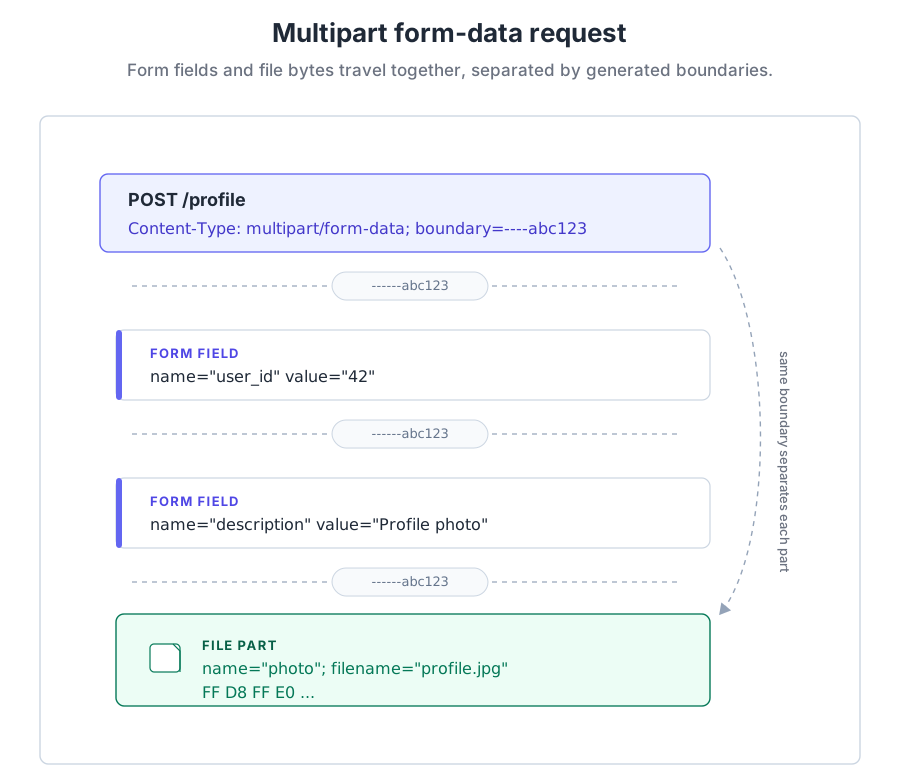
The pieces of that body are worth naming because they show up in error messages and tcpdump output:
- Boundary strings. Random separators (like
----WebKitFormBoundary...) divide the parts of the request so the server can tell where each form field or file begins and ends. - Form fields. Each key in your
data=dictionary becomes its own part, containing the field name and the value as text. - File data. The file gets its own part with the filename, a per-file
Content-Typeheader, and the actual binary bytes. - End boundary. A final boundary marks the close of the multipart message so the server stops reading.
files= and json=
A single HTTP request has one Content-Type header. files= switches the request to multipart/form-data; json= wants application/json. The two are mutually exclusive. If you need to send metadata alongside an upload, put it in data= as form fields, not json=. This catches a lot of developers the first time, usually as a confusing 400 from the server.
Building ProfilePictureUploader
The class below combines the patterns from this section (binary-mode reads, multipart/form-data uploads) with three production guards: an extension allow-list, a 5MB size cap, and magic-byte validation that catches a .txt file renamed to .jpg before it reaches the network. Save it as profile_picture_uploader.py:
import os
from pathlib import Path
import mimetypes
import requests

class ProfilePictureUploader:
    """
    A production-style profile picture uploader with:
      - Extension and size limits
      - Basic header validation (magic bytes)
      - Safe filenames
      - Proper MIME types
      - Clear (success, message, url) return structure
    """

    # Maximum file size: 5MB
    MAX_FILE_SIZE = 5 * 1024 * 1024

    # Allowed image extensions
    ALLOWED_EXTENSIONS = {'.jpg', '.jpeg', '.png', '.gif'}

    def __init__(self, user_id):
        self.user_id = user_id

    def upload_profile_picture(self, filepath):
        """
        Upload a profile picture with comprehensive validation.

        Returns:
            tuple: (success: bool, message: str, url: str or None)
        """

        # STEP 1: File existence check
        if not os.path.exists(filepath):
            return (False, "File not found", None)

        # STEP 2: Extension validation
        file_ext = Path(filepath).suffix.lower()
        if file_ext not in self.ALLOWED_EXTENSIONS:
            allowed = ', '.join(self.ALLOWED_EXTENSIONS)
            return (False, f"Invalid file type. Allowed: {allowed}", None)

        # STEP 3: File size validation
        file_size = os.path.getsize(filepath)
        if file_size > self.MAX_FILE_SIZE:
            max_mb = self.MAX_FILE_SIZE / (1024 * 1024)
            actual_mb = file_size / (1024 * 1024)
            return (False, f"File too large ({actual_mb:.1f}MB). Max: {max_mb}MB", None)

        # STEP 4: Basic content validation (is it really an image?)
        try:
            with open(filepath, 'rb') as f:
                header = f.read(10)

            if not self._is_valid_image_header(header, file_ext):
                return (False, "File content does not match a valid image format", None)
        except Exception as e:
            return (False, f"Failed to read file header: {str(e)}", None)

        # STEP 5: Prepare safe filename
        safe_filename = self._build_safe_filename(file_ext)

        # STEP 6: Determine correct MIME type
        mime_type = self._get_mime_type(file_ext)

        # STEP 7: Upload to remote API
        try:
            with open(filepath, 'rb') as f:
                files = {
                    'file': (safe_filename, f, mime_type)
                }

                response = requests.post(
                    "https://httpbin.org/post",
                    files=files,
                    timeout=30
                )
                response.raise_for_status()

                # In a real system, you'd parse the response to get the final URL.
                # Here we just return a pretend URL.
                uploaded_url = f"https://cdn.example.com/profile_pics/{safe_filename}"
                return (True, "Upload successful", uploaded_url)

        except requests.exceptions.Timeout:
            return (False, "Upload timed out - please try again", None)

        except requests.exceptions.RequestException as e:
            return (False, f"Upload failed: {str(e)}", None)

    def _is_valid_image_header(self, header, extension):
        """Check if file header matches the claimed extension"""
        # JPEG: FF D8 FF
        if extension in {'.jpg', '.jpeg'} and header[:3] == b'\xFF\xD8\xFF':
            return True
        # PNG: 89 50 4E 47 0D 0A 1A 0A
        if extension == '.png' and header[:8] == b'\x89PNG\r\n\x1a\n':
            return True
        # GIF: 47 49 46 38 37 61 or 47 49 46 38 39 61
        if extension == '.gif' and header[:6] in (b'GIF87a', b'GIF89a'):
            return True
        return False

    def _get_mime_type(self, extension):
        """Get proper MIME type for extension"""
        mime_types = {
            '.jpg': 'image/jpeg',
            '.jpeg': 'image/jpeg',
            '.png': 'image/png',
            '.gif': 'image/gif'
        }
        return mime_types.get(extension, 'application/octet-stream')

    def _build_safe_filename(self, extension):
        """
        Build a safe filename that does not leak original names
        (which might contain personal data).
        """
        return f"user_{self.user_id}_profile{extension}"

# Usage Example
if __name__ == "__main__":
    # Create a tiny fixture so the success path runs end-to-end.
    # Real apps receive the path from a file-upload form or CLI argument.
    test_image = "test_profile_picture.jpg"
    with open(test_image, "wb") as f:
        f.write(b"\xFF\xD8\xFF\xE0" + b"\x00" * 1024)  # JPEG header + filler

    uploader = ProfilePictureUploader(user_id=12345)
    success, message, url = uploader.upload_profile_picture(test_image)
    print("Success:", success)
    print("Message:", message)
    print("URL:", url)
The class posts to httpbin.org/post, which echoes the request back so you can inspect what the server received but does not actually host the upload. The uploaded_url string returned on success (https://cdn.example.com/profile_pics/...) is a placeholder for what a real CDN would give you. In production you would parse the response body to pull out the actual hosted URL.
Testing the failure paths
Run the script as-is to see the success path. Then point it at the kinds of files real users will throw at it (a 10MB image, a .txt file renamed to .jpg, a file whose first bytes do not match the claimed extension) and watch each guard catch the problem before requests.post() sees a single byte:
uploader = ProfilePictureUploader(user_id=12345)
success, message, url = uploader.upload_profile_picture("my_photo.jpg")
The point isn't that magic-byte validation is bulletproof. A determined attacker can prepend FF D8 FF to anything and pass that check, which is why production uploads still need server-side virus scanning. The point is that the cheap checks (extension, size, header signature) catch the overwhelming majority of casual rename mistakes and reduce the load on the expensive checks downstream.
In production you would usually upload to dedicated object storage (S3, Google Cloud Storage, Azure Blob Storage) rather than your app server's local disk. The validation pattern stays identical; only the destination URL and the SDK call change.