Chapter 21: File uploads and binary data
1. Understanding binary data
Twenty chapters of API work, all of it text-shaped. Real applications also move files: profile images, PDF reports, video clips, receipt photos. The wire format changes, the memory model changes, and the failure modes change. This chapter gives you a working pattern for each shift, ending with a Receipt Scanner that uploads a phone-camera photo, runs it through an OCR API, and returns structured data your code can use.
You will build the chapter project (the ReceiptScanner class) on top of patterns introduced in order: opening files in binary mode without corrupting them, uploading them through multipart/form-data, streaming large bodies in fixed-size chunks so memory stays flat, downloading safely with header validation, and fanning a batch out across worker threads. By the end, file handling stops being a special case and becomes a repeatable shape: open in 'rb', validate, stream when the size is unbounded, surface progress, handle each error explicitly.
- Distinguish text from binary at the byte level and read non-text files in
'rb'mode without corruption - Upload files with
multipart/form-datausing thefiles=parameter, and combine files with form metadata viadata= - Stream large uploads through a generator-based
ProgressFileReaderso memory stays flat regardless of file size - Download binary content safely with
stream=Trueanditer_content(), validatingContent-Typebefore writing to disk - Fan a batch of uploads out across a
ThreadPoolExecutorwith boundedmax_workersand per-file error isolation - Integrate an OCR (optical character recognition) API to turn a receipt image into structured data via regex parsing
basic_upload.py— first multipart upload to httpbin to see howrequestsassembles the bodyprofile_picture_uploader.py—ProfilePictureUploaderclass with magic-byte validation, size cap, and safe filenamesstreaming_upload.py—ProgressFileReadergenerator that streams a 5MB file in 8KB chunks and prints percent-completedownload_file.py— safe download function with content-type validation and chunked writeconcurrent_upload.py—ThreadPoolExecutor-based batch uploader with per-file error capturereceipt_scanner.py— the keystoneReceiptScannerclass: image upload to OCR.space, regex parsing of total and date
Text vs binary: the byte-level difference
To understand why file uploads require special handling, look at how Python reads files in each mode. Start with the text path you have used in every chapter so far.
The JSON path (text)
When you send JSON, you are sending text strings. requests handles the encoding for you:
# Text data - what you've been doing
text_data = {"name": "Alice", "age": 25}

# requests converts this dictionary to a UTF-8 string automatically
response = requests.post("https://httpbin.org/post", json=text_data)
The binary path (images, PDFs, videos)
Images and documents are different. They are binary data: raw bytes like 0xFF 0xD8 0xFF 0xE0 (the start of a JPEG). These bytes do not represent text characters, and trying to decode them as UTF-8 corrupts the file:
# WRONG - this corrupts binary files
with open('profile.jpg', 'r') as f:  # text mode tries to decode bytes
    data = f.read()  # decoding error or silently corrupted data

# CORRECT - binary mode preserves raw bytes
with open('profile.jpg', 'rb') as f:  # binary mode reads raw bytes
    data = f.read()  # data preserved exactly as-is
    print(f"First 4 bytes: {data[:4]}")  # shows actual hex values
First 4 bytes: b'\xff\xd8\xff\xe0'
Notice the b prefix? That indicates raw bytes, not text. If you try to open an image in text mode, Python tries to interpret those bytes as UTF-8 characters, fails, and corrupts the data.
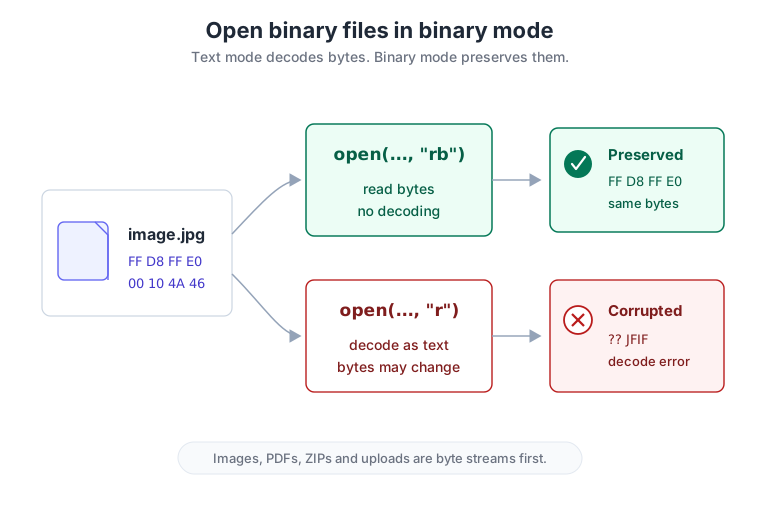
Always use 'rb' (read binary) mode when opening non-text files. open('image.jpg', 'r') tries to decode the bytes as UTF-8 and corrupts the file; open('image.jpg', 'rb') reads raw bytes without interpretation. The check costs you one character at the call site and saves you an afternoon of debugging garbled uploads downstream.
Memory matters once files are big
f.read() on a 1GB video file pulls all 1GB into memory before requests sees a single byte. Your Railway Hobby-plan deployment from Chapter 20 runs under a finite memory budget; free and entry-tier containers commonly cap around 512MB, and even more generous setups cut you off well before "all of system RAM." Loading a 600MB upload all at once is the fastest way to crash any of them.
The fix is streaming: read the file in fixed-size chunks and let requests send each chunk as it lands. Memory stays flat regardless of file size. Section 3 walks through the pattern and builds ProgressFileReader from scratch; for now, just notice that the production constraint (bounded RAM, unbounded user uploads) is the same one Chapter 20 set up. Streaming is how the two reconcile.