3. Handle large files with streaming
f.read() loads the whole file into memory before requests sends a byte. That works for a 50MB image and crashes hard on a 2GB video. The fix is streaming: read the file in fixed-size chunks and let your HTTP client send each chunk as it lands. Memory stays flat at whatever chunk size you pick (8KB is a sensible default), regardless of whether the file is 1KB or 1GB. This section builds ProgressFileReader, a generator that yields chunks and prints percent-complete on the way past, then explains why the same pattern is what stands between your Hobby-plan deployment and an Out-of-Memory crash on the first big upload.
Stream your first large file
Python generators read files lazily, one chunk at a time. The class below wraps a file object in a generator that yields fixed-size byte slices, tracks how many bytes have been read, and prints percent-complete on each pass so the user knows the upload is alive. requests consumes the generator one chunk at a time, sending each one as it arrives. Save it as streaming_upload.py:
import os
import requests

class ProgressFileReader:
    """Generator that reads a file in chunks and displays progress."""

    def __init__(self, filepath, chunk_size=8192):
        self.filepath = filepath
        self.chunk_size = chunk_size
        self.file_size = os.path.getsize(filepath)
        self.bytes_read = 0

    def __iter__(self):
        with open(self.filepath, "rb") as f:
            while True:
                chunk = f.read(self.chunk_size)
                if not chunk:
                    break

                self.bytes_read += len(chunk)
                percentage = (self.bytes_read / self.file_size) * 100
                print(f"\rUploading: {percentage:.1f}% ({self.bytes_read}/{self.file_size} bytes)", end="")

                yield chunk
        print()  # New line after completion

# Create a test file (5MB)
with open("large_test.dat", "wb") as f:
    f.write(os.urandom(5 * 1024 * 1024))

print("Starting upload...")
reader = ProgressFileReader("large_test.dat")

# We stream the data directly using the reader object
response = requests.post(
    "https://httpbin.org/post",
    data=reader,
    timeout=300  # Longer timeout for large files
)

print("\nUpload Complete!")
Starting upload...
Uploading: 45.2% (2367488/5242880 bytes)
...
Uploading: 100.0% (5242880/5242880 bytes)

Upload Complete!
ProgressFileReader implements Python's iterator protocol (__iter__): each iteration reads 8KB from disk, yields it to requests, and updates the on-screen counter. requests sends each yielded chunk as a separate piece of the request body, so memory only ever holds the current chunk plus a small amount of bookkeeping -- flat at roughly 8KB regardless of whether the source file is 5MB or 5GB.
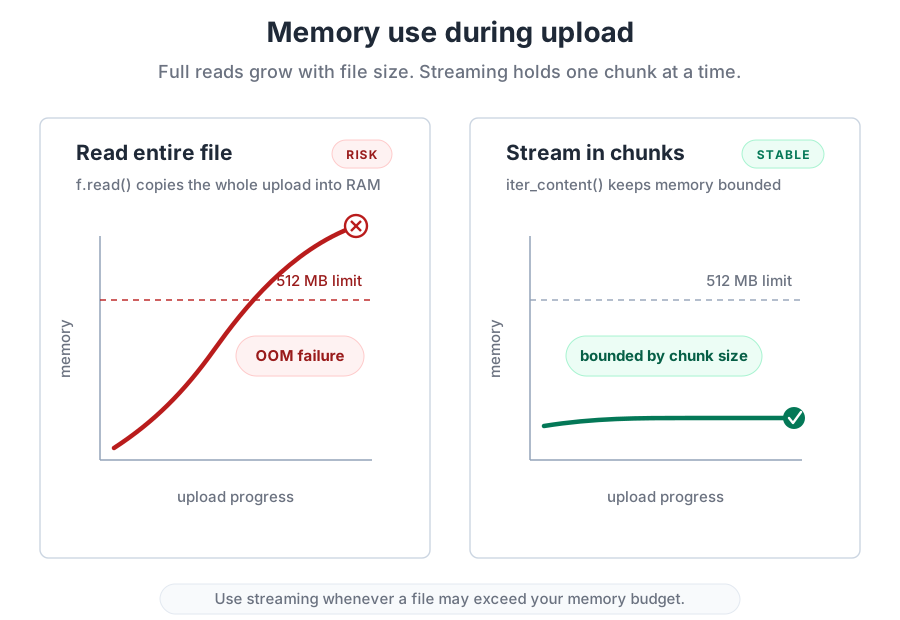
The cost of skipping this pattern shows up in the memory profile. Loading the file all at once climbs in a straight line until either the upload finishes or the container kernel kills the process; streaming sits as a flat horizontal trace until completion:
Why this matters for production
Remember the memory budget from the chapter overview: your Railway Hobby-plan deployment from Chapter 20 runs in the entry-tier range that commonly caps around 512MB. If a user tries to upload a 600MB video and your code calls f.read(), the kernel kills the process before requests finishes the request, and from the user's side the upload just disappears with no useful error.
Streaming sidesteps that whole class of failure. The chunk size is the memory ceiling. 8KB is a reasonable default; larger chunks (64KB, 1MB) reduce per-chunk overhead at the cost of a bigger memory floor, smaller chunks do the reverse. For most upload-shaped work, 8KB lands close to the sweet spot. The example above streams the file as the raw request body; for the more common multipart/form-data shape, the third-party requests-toolbelt library assembles the envelope around chunked content, so you get the same memory-flat behaviour for production form-style uploads.
Section 4 flips this same chunked-iteration pattern around for downloads, where the payoff is the same (flat memory) but the trust model is different: the server you are pulling from can lie about what it is sending you, so the safe download adds header validation on top of streaming.