
5. HTTP-Level Mocking
HTTP-level mocking is a fake post office for your tests. Your code thinks it's sending a real request to OpenWeather, Spotify, or GitHub; a mocking library intercepts the letter at the door, checks the address and contents match what the test expects, and hands back a canned reply. No real network, no rate limits, no flaky connections, no live credentials.
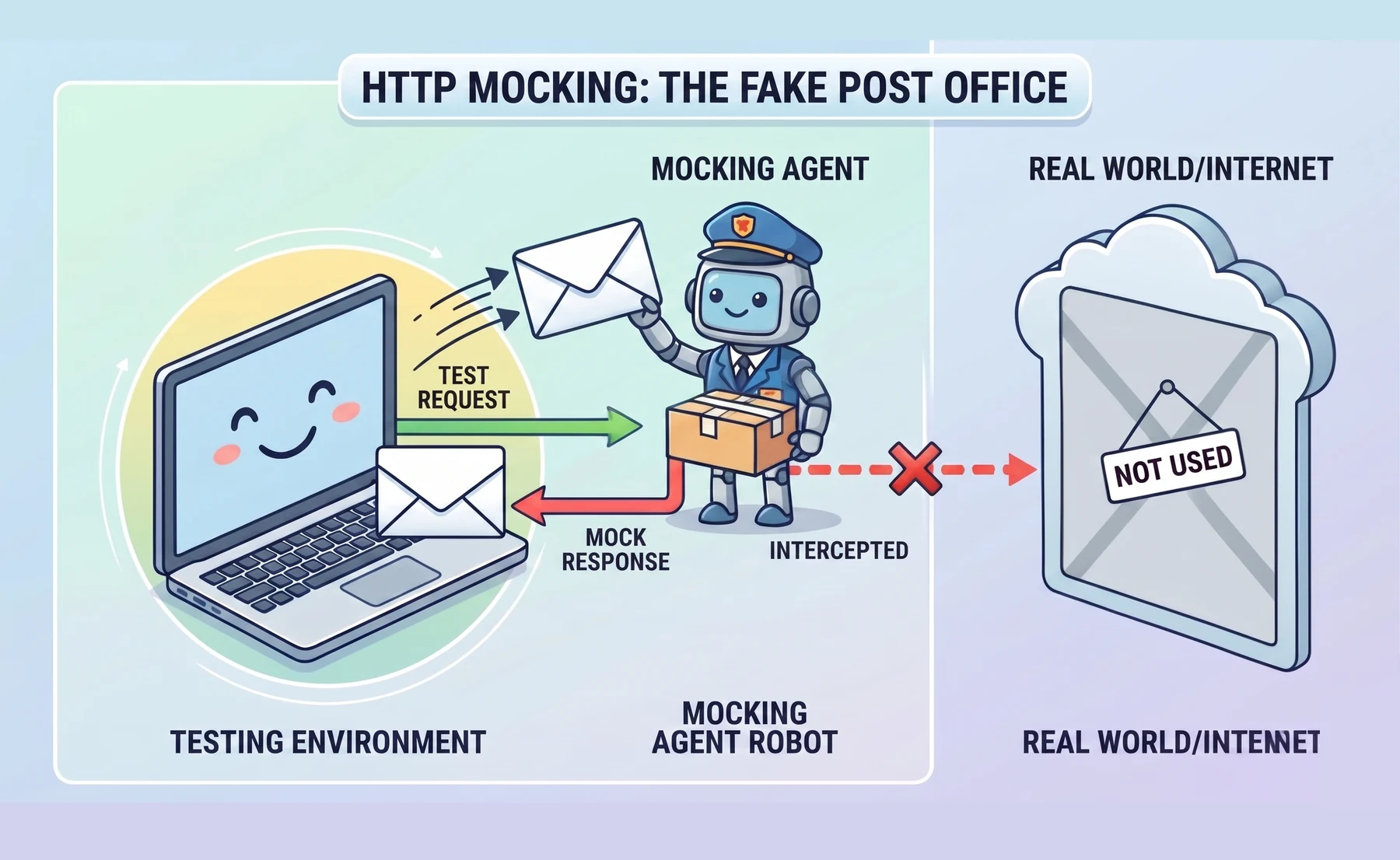
The rest of this section works through a short experiment. We'll meet Python's standard mocking tool, unittest.mock, apply an intentionally under-specified mock to a real HTTP client, watch it miss a request-shape bug, then use a transport-level matcher that catches the bug by design.
Python's built-in mocking tools
Python's standard library ships unittest.mock, a module for replacing real code with controlled fakes during tests. Two tools from it, patch and Mock, turn up in almost every pytest tutorial, so it's worth seeing what each one does before we use them.
patch temporarily replaces something (a function, method, or attribute) with a fake for the duration of one test. Here's a minimal example that patches requests.get so no real HTTP call leaves the machine:
from unittest.mock import patch
import requests

@patch("requests.get")
def test_api_call(mock_get):
    mock_get.return_value.status_code = 200

    response = requests.get("https://api.example.com")

    assert response.status_code == 200
The decorator swaps out requests.get inside the test. No real HTTP request leaves the machine. The object returned by the fake is itself a Mock, which is why mock_get.return_value.status_code = 200 works.
Mock is the other half of the story: a flexible fake object where attributes and method return values are configured by assignment. Here's one on its own, outside a test:
from unittest.mock import Mock

fake_response = Mock()
fake_response.status_code = 200
fake_response.json.return_value = {"data": "test"}
Set an attribute, get that attribute back. Set .return_value on a method, get that value when the method is called. That's the entire API. Used together, patch swaps out the thing you don't want to run and Mock hands back whatever the test needs.
That's everything most pytest tutorials teach about mocking. Next we'll apply it to a real HTTP client, and watch it quietly stop being enough.
The client we're testing
We'll test a small client for the OpenWeather API. It makes one GET request, parses the JSON, and returns three fields. The client uses the requests library, so install it now (we'll add the mocking library a little later):
python -m pip install requests
python -m pip freeze > requirements.txt
Save the client at the root of your project as weather_client.py (next to requirements.txt and .gitignore, not inside tests/):
import requests

def get_weather(city, api_key):
    response = requests.get(
        "https://api.openweathermap.org/data/2.5/weather",
        params={"q": city, "appid": api_key, "units": "metric"},
        timeout=5,
    )
    response.raise_for_status()
    data = response.json()
    return {
        "city": data["name"],
        "temp_c": data["main"]["temp"],
        "description": data["weather"][0]["description"],
    }
Now we'll test it. The standard first move is to patch requests.get with unittest.mock and assert that the function returns the right dict. Save this as tests/test_weather_client_with_mock.py:
from unittest.mock import patch, Mock
from weather_client import get_weather

def test_get_weather_transforms_response():
    fake_response = Mock()
    fake_response.status_code = 200
    fake_response.json.return_value = {
        "name": "Dublin",
        "main": {"temp": 11.2},
        "weather": [{"description": "light rain"}],
    }

    with patch("weather_client.requests.get", return_value=fake_response):
        result = get_weather("Dublin", api_key="secret_key")

    assert result == {
        "city": "Dublin",
        "temp_c": 11.2,
        "description": "light rain",
    }
Run it from the project root:
$ pytest tests/test_weather_client_with_mock.py
============================= test session starts =============================
collected 1 item

tests/test_weather_client_with_mock.py .                                [100%]

============================== 1 passed in 0.04s ==============================
Green. Now let's introduce a bug. In weather_client.py, rename the query parameter "appid" to "api_key". That's a plausible refactor mistake: OpenWeather will reject the request with a 401 in production. Rerun the same command:
$ pytest tests/test_weather_client_with_mock.py
tests/test_weather_client_with_mock.py .                                [100%]

============================== 1 passed in 0.04s ==============================
Still green. This particular test never asserts how requests.get was called, so the params dict and URL are not checked. unittest.mock can verify call arguments with methods such as assert_called_once_with; the problem here is an under-specified test, not an incapable library. The transport-level approach below makes the expected HTTP contract explicit.
unittest.mock replaces Python objects, while an HTTP-level mock intercepts the request prepared by requests. Both can be strict when configured carefully, but transport-level matchers express the contract in HTTP terms: method, URL, query parameters, headers, and body. That makes request-shape regressions harder to overlook.
Mocking with responses
The responses library intercepts HTTP calls at the transport layer. Register the URL, method, and response body you expect; any unmatched request fails with a ConnectionError. Install it:
python -m pip install responses
python -m pip freeze > requirements.txt
Now let's rewrite the same test with responses. This time we're checking two things: the JSON transformation, and the shape of the outgoing HTTP request. Save this as tests/test_weather_client.py (a fresh file alongside your existing test_weather_client_with_mock.py):
import responses
from responses import matchers
from weather_client import get_weather

@responses.activate
def test_get_weather_sends_correct_request():
    responses.add(
        responses.GET,
        "https://api.openweathermap.org/data/2.5/weather",
        json={
            "name": "Dublin",
            "main": {"temp": 11.2},
            "weather": [{"description": "light rain"}],
        },
        status=200,
        match=[
            matchers.query_param_matcher({
                "q": "Dublin",
                "appid": "secret_key",
                "units": "metric",
            })
        ],
    )

    result = get_weather("Dublin", api_key="secret_key")

    # Response transformation is correct
    assert result == {
        "city": "Dublin",
        "temp_c": 11.2,
        "description": "light rain",
    }

    # The matcher above already checked the query parameters.
    # Inspect the recorded call when you need additional assertions.
    assert len(responses.calls) == 1
    assert responses.calls[0].request.method == "GET"
Run the new test from the project root:
$ pytest tests/test_weather_client.py
tests/test_weather_client.py .                                          [100%]

============================== 1 passed in 0.05s ==============================
Now reintroduce the appid → api_key bug in weather_client.py and run the same command again:
$ pytest tests/test_weather_client.py
tests/test_weather_client.py F                                          [100%]

================================== FAILURES ===================================
_________________ test_get_weather_sends_correct_request __________________

ConnectionError: Connection refused by Responses - the call doesn't match
any registered mock
  - GET https://api.openweathermap.org/data/2.5/weather

============================== 1 failed in 0.06s ==============================
The query-parameter matcher catches the bug that the earlier under-specified mock missed. The error message names the request that did not match, which is usually enough to find the regression quickly.
A quick note on the @responses.activate decorator you've been using: it installs the interception for the duration of one test. If you prefer an explicit context manager, with responses.RequestsMock() as rsps: does the same job.
Testing error paths
Real APIs fail in specific ways: 401 on expired tokens, 429 on rate limits, 503 on outages. Each failure gets its own short test. First fix the bug you introduced a moment ago (restore "appid" in weather_client.py), then add these two tests to the bottom of your existing tests/test_weather_client.py:
import pytest
import responses
import requests
from weather_client import get_weather

@responses.activate
def test_get_weather_raises_on_unauthorized():
    responses.add(
        responses.GET,
        "https://api.openweathermap.org/data/2.5/weather",
        json={"cod": 401, "message": "Invalid API key"},
        status=401,
    )

    with pytest.raises(requests.HTTPError) as exc_info:
        get_weather("Dublin", api_key="wrong_key")

    assert exc_info.value.response.status_code == 401


@responses.activate
def test_get_weather_raises_on_service_outage():
    responses.add(
        responses.GET,
        "https://api.openweathermap.org/data/2.5/weather",
        status=503,
    )

    with pytest.raises(requests.HTTPError):
        get_weather("Dublin", api_key="any_key")
Run the whole file from the project root. You should now see three tests passing: the happy path, plus the two error paths you just added.
$ pytest tests/test_weather_client.py
tests/test_weather_client.py ...                                        [100%]

============================== 3 passed in 0.05s ==============================
The pattern scales: register a status code and body, assert that your code reacts. No need to take down a real service to exercise the error path. In a production client you'd usually wrap get_weather in a retry-on-503 policy and test that as well.
When Mock is still the right tool
Use responses when your code calls requests.get/post/... directly. Use unittest.mock when your code calls an SDK that doesn't go through requests, such as most AWS clients, google-cloud libraries, or gRPC stubs. The rule: mock at the boundary that matters for the behaviour you're testing.
For AWS SDK code, the moto project can emulate many AWS services behind boto3. It is useful when you want service-like behaviour for S3, DynamoDB, SQS, and similar APIs, but its coverage and fidelity vary by service, so keep a small number of integration checks against real infrastructure where the risk justifies them.