6. GitHub Activity Notifier
The previous five sections built every piece in isolation: minimal receiver, anatomy walk-through, persistent receiver with a background worker, signature-verified production-shape receiver. This section composes them into the chapter's keystone project. A real GitHub event lands at your endpoint, gets verified, gets persisted, gets picked up by the worker, gets normalised into a small internal shape, gets formatted into a Slack message, and arrives in a Slack channel within a couple of seconds. The same pipeline shape carries Stripe payment events to a billing system, GitLab CI events to a deploy dashboard, or Twilio SMS events to a customer-support tool; only the normaliser and the destination change.
Designing the GitHub Activity Notifier
You now have a webhook receiver that can accept, verify, and store GitHub events, plus a worker process that drains unprocessed events from the database. The final step is turning those events into useful Slack notifications.
In this section you will build a GitHub Activity Notifier that sends Slack messages when important events occur in your repository, such as:
- New issues being opened.
- Pull requests being opened or merged.
- Stars on the repository.
The architecture looks like this:
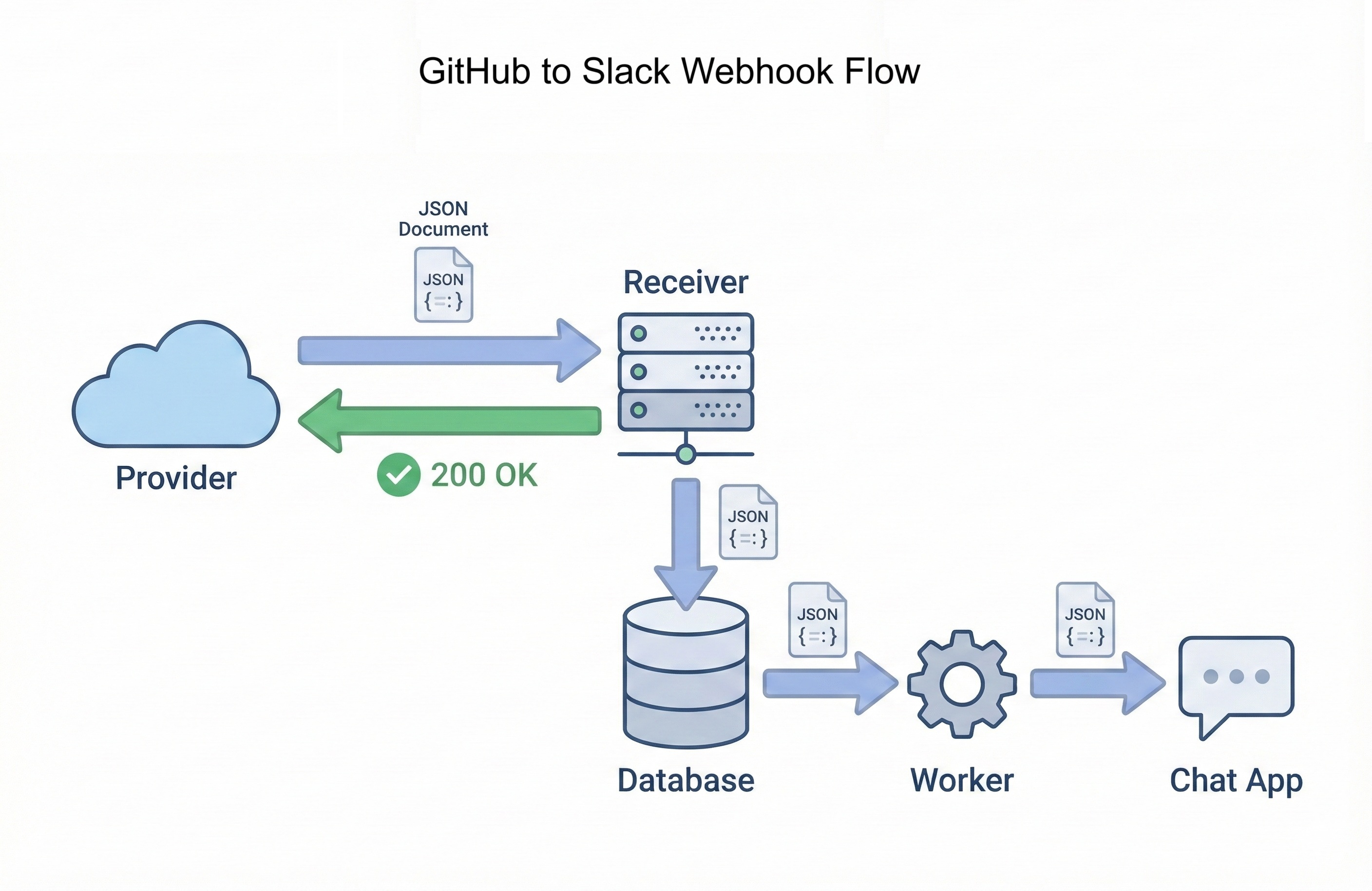
The same pattern shows up with many other providers. Stripe uses webhooks to tell your application when a payment succeeds or a subscription changes. Slack and Discord both accept incoming webhooks that you can post messages to, just like your notifier does. Tools such as RequestBin and webhook.site let you inspect raw webhook deliveries in a browser, which is extremely useful when you are debugging or exploring a new provider.
Normalising GitHub events
GitHub can send many different webhook event types, each with its own JSON structure. To avoid scattering GitHub specific details throughout your code, you will normalise the events into a simple internal format and then format messages from that.
Start with a helper that takes an event_type (from X-GitHub-Event) and the JSON payload, and returns a dictionary with the fields your notifier cares about. Save it as github_normaliser.py:
def normalize_github_event(event_type, payload):
    """
    Convert a raw GitHub event into a simple internal representation.

    Returns a dict with keys:
      - kind: high level type ("issue_opened", "pr_opened", "pr_merged", "repo_starred", ...)
      - actor: who triggered the event
      - repository: "owner/name"
      - title: issue or PR title (if applicable)
      - url: link to the GitHub resource
      - extra: small dict with extra details (optional)
    Or returns None if this event type is not interesting.
    """
    repo_full_name = (payload.get("repository") or {}).get("full_name", "unknown/unknown")
    sender_login = (payload.get("sender") or {}).get("login", "someone")

    if event_type == "issues":
        action = payload.get("action")
        issue = payload.get("issue") or {}
        if action == "opened":
            return {
                "kind": "issue_opened",
                "actor": sender_login,
                "repository": repo_full_name,
                "title": issue.get("title", "(no title)"),
                "url": issue.get("html_url"),
                "extra": {"number": issue.get("number")},
            }

    if event_type == "pull_request":
        action = payload.get("action")
        pr = payload.get("pull_request") or {}
        is_merged = pr.get("merged", False)

        if action == "opened":
            return {
                "kind": "pr_opened",
                "actor": sender_login,
                "repository": repo_full_name,
                "title": pr.get("title", "(no title)"),
                "url": pr.get("html_url"),
                "extra": {"number": pr.get("number")},
            }

        if action == "closed" and is_merged:
            return {
                "kind": "pr_merged",
                "actor": sender_login,
                "repository": repo_full_name,
                "title": pr.get("title", "(no title)"),
                "url": pr.get("html_url"),
                "extra": {"number": pr.get("number")},
            }

    if event_type == "star":
        action = payload.get("action")
        # We only notify when someone stars the repo, not when they unstar it.
        if action == "created":
            return {
                "kind": "repo_starred",
                "actor": sender_login,
                "repository": repo_full_name,
                "title": f"{repo_full_name} starred",
                "url": (payload.get("repository") or {}).get("html_url"),
                "extra": {},
            }

    # You can add more event types here over time.

    # Not an event we care about for Slack notifications
    return None
This helper focuses on a small subset of events and ignores the rest. That is deliberate. In a real application you will add more cases over time, but it is better to start with a tiny set of high signal events rather than trying to handle everything at once.
Sending messages to Slack
Slack provides Incoming Webhooks that accept simple JSON payloads. You post a message to a special URL, and Slack delivers it into a channel. This fits perfectly with the way your worker already makes HTTP requests.
At a high level you will:
- Create a Slack app with an incoming webhook.
- Copy the webhook URL and store it in an environment variable (for example
SLACK_WEBHOOK_URL). - Use
requests.postin your worker to send JSON payloads to that URL.
Slack notification helper
Save this as slack_notifier.py:
import os
import requests

SLACK_WEBHOOK_URL = os.environ.get("SLACK_WEBHOOK_URL", "")

def send_slack_notification(text):
    """
    Send a notification to Slack via incoming webhook.

    Raises requests.RequestException if the notification fails.
    """
    if not SLACK_WEBHOOK_URL:
        print("SLACK_WEBHOOK_URL is not set. Skipping Slack notification.")
        return

    response = requests.post(
        SLACK_WEBHOOK_URL,
        json={"text": text},
        timeout=5,
    )
    response.raise_for_status()
    print("Sent Slack notification.")
Slack supports rich formatting (bold, links, emojis, and more) using a simple markup. For now you will send plain text with a bit of structure; later you can improve formatting without changing the rest of your pipeline.
Creating a Slack Incoming Webhook
In your Slack workspace, create a new app or use an existing one. Enable the Incoming Webhooks feature and add a webhook to the channel where you want notifications to appear. Copy the Webhook URL and set it as the SLACK_WEBHOOK_URL environment variable in your development and production environments. The fallback path in send_slack_notification means the chapter still runs end to end if you have not configured Slack yet (it just prints a "skipping" line instead).
Updating the worker to notify Slack
Now connect everything together. You will update the background worker from Section 3 so that it:
- Fetches unprocessed events from the database.
- Normalises GitHub events into a simple internal structure.
- Formats a Slack message.
- Sends the notification.
- Marks the event as processed or error.
GitHub-to-Slack worker
Save this as full_worker.py (replacing the simpler worker.py from Section 4):
import json
import sqlite3
import time
from datetime import datetime, timezone

import requests
import os

DB_FILE = "webhooks.db"
SLACK_WEBHOOK_URL = os.environ.get("SLACK_WEBHOOK_URL", "")

def get_db_connection():
    conn = sqlite3.connect(DB_FILE)
    conn.row_factory = sqlite3.Row
    return conn

def fetch_unprocessed_events(limit=10):
    with get_db_connection() as conn:
        rows = conn.execute(
            """
            SELECT id, source, event_type, delivery_id, payload_json
            FROM webhook_events
            WHERE status = 'unprocessed'
            ORDER BY received_at ASC
            LIMIT ?
            """,
            (limit,),
        ).fetchall()
    return rows

def mark_event_processed(event_id, status="processed"):
    processed_at = datetime.now(timezone.utc).isoformat(timespec="seconds")
    with get_db_connection() as conn:
        conn.execute(
            """
            UPDATE webhook_events
            SET status = ?, processed_at = ?
            WHERE id = ?
            """,
            (status, processed_at, event_id),
        )
        conn.commit()

def normalize_github_event(event_type, payload):
    """
    Convert a raw GitHub event into a simple internal representation.

    Returns a dict with keys:
      - kind: high level type ("issue_opened", "pr_opened", "pr_merged", "repo_starred", ...)
      - actor: who triggered the event
      - repository: "owner/name"
      - title: issue or PR title (if applicable)
      - url: link to the GitHub resource
      - extra: small dict with extra details (optional)
    Or returns None if this event type is not interesting.
    """
    repo_full_name = (payload.get("repository") or {}).get("full_name", "unknown/unknown")
    sender_login = (payload.get("sender") or {}).get("login", "someone")

    if event_type == "issues":
        action = payload.get("action")
        issue = payload.get("issue") or {}
        if action == "opened":
            return {
                "kind": "issue_opened",
                "actor": sender_login,
                "repository": repo_full_name,
                "title": issue.get("title", "(no title)"),
                "url": issue.get("html_url"),
                "extra": {"number": issue.get("number")},
            }

    if event_type == "pull_request":
        action = payload.get("action")
        pr = payload.get("pull_request") or {}
        is_merged = pr.get("merged", False)

        if action == "opened":
            return {
                "kind": "pr_opened",
                "actor": sender_login,
                "repository": repo_full_name,
                "title": pr.get("title", "(no title)"),
                "url": pr.get("html_url"),
                "extra": {"number": pr.get("number")},
            }

        if action == "closed" and is_merged:
            return {
                "kind": "pr_merged",
                "actor": sender_login,
                "repository": repo_full_name,
                "title": pr.get("title", "(no title)"),
                "url": pr.get("html_url"),
                "extra": {"number": pr.get("number")},
            }

    if event_type == "star":
        action = payload.get("action")
        # We only notify when someone stars the repo, not when they unstar it.
        if action == "created":
            return {
                "kind": "repo_starred",
                "actor": sender_login,
                "repository": repo_full_name,
                "title": f"{repo_full_name} starred",
                "url": (payload.get("repository") or {}).get("html_url"),
                "extra": {},
            }

    # You can add more event types here over time.

    # Not an event we care about for Slack notifications
    return None

def format_slack_message(event):
    kind = event["kind"]
    actor = event["actor"]
    repo = event["repository"]
    title = event["title"]
    url = event["url"]
    number = event["extra"].get("number")

    # Slack renders :name: shortcodes as emoji on the receiving side, so the
    # source file stays pure ASCII and avoids console encoding issues on
    # Windows.
    if kind == "issue_opened":
        return f":bug: New issue in *{repo}*: #{number} *{title}* opened by @{actor}\n{url}"
    if kind == "pr_opened":
        return f":twisted_rightwards_arrows: New pull request in *{repo}*: #{number} *{title}* opened by @{actor}\n{url}"
    if kind == "pr_merged":
        return f":white_check_mark: Pull request merged in *{repo}*: #{number} *{title}* merged by @{actor}\n{url}"
    if kind == "repo_starred":
        return f":star: Repository *{repo}* was starred by @{actor}\n{url}"

    # Fallback, should not normally be reached
    return f":information_source: Activity in *{repo}* by @{actor}: {title}\n{url}"

def send_slack_notification(text):
    """
    Send a notification to Slack via incoming webhook.

    Raises requests.RequestException if the notification fails.
    """
    if not SLACK_WEBHOOK_URL:
        print("SLACK_WEBHOOK_URL is not set. Skipping Slack notification.")
        return

    response = requests.post(
        SLACK_WEBHOOK_URL,
        json={"text": text},
        timeout=5,
    )
    response.raise_for_status()
    print("Sent Slack notification.")

def handle_event(row):
    # Defensive guard: the chapter only stores GitHub events, but this
    # makes the worker safe to extend with other sources later (Stripe,
    # GitLab) without rewriting the dispatch logic.
    if row["source"] != "github":
        print(f"Skipping non-GitHub event {row['id']}")
        mark_event_processed(row["id"], status="skipped")
        return

    payload = json.loads(row["payload_json"])
    normalized = normalize_github_event(row["event_type"], payload)

    if normalized is None:
        print(f"Skipping uninteresting event {row['id']} ({row['event_type']})")
        mark_event_processed(row["id"], status="skipped")
        return

    text = format_slack_message(normalized)

    try:
        send_slack_notification(text)
        mark_event_processed(row["id"], status="processed")
    except Exception as exc:
        print(f"Error sending Slack notification for event {row['id']}: {exc}")
        mark_event_processed(row["id"], status="error")

def run_worker(loop_delay=5):
    print("Starting GitHub-to-Slack worker. Press Ctrl+C to stop.")
    try:
        while True:
            events = fetch_unprocessed_events()
            if not events:
                print("No unprocessed events. Sleeping...")
                time.sleep(loop_delay)
                continue

            for row in events:
                handle_event(row)

    except KeyboardInterrupt:
        print("Worker stopped.")

if __name__ == "__main__":
    run_worker()
Run this worker in a separate terminal while your Flask app receives webhook events from GitHub. When you open or merge pull requests or create issues, you should see new rows in the database and matching notifications arriving in Slack.
Deploying the notifier
The chapter has run everything against ngrok and a local Flask process. Production deployment is the same shape Chapter 20 walked through for the Music Time Machine: connect a GitHub repository to Railway, set GITHUB_WEBHOOK_SECRET and SLACK_WEBHOOK_URL in the Variables tab, generate the production domain, and re-register that domain (not the ngrok URL) as the Payload URL in your GitHub repository's webhook settings. Run the worker inside the same Railway service as the receiver (a start command that launches both processes works), because a Railway volume attaches to one service only; splitting receiver and worker into separate services would require a network database, a move Chapter 24 makes for exactly this reason. With those changes the receiver runs 24/7 instead of for the lifetime of an ngrok session, and the activity notifier becomes a real piece of infrastructure you can show in interviews.