Chapter 22: Webhooks and real-time APIs
1. From polling to push
Twenty-one chapters of API work, all of it pull: your code asks, the API answers. The model breaks down when the API has something to tell you the moment it happens, like a payment clearing or a pull request landing. The HTTP plumbing is the same (a POST with a JSON body), but the wire goes the other way: the API calls you. By the end of this chapter you will have a GitHub Activity Notifier that turns repo events into real-time Slack messages, secured against forged requests and resilient against duplicate deliveries.
The ReceiptScanner from Chapter 21 closed with a forward-pointer at this exact pattern: a synchronous request/response holds the connection open while the server works (which is what the Receipt Scanner did against OCR.space, where jobs finish in seconds), and an async-with-callback shape lets the server notify you when it has something to say (the long-job variant). Webhooks are the canonical way services do that notification; polling the same status endpoint repeatedly is the alternative the chapter argues against in §1.
- Recognise when polling is the right call and when push is, and articulate the trade-off in terms an interviewer will accept
- Build a Flask endpoint that accepts webhook POSTs from GitHub, parses the JSON payload, and returns 200 OK in milliseconds
- Verify HMAC SHA-256 signatures with a shared secret so forged requests get rejected at the door (sender authenticity, not body confidentiality)
- Persist incoming events to SQLite with delivery-ID dedup, so retries from the provider do not double-process
- Run a separate background worker that drains the event queue, normalises payloads, and posts to Slack -- decoupling fast acknowledgement from slow downstream work
- Test the whole pipeline locally with ngrok, then point production at a Railway-deployed URL with the same code path
polling_loop.py-- the alternative the chapter argues against, run once so the cost is concreteminimal_receiver.py-- 15-line Flask app exposed via ngrok; first real GitHub event arrives in your terminallogging_receiver.py-- adds full request logging so the headers and JSON payload are inspectablereceiver_with_db.py+schema.sql-- persistence layer with delivery-ID idempotencyworker.py-- background processor that drains the queue and stays out of the request hot pathreceiver_with_hmac.py-- production-shape receiver with signature verification and replay protectiongithub_normaliser.py+slack_notifier.py+full_worker.py-- the keystone GitHub Activity Notifier, end to end
This chapter needs a bit more setup than any prior one. None of it costs money, but you will save yourself friction by knocking it out before the chapter starts:
- A GitHub account with a repository you own. Webhooks attach to a specific repo; an empty test repo is fine.
- A Slack workspace where you can install an app. Free-tier signup takes a minute; if you do not already belong to one, create a personal workspace just for the chapter -- the notifier will deliver to it the same way.
- ngrok, installed locally with a free account. ngrok exposes
localhost:5000to the internet so GitHub can reach your laptop; the free tier is plenty for the chapter.
Total: about ten minutes if you are starting from zero on all three. The chapter walks through the GitHub webhook config and the Slack Incoming Webhook setup at the points where they are first needed; you do not have to figure them out up front.
What you'll build: GitHub Activity Notifier
The GitHub Activity Notifier watches a repository and posts to Slack when something interesting happens. Four event types demonstrate different webhook integration patterns:
- Issue alerts. When someone opens an issue, your receiver captures the event, extracts issue details (title, number, author), and posts a formatted Slack message within seconds. The system proves webhooks close the gap between event and awareness.
- Pull request open + merge alerts. Catch the two PR state changes that matter most: opens (so reviewers know a PR is waiting) and merges (so the team knows code shipped). The pattern extends to closures and review requests in a few extra normaliser branches.
- Repository stars. Track each new star as it lands. The pattern extends to forks and watchers with the same shape; the chapter implements stars as the representative case.
- Event filtering. Not every webhook deserves a notification. Unhandled event types (legacy commit-comment, ping noise, anything not in the normaliser) get marked as
skippedrather than processed. This is the production-grade pattern that prevents alert fatigue and keeps Slack focused on what matters.
The same shape shows up across most production integrations a backend developer touches; the "Why webhooks matter professionally" section below names the platform examples concretely.
The polling problem
To understand why webhooks matter, start with the alternative. Imagine you want notifications when someone opens issues in your GitHub repositories. The naive solution: poll the GitHub API every 30 seconds and check for new issues.
import time
import requests

API_URL = "https://api.github.com/repos/your-user/your-repo/issues"

def poll_new_issues(poll_interval=30):
    last_seen_id = None

    while True:
        print("Checking for new issues...")
        response = requests.get(
            API_URL,
            params={"state": "open", "per_page": 1},
            timeout=10,
        )
        response.raise_for_status()
        issues = response.json()

        if issues:
            newest = issues[0]
            issue_id = newest["id"]

            if issue_id != last_seen_id:
                print(f"New issue: #{newest['number']} - {newest['title']}")
                last_seen_id = issue_id

        time.sleep(poll_interval)

if __name__ == "__main__":
    poll_new_issues()
The script works. The problem is its cost profile:
- Waste. 2,880 requests per day per repository, whether anything happened or not. Most return an empty list.
- Delay. An issue opened one second after your last poll waits 29 more seconds before you see it. Average notification latency is half the poll interval, here 15 seconds.
- Scale. Ten repositories pushes you to 28,800 daily requests, about 1,200 per hour against GitHub's 5,000-per-hour authenticated rate limit. The cap holds, but a quarter of your hourly budget is consumed by checking rather than by doing real work.
- Fragility. If the script crashes, events that arrived during the gap are missed permanently unless you manually backfill from GitHub's history.
- Cost. On serverless deployments that charge per execution, the polling loop is a bill on top of everything else you do.
Polling is fine when you control the timing and the answer is cheap to fetch -- the OAuth code-flow polling in Chapter 14, the OCR-job polling sketched at the end of Chapter 21, any background sync that runs once an hour. It is the wrong tool when the cost profile above starts mattering: real-time user-facing notifications, anything that needs to react inside a second, anything billed per request. For those, the inversion is worth it.
The webhook mental model
A webhook is an HTTP callback. Instead of your code calling an API repeatedly, the API calls your URL when events occur. The provider POSTs to your endpoint with headers describing the event and a JSON payload containing full details.
Webhook integrations have three components:
- Event source: The service where events happen (GitHub, Stripe, Twilio).
- Webhook receiver: Your HTTP endpoint that accepts POSTs and validates authenticity.
- Event consumer: Your application logic that turns events into actions (send Slack messages, update databases, trigger workflows).
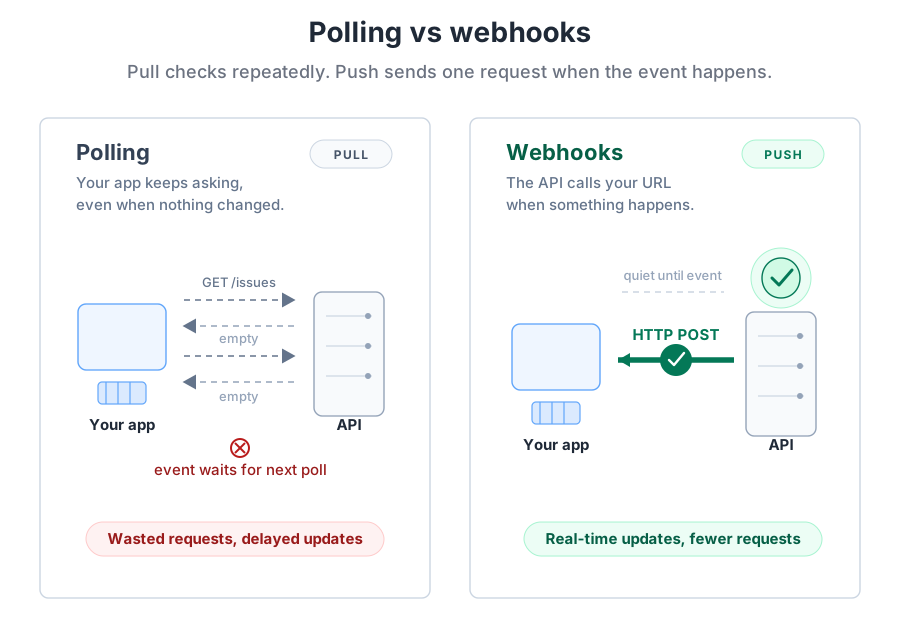
When GitHub detects a new issue, it immediately POSTs to your webhook URL. Your Flask endpoint receives the request, validates the signature, stores the event in your database, and returns 200 OK within milliseconds. A background worker picks up the stored event, extracts issue details, formats a Slack message, and posts the notification. Total time from event to notification: typically under 2 seconds.
Contrast this with polling: average 15-second delay, 2,880 wasted requests per day, constant rate limit pressure. Webhooks eliminate all three problems. Events arrive immediately, your app only responds when needed, and rate limits apply to real work rather than empty checks.
Why webhooks matter professionally
Backend, infrastructure, and integration roles expect candidates to understand event-driven architectures, and webhooks are the foundational pattern. Every major platform uses them for critical workflows:
- Payment processing: Stripe, PayPal, and Square notify you when charges succeed, subscriptions renew, or disputes open. You can't poll payment APIs fast enough to provide instant checkout confirmation pages.
- Communication platforms: Slack, Discord, and Twilio use webhooks to notify your apps when messages arrive, calls complete, or SMS messages get delivered.
- Version control: GitHub, GitLab, and Bitbucket send webhooks for every push, pull request, issue, and release. CI/CD pipelines depend on these hooks to trigger builds.
- Monitoring and alerting: Datadog, PagerDuty, and Sentry webhook your on-call systems when incidents occur. Response time matters.
The interview-shaped version of the question
A common backend interview prompt: "How would you design a system to notify users instantly when payments succeed?" The losing answer is "poll the payment API every few seconds." The strong answer names every pattern this chapter covers:
"Configure a webhook endpoint that the payment provider POSTs to when events occur. Validate the HMAC signature so forged requests get dropped. Store the raw event in a database (an audit trail and a dedup key) and return a fast 200 OK so the provider does not retry. A separate background worker reads the queue, formats the user-facing notification, and sends it. This decouples acknowledgement from work, survives downstream slowness, and produces a replayable record of every event."
The GitHub Activity Notifier you build in Section 6 hits each of those beats: signature verification, idempotent processing, fast acknowledgement, decoupled worker. The provider changes (GitHub instead of Stripe) and the destination changes (Slack instead of an email service), but the shape is identical to what you would write in production.