5. Webhook security and verification
The receiver from Section 4 trusts every POST that lands on its URL. Anything on the public internet that knows the URL can deliver "GitHub" events and your worker will dutifully process them. The fix is HMAC SHA-256 verification with a shared secret: GitHub signs the request body, your code recomputes the signature, and you reject anything that does not match. This verifies sender authenticity (the request came from someone holding the shared secret), but it does not verify body confidentiality (the payload travels as plaintext over HTTPS, and intermediaries that terminate TLS still see it). This section adds the verification step, then closes the residual gap with replay protection.
Why webhook security matters
A webhook endpoint is a URL on the public internet. GitHub will send genuine events to it; nothing stops a random script anywhere on the internet from POSTing to the same URL and pretending to be GitHub.
If you trust every request blindly, several bad things can happen:
- Attackers can send fake events to trigger actions in your system, such as sending Slack spam or creating fake records.
- Bots can flood your endpoint with garbage payloads and cause performance problems.
- Your logs and metrics become polluted with events that did not come from the provider.
To prevent this, most providers include a way for you to verify that a webhook really came from them. GitHub uses a shared secret and an HMAC signature that you can recompute on your side. In this section you will add that verification step to your Flask app so that untrusted requests are rejected before they reach your business logic.
Shared secrets and HMAC signatures
When you configure a webhook in GitHub, you can set a secret string that only you and GitHub know. GitHub never shows this secret to anyone else. On each webhook delivery, GitHub takes the raw request body, signs it with this secret using HMAC SHA-256, and puts the result in the
X-Hub-Signature-256 header.
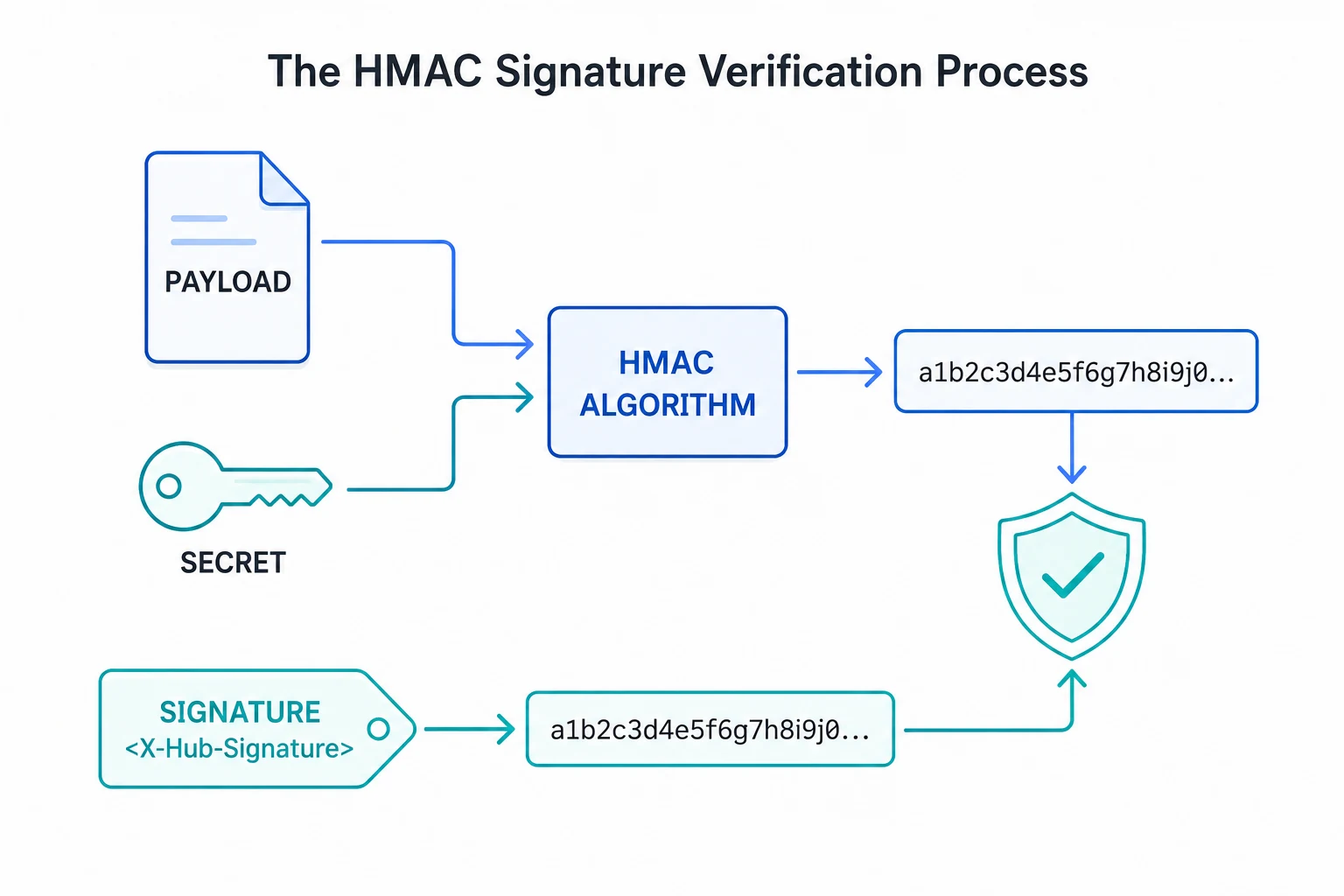
On your side, you reuse the same secret and the same algorithm. You compute your own HMAC over the raw request body and compare it to the signature in the header. If they match, the request is very likely to be genuine. If they do not match, you treat the request as untrusted and return an error.
The high level flow looks like this:
- You and GitHub agree on a shared secret (configured once in the GitHub settings page).
- GitHub signs each payload with HMAC SHA-256 using that secret and sends the signature in the header.
- Your code recomputes the signature using the same secret and compares the two values.
- If they match, you continue. If not, you reject the request.
You will keep the secret in an environment variable in your application (for example
GITHUB_WEBHOOK_SECRET) so that it never appears in source control.
Implementing signature verification in Flask
To verify signatures you need access to the raw request body bytes exactly as GitHub sent them. You cannot rely on the parsed JSON alone because even small changes in whitespace would change the HMAC result.
The following code adds a verify_github_signature helper and updates the Flask route to reject requests with invalid signatures.
import hmac
import hashlib
import os
import json
import sqlite3
from datetime import datetime, timezone
from flask import Flask, request

DB_FILE = "webhooks.db"
GITHUB_WEBHOOK_SECRET = os.environ.get("GITHUB_WEBHOOK_SECRET", "")

app = Flask(__name__)

def get_db_connection():
    conn = sqlite3.connect(DB_FILE)
    conn.row_factory = sqlite3.Row
    return conn

def init_db():
    with get_db_connection() as conn:
        conn.execute(
            """
            CREATE TABLE IF NOT EXISTS webhook_events (
                id INTEGER PRIMARY KEY AUTOINCREMENT,
                source TEXT NOT NULL,
                event_type TEXT NOT NULL,
                delivery_id TEXT NOT NULL UNIQUE,
                payload_json TEXT NOT NULL,
                received_at TEXT NOT NULL,
                processed_at TEXT,
                status TEXT NOT NULL
            );
            """
        )
        conn.commit()

def store_webhook_event(source, event_type, delivery_id, payload_dict):
    payload_json = json.dumps(payload_dict)
    received_at = datetime.now(timezone.utc).isoformat(timespec="seconds")

    with get_db_connection() as conn:
        cursor = conn.cursor()
        try:
            cursor.execute(
                """
                INSERT INTO webhook_events
                    (source, event_type, delivery_id, payload_json, received_at, processed_at, status)
                VALUES
                    (?, ?, ?, ?, ?, NULL, ?)
                """,
                (source, event_type, delivery_id, payload_json, received_at, "unprocessed"),
            )
            conn.commit()
            return cursor.lastrowid
        except sqlite3.IntegrityError:
            return None  # duplicate delivery_id

def verify_github_signature(secret, body_bytes, signature_header):
    """
    Verify GitHub's HMAC SHA-256 signature.

    signature_header looks like:
        'sha256=abcdef1234...'
    """
    if not secret:
        # No secret configured: treat all requests as unverified
        return False

    if not signature_header or not signature_header.startswith("sha256="):
        return False

    try:
        their_sig = signature_header.split("=", 1)[1]
    except (IndexError, AttributeError):
        return False

    mac = hmac.new(secret.encode("utf-8"), body_bytes, hashlib.sha256)
    expected_sig = mac.hexdigest()

    # Use compare_digest to avoid timing attacks
    return hmac.compare_digest(their_sig, expected_sig)

@app.post("/webhooks/github")
def github_webhook():
    event_name = request.headers.get("X-GitHub-Event", "unknown")
    delivery_id = request.headers.get("X-GitHub-Delivery", "no-delivery-id")
    signature = request.headers.get("X-Hub-Signature-256", "")

    # Get raw body bytes exactly as GitHub sent them
    raw_body = request.get_data(cache=True)

    if not verify_github_signature(GITHUB_WEBHOOK_SECRET, raw_body, signature):
        print(f"Invalid signature for delivery {delivery_id}. Rejecting.")
        return "", 401

    payload = request.get_json(silent=True) or {}

    event_id = store_webhook_event(
        source="github",
        event_type=event_name,
        delivery_id=delivery_id,
        payload_dict=payload,
    )

    if event_id is None:
        print(f"Ignoring duplicate delivery: {delivery_id}")
    else:
        print(f"Stored verified event {event_id} from delivery {delivery_id} ({event_name})")

    return "", 200

if __name__ == "__main__":
    init_db()
    app.run(debug=True, port=5000)
This version of the route only stores events after the signature has been verified. Unverified requests never reach your database and receive a simple 401 response. In a real system you would also monitor these failures in your logs or metrics to spot configuration issues or suspicious traffic.
Replay protection and hardening
HMAC signatures prove that a request was created by someone who knows the shared secret, but they do not stop an attacker from replaying an old request that they have captured. For example, if someone records a valid webhook and sends it to your endpoint again, the HMAC will still be valid.
There are a few simple techniques that help reduce this risk:
-
Use the unique delivery identifier (for example
X-GitHub-Delivery) and ignore duplicate deliveries after the first time you process them. - Prefer providers that include a timestamp header and reject events that are too old. (GitHub does not include a timestamp header today, but other providers such as Stripe do.)
- When your provider publishes a fixed set of IP ranges, combine signature checks with an IP allowlist at your reverse proxy or firewall. That way requests must both come from a known network range and carry a valid HMAC signature.
- Log suspicious patterns, such as many failed signature checks from the same IP address, and add basic rate limiting at the HTTP layer.
Your current design already handles one important part of replay protection. Because the
webhook_events table has a unique constraint on
delivery_id, any attempt to reinsert the same delivery will be treated as a duplicate and ignored.
Combined with HMAC verification, this gives you a strong baseline for most applications.
Testing secure webhooks with ngrok
Re-expose the Flask app via ngrok the same way you did in Section 2 (ngrok http 5000) and update the GitHub webhook with one new field: set the Secret to the same value as your GITHUB_WEBHOOK_SECRET environment variable. Trigger an event (open an issue or push a commit). You should see a new delivery in GitHub's web interface, a verified row in your webhook_events table, and a successful 200 response in the Flask logs. Any forged request -- or any genuine request that arrives while the secrets are out of sync -- gets rejected with 401 instead.
Keep secrets in sync
If you change the secret in GitHub, make sure you update the corresponding environment variable in your application. Signature verification will fail if the two values do not match, and GitHub will show your endpoint as returning 401 errors until you fix the mismatch.
You now have a webhook receiver that is not only robust but also secure. In the next section you will turn these verified events into real notifications by connecting your GitHub webhook to Slack.
The receiver is now production-shape: it acknowledges fast, persists every delivery, dedups retries, and rejects forged requests at the door. Section 6 puts all of this to work building the keystone GitHub Activity Notifier -- raw events into normalised data, normalised data into Slack messages, Slack messages back to a real human in a real channel.