3. Understanding containers
Containers package an app with its dependencies into a unit that runs the same everywhere. Unlike virtual machines, they share the host OS kernel, which makes them light and fast.
What containers are
Containers are lightweight, portable packages that bundle an application with everything it needs to run. Each container includes your app code, its runtime, system libraries, and other dependencies, so it behaves the same way in any environment.
In a traditional setup without containers, your application depends on whatever machine it runs on to provide its runtime and libraries. It expects Python to be installed, specific Linux libraries to be present, and certain system tools to be available. If any of those are missing or the wrong version, your app crashes or behaves unpredictably.
A container changes this by packing its own internal filesystem.
Instead of relying on the host machine, the container brings its own stack:
- Code: Your actual script (for example,
main.py). - Runtime: The exact version of the language (for example, Python 3.11.4). It does not care which version of Python is installed on your laptop because it uses the one inside the container.
- System Libraries: The low-level operating system tools your app needs (for example, OpenSSL, compression tools, or database client libraries).
- Dependencies: The exact list of external packages (such as
requestsorpandas) defined in yourrequirements.txt.
Think of containers like shipping containers for software. A physical shipping container standardises how cargo moves: the same container travels by truck, train, or ship without repacking the contents. In the same way, a software container standardises how your application runs: the same image can start on your Mac, a teammate's Linux laptop, or an AWS server without reconfiguration.
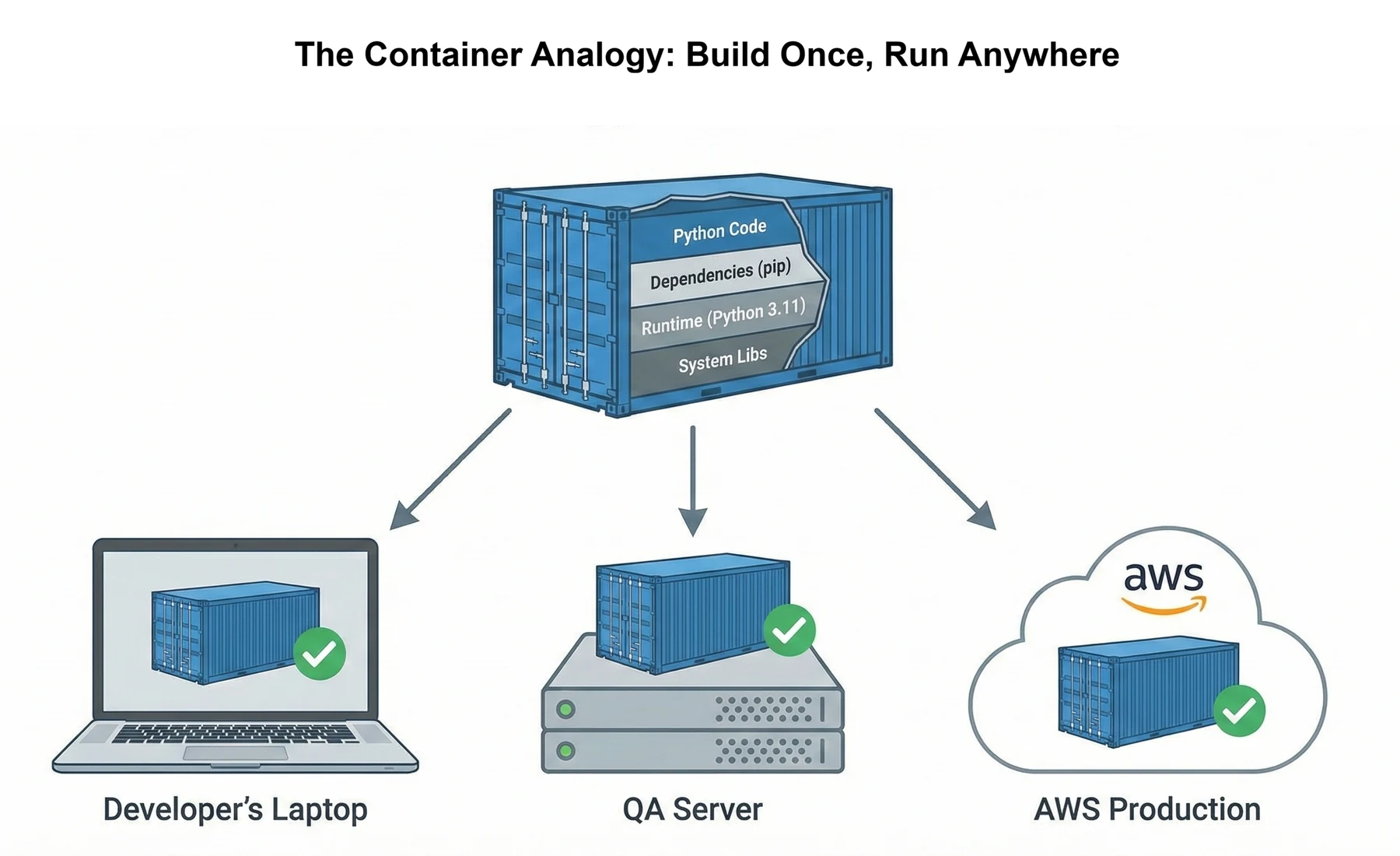
A container for your News API would bundle the following:
- Python code (FastAPI application)
- the Python runtime (exactly version 3.11 rather than 3.10 or 3.12)
- all pip packages (
requests,psycopg2,fastapi,redis) - system libraries and client tools for PostgreSQL and Redis
- configuration files
When someone runs your container, they get your exact development environment with no manual installation, no missing module errors, and far fewer version mismatches.
Unlike virtual machines, which bundle a full guest operating system for each app, containers reuse the host operating system kernel and only package your application and its dependencies. You still get isolation because each container sees its own filesystem, processes, and network view, but with far less overhead in disk space and startup time.
Why containers exist
Section 1 introduced the news aggregator's portability problem: it ran perfectly on your laptop but fell apart on a teammate's machine. The code was identical; the environment was not. That gap between your setup and theirs is what containers exist to close.
Traditional solutions involve lengthy setup documentation: "Install Python 3.11. Install PostgreSQL 15. Set these environment variables. Run these migrations. Install these system libraries." Each step is a potential failure point. Teammates spend hours configuring environments instead of writing code, and production servers need careful, error-prone environment matching.
Containers solve this by packaging the environment with the application. Instead of asking everyone to recreate your laptop manually, you ship an image that already includes Python 3.11, your dependencies, and the correct configuration. Your teammate runs one command (docker compose up) and gets the same environment you developed in.
This benefit extends beyond local development. When you deploy to AWS, you deploy the same image that runs on your laptop. No custom setup scripts. No production-only surprises. If it works locally in the container, it behaves the same way in staging and production because the environment travels with the code.
Virtual machines vs containers
Virtual machines and containers both provide isolation, but their architectures differ fundamentally. Understanding this difference explains why containers became the industry standard for application deployment.
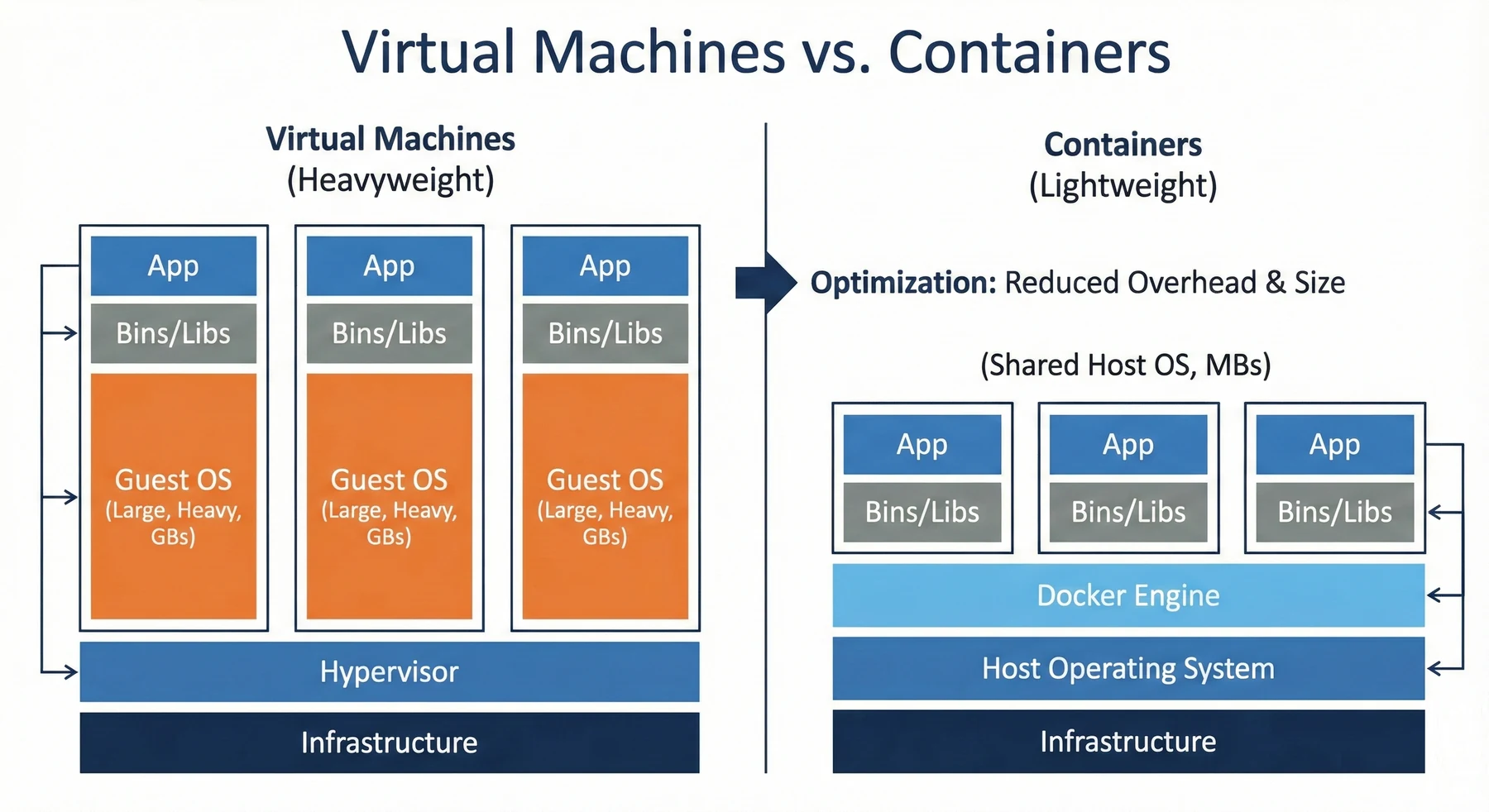
Virtual machines package complete operating systems. A VM running Ubuntu includes the full Ubuntu OS, kernel, system services, and utilities. Running three applications in three VMs means three complete operating systems consuming memory and disk space. Each VM is gigabytes in size. Starting a VM takes minutes because you're booting an entire operating system. VMs provide strong isolation because each runs its own kernel, but resource overhead is substantial.
Containers package applications and dependencies, sharing the host kernel. A container running your Python application includes Python, your code, and pip packages. It shares the host Linux kernel. Running three applications in three containers means one kernel, three isolated application environments. Each container is megabytes, not gigabytes. Starting a container takes seconds because you're starting a process, not booting an OS. Containers provide sufficient isolation for most applications with minimal overhead.
Size comparison: A VM image for a Python web application might be 2-4 GB (full Ubuntu installation plus application). A container image for the same application is typically 200-400 MB (minimal base image plus application dependencies).
Startup time comparison: VMs boot an operating system before the application can run. Containers start a process inside an already-running host environment. That speed advantage makes containers ideal for scaling (starting additional instances quickly during traffic spikes) and development (restarting quickly after code changes).
Resource usage: VMs allocate fixed memory and CPU. A VM configured with 2 GB RAM reserves that memory even if the application uses 500 MB. Containers share host resources dynamically. Three containers might collectively use 1 GB of the host's 8 GB RAM, leaving 7 GB available for other work.
Containers are the concept: lightweight, isolated environments for running applications. Docker is a tool (a container runtime) that creates and manages containers. It's the most popular container tool, but not the only one. Other container runtimes include Podman and containerd.
The relationship is similar to "Python" (the language) versus "CPython" (the most popular Python interpreter). When people say "containers," they usually mean Docker containers because Docker popularised containerisation and remains the industry standard. When you install Docker, you get the tools to build container images, run containers, and orchestrate multi-container applications.
When you need containers
Containers aren't always necessary. Simple scripts, exploratory notebooks, and personal tools run fine without containerisation. Understanding when containers add value prevents over-engineering.
You need containers when:
- More than one person works on the codebase. Without containers, each developer configures their environment separately, and the subtle differences are where bugs live. A teammate clones the repo, runs
docker compose up, and is contributing in minutes instead of working through a setup README. - You're deploying to a cloud platform. AWS, Azure, and Google Cloud all run their container orchestration services (ECS, AKS, GKE) against image artefacts. Deploying without containers means matching environments on the server by hand; deploying with containers means pushing the image you already verified locally.
- The application has more than one service. A Python API plus PostgreSQL plus Redis plus a frontend is four processes with four start commands and four config files to coordinate. Compose collapses that into one YAML and one command.
- The environment has to match between machines. Python versions, system libraries, OS-level dependencies; any drift between dev and prod is somewhere a bug can hide. The container is the boundary that pins all of that to one set of versions.
Don't reach for Docker if:
- You're writing personal scripts. A script you run occasionally on your laptop doesn't benefit from the setup overhead. Simple
requirements.txtfiles work fine here. - You're the only developer. If the code never leaves your laptop and you aren't deploying it, portability isn't a priority.
- The app is extremely simple. A single-file Python script with no dependencies doesn't need a container. The complexity of Docker setup exceeds the value it provides.
If sharing your project or deploying it involves more than "clone and run," containers probably help. Your News Aggregator API crosses this threshold. It has multiple services (API, database, cache), requires specific configuration (environment variables, database setup), and you plan to deploy it to AWS in Chapter 28. Containerization is appropriate and valuable.
Installing Docker
Docker Desktop provides everything you need: the Docker engine (runs containers), Docker Compose (orchestrates multi-container applications), and a GUI for managing containers. Installation is straightforward but platform-specific.
For macOS: Download Docker Desktop from docker.com/products/docker-desktop. Open the downloaded DMG file and drag Docker to Applications. Launch Docker Desktop from Applications. You'll see a whale icon in your menu bar when Docker is running.
For Windows: Download Docker Desktop for Windows. The installer requires Windows 10 or 11 with WSL 2 (Windows Subsystem for Linux). Follow the installation wizard. Docker Desktop will prompt you to enable WSL 2 if it's not already configured. Restart when prompted. Launch Docker Desktop from the Start menu.
For Linux: Install Docker Engine using your distribution's package manager. On Ubuntu:
sudo apt-get update
sudo apt-get install docker.io docker-compose
sudo systemctl start docker
sudo systemctl enable docker
Verify installation: Open a terminal and run:
docker --version
You should see output like Docker version 24.0.6, build ed223bc. Then verify Docker Compose:
docker compose version
Expected output: Docker Compose version v2.23.0. If both commands work, your Docker installation is complete and ready for containerisation.
Docker daemon not running: If you see "Cannot connect to Docker daemon," Docker Desktop isn't started. Launch Docker Desktop from Applications (Mac) or Start menu (Windows). The whale icon appears in your system tray when ready.
Permission denied (Linux): On Linux, Docker commands require sudo unless you add your user to the docker group: sudo usermod -aG docker $USER. Log out and back in for changes to take effect.
WSL 2 required (Windows): Docker Desktop for Windows needs WSL 2. Follow the prompts to enable it if not already configured. This requires Windows 10 version 2004 or higher, or Windows 11.
Next, in section 4, we write the chapter's first Dockerfile, build the news aggregator into an image, and run it as a container, with the layer-cache discipline that makes subsequent builds fast.