6. Adding Redis caching
Redis is an in-memory data store that doubles as a cache. Putting it in front of slow endpoints can turn slow, network-bound responses into fast memory lookups.
What Redis is
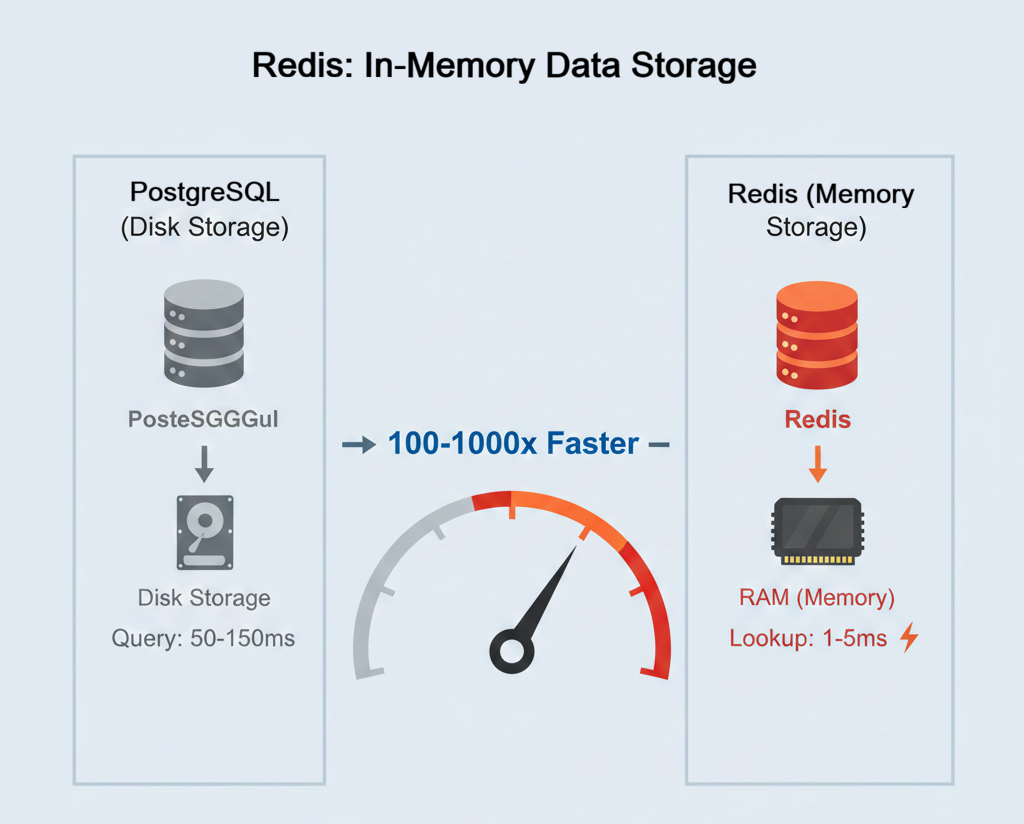
Redis (REmote DIctionary Server) is an in-memory data store that functions as a cache, database, and message broker. Unlike PostgreSQL which stores data on disk, Redis keeps data in RAM (memory), enabling extremely fast reads and writes. Think of it as a high-speed key-value store where you set a key ("articles:technology") and retrieve it milliseconds later.
For caching, Redis excels because memory access is much faster than disk-backed work and external network calls. The exact numbers vary by machine and workload, but the shape is consistent: a cache hit reads one value from memory instead of repeating the slow path. That difference transforms application performance when you cache frequently accessed data.
How it works
Redis runs as a separate server process that listens on a network port. Your web app opens a connection to this server and sends simple commands. Inside Redis, everything is stored in an in-memory dictionary that maps keys to values, similar to a Python dict.
At a basic level, you write data with SET key value and read it with GET key. Your code chooses meaningful keys like "articles:technology" or "user:42:profile", and Redis keeps the corresponding values in RAM. Because the lookup happens in memory instead of on disk, Redis can return the value in a few milliseconds.
For caching, the typical pattern is called cache-aside: your application checks Redis first, and only falls back to the slower data source (like PostgreSQL or an external API) if the key is missing. On a cache hit, Redis returns the value immediately. On a cache miss, your app retrieves the data from the authoritative source, stores it in Redis for next time, and returns it to the user. Redis supports automatic expiration using commands like SETEX key ttl value, which sets a key with a time-to-live (TTL) in seconds.
Here's the sequence in practice: when the first user requests technology articles, Redis has no cached data yet (cache miss). Your app fetches from the external APIs, stores the result in Redis with a 5-minute expiry, and returns the articles to the user. When the second user makes the same request 30 seconds later, Redis finds the key (cache hit) and returns the cached articles instantly without calling the external APIs. This continues for 5 minutes until the TTL expires. The next request after expiration becomes a cache miss, triggering a fresh fetch that repopulates the cache. The pattern repeats: one expensive operation followed by many fast cached responses.
Why the API needs caching
Remember Section 2's worked-example baseline: roughly 12 requests per second with 723ms average response time. The News API is slow because it fetches from NewsAPI and Guardian on every request. If 100 users request technology articles within 5 minutes, you make 200 external API calls fetching identical data. This wastes your API quota, adds latency, and risks rate limiting.
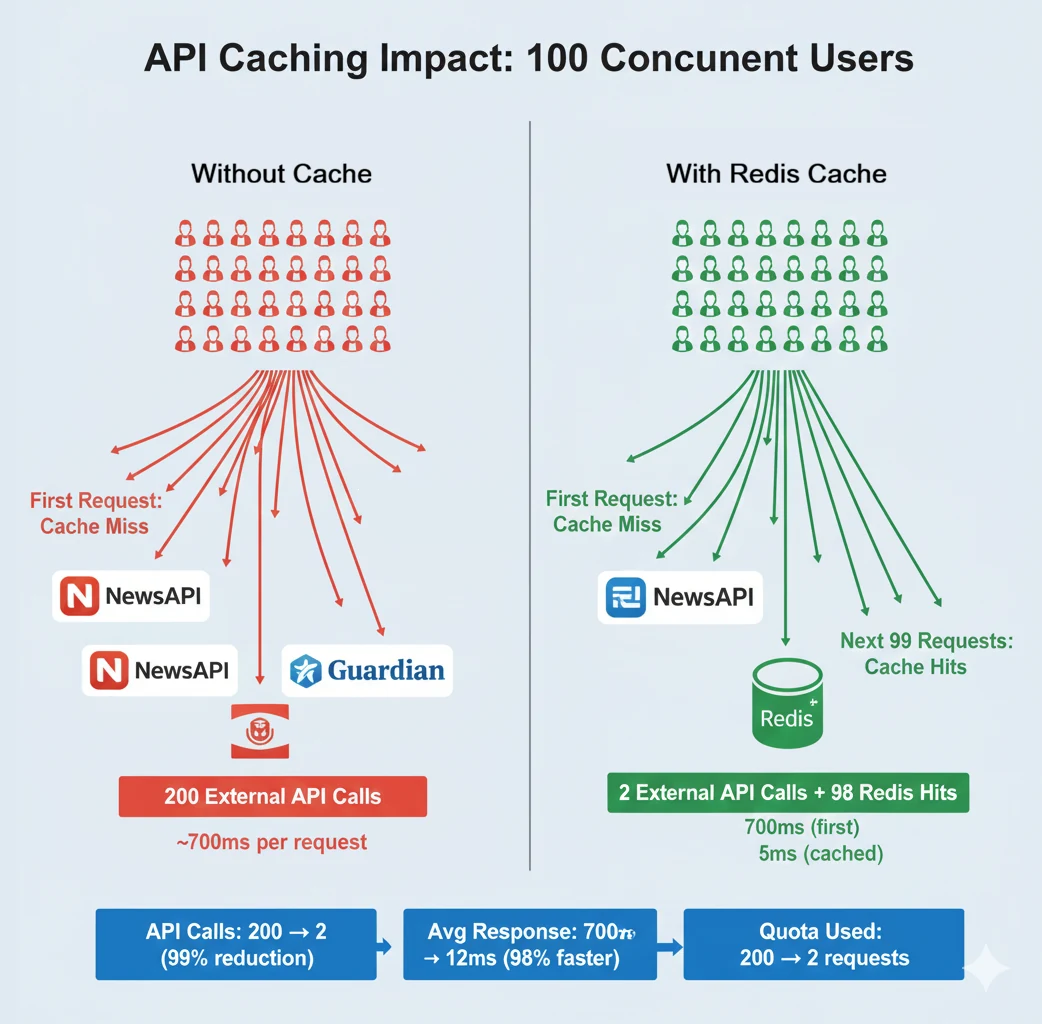
Caching solves this by storing results temporarily. The first user requesting technology articles triggers the external API calls and pays the slow-path cost. The result is cached in Redis for 5 minutes. The next 99 users requesting technology articles get cached data from memory. You make 2 external API calls instead of 200, and most users get the fast path.
The trade-off is data freshness. Cached articles might be 5 minutes old. For news, this is acceptable. Breaking news from 4 minutes ago is still relevant. For real-time stock prices or live sports scores, this delay is unacceptable. Understanding when caching is appropriate is a critical engineering judgment.
When you need caching
Cache when:
- Data changes infrequently but is accessed frequently. News articles from the past hour change rarely but are requested hundreds of times. Product catalogs update daily but are viewed constantly. User profiles change weekly but are loaded on every page view.
- Retrieving data is expensive. External API calls, complex database queries, or heavy computations that produce the same result for multiple users. If computing the result once and reusing it saves resources, cache it.
- Slight staleness is acceptable. Five-minute-old news is fine. Ten-minute-old weather data is reasonable. Users understand these aren't real-time updates.
Don't cache when:
- Data must be absolutely current. Bank account balances, inventory counts, authentication tokens. Serving stale data causes incorrect behaviour or security issues.
- Data is unique per user and rarely reused. If every user requests different data that's never requested again, caching provides no benefit. You're storing data in memory that's never reused.
- Retrieval is already fast. If the original lookup is already cheap and reliable, the complexity of cache management can outweigh the benefit.
Implementing caching for the news API
Your Docker Compose stack already includes Redis. Now add caching logic to your News API. The pattern: check cache first, return cached data if available, otherwise fetch from external APIs and cache the result.
Make: Install the Redis Python client:
pip install redis
Add redis>=5.0.0 to your requirements.txt file manually. pip freeze > requirements.txt works if your virtual environment is clean; adding the package explicitly is safer. If you accidentally run pip freeze outside your venv or with global packages installed, you'll pollute your requirements file with dozens of unrelated dependencies.
Create a caching module with a decorator that handles caching logic. Name it redis_cache.py; it lives alongside the database-backed cache.py from Chapter 26 rather than replacing it:
import redis
import json
import os
from functools import wraps


# Connect to Redis
redis_client = redis.from_url(
    os.getenv("REDIS_URL", "redis://localhost:6379"),
    decode_responses=True  # Automatically decode bytes to strings
)


def cached(expire_seconds=300):
    """
    Caching decorator for functions.

    Args:
        expire_seconds: How long to cache results (default: 5 minutes)

    Usage:
        @cached(expire_seconds=300)
        def fetch_articles(category):
            # Expensive operation here
            return articles

        # The wrapped call returns (result, cache_hit):
        data, was_cached = fetch_articles("tech")
    """
    def decorator(func):
        @wraps(func)
        def wrapper(*args, **kwargs):
            # Generate cache key from function name and arguments
            cache_key = f"{func.__name__}:{args}:{kwargs}"

            # Try to get cached result
            cached_result = redis_client.get(cache_key)
            if cached_result:
                print(f"Cache HIT for {cache_key}")
                # Return the hit/miss flag alongside the result rather than
                # stashing it on the wrapper: a shared attribute is per-function,
                # not per-call, so a concurrent request could overwrite it
                # between this write and the caller's read.
                return json.loads(cached_result), True

            # Cache miss: call the actual function
            print(f"Cache MISS for {cache_key}")
            result = func(*args, **kwargs)

            # Store result in cache
            redis_client.setex(
                cache_key,
                expire_seconds,
                json.dumps(result)
            )

            return result, False

        return wrapper
    return decorator


# Track cache statistics
def get_cache_stats():
    """Get Redis cache statistics."""
    info = redis_client.info("stats")
    return {
        "hits": info.get("keyspace_hits", 0),
        "misses": info.get("keyspace_misses", 0),
        "keys": redis_client.dbsize()
    }
Now apply caching to your article fetching function. Update main.py. The endpoint keeps its authentication and rate-limiting dependency (covered in Chapter 26); only the data path changes:
from redis_cache import cached, get_cache_stats
from sources import fetch_from_all_sources


@cached(expire_seconds=300)  # Cache for 5 minutes
def get_cached_articles(category: str = None, source: str = None, limit: int = 20):
    """
    Fetch articles with caching.
    First call: Fetches from external APIs (slow).
    Subsequent calls: Returns from Redis cache (fast).
    """
    articles = fetch_from_all_sources(category=category, limit=limit)

    # Filter by source if specified
    if source:
        articles = [a for a in articles if a["source"] == source]

    return articles


@app.get("/articles")
async def get_articles(
    category: str | None = None,
    source: str | None = None,
    limit: int = Query(20, ge=1, le=100),
    api_key: DBAPIKey = Depends(require_api_key_with_rate_limit)
):
    """Get articles with automatic caching."""
    articles, was_cached = get_cached_articles(category=category, source=source, limit=limit)

    return {
        "articles": articles,
        "total": len(articles),
        "cached": was_cached  # Did Redis serve this response?
    }


@app.get("/cache/stats")
async def cache_statistics():
    """Get cache performance statistics."""
    stats = get_cache_stats()

    hit_rate = 0
    total = stats["hits"] + stats["misses"]
    if total > 0:
        hit_rate = (stats["hits"] / total) * 100

    return {
        "hits": stats["hits"],
        "misses": stats["misses"],
        "total_keys": stats["keys"],
        "hit_rate_percent": round(hit_rate, 2)
    }
One honest caveat about the event loop. get_cached_articles is a synchronous function doing blocking Redis and HTTP work, and the async def route calls it directly rather than awaiting it. That means a cache-miss request blocks the event loop for the full external-API duration, which caps the concurrency you'll see when you load-test later in this chapter. At this teaching scale it keeps the code simple and is fine. In production you would either declare the route a plain def (FastAPI then runs it in a worker thread so the loop stays free) or switch to async Redis and HTTP clients and await them.
Check: Rebuild and restart your stack:
docker compose down
docker compose up --build
Make your first request to http://localhost:8000/articles?category=technology, sending your API key in the Authorization: Bearer header as before. Watch your terminal logs. Your exact timings will differ, but the first request should be a miss:
Cache MISS for get_cached_articles:():{'category': 'technology', 'source': None, 'limit': 20}
GET /articles?category=technology - 687.34ms
Make the same request again immediately. This time, the same key should be a hit:
Cache HIT for get_cached_articles:():{'category': 'technology', 'source': None, 'limit': 20}
GET /articles?category=technology - 4.23ms
Extract: the first request still pays the full external-API cost; the second request hits Redis and returns much faster. The cache-miss path is unchanged; the cache-hit path is the win. Check cache statistics at http://localhost:8000/cache/stats:
{
  "hits": 15,
  "misses": 3,
  "total_keys": 3,
  "hit_rate_percent": 83.33
}
After several repeated requests, your cache hit rate should climb. A high hit rate means most requests are served from cache, dramatically reducing external API usage and improving response times.
One important detail: these keyspace_hits and keyspace_misses numbers are Redis-server-wide counters, not counters owned by this decorator alone. They are useful for a quick cache-health check, but they may include other keys or other code paths that touched the same Redis server.
The @cached decorator wraps your function with caching logic. Before calling the actual function, it generates a cache key from the function name and arguments. get_cached_articles(category="technology", source=None, limit=20) generates the key "get_cached_articles:():{'category': 'technology', 'source': None, 'limit': 20}". Because limit is part of the key, a request for 10 articles never serves a cached response that was built for 100.
The decorator checks Redis for this key. If found (cache hit), it returns the cached result without calling the function. If not found (cache miss), it calls the function, stores the result in Redis with an expiration time (TTL), and returns the result. Either way it returns the result together with a hit/miss flag as (result, cache_hit), and the endpoint unpacks that flag into its cached field. Returning the flag with the result keeps it per-call; stashing it on the function object instead would let a concurrent request overwrite it between the decorator's write and the endpoint's read.
redis_client.setex() combines setting a value and expiration. After 300 seconds (5 minutes), Redis automatically deletes the key. The next request is a cache miss, triggering a fresh fetch from external APIs.
This pattern ensures users get fresh data every 5 minutes while serving the majority of requests from the high-speed cache. You control the trade-off between freshness and performance by adjusting expire_seconds.
Measuring cache performance with load testing
Section 2 established a baseline. Now test your cached API with the same command so you can measure the improvement on your machine.
Check: Run the same load test from Section 2:
hey -n 100 -c 10 -H "Authorization: Bearer YOUR_KEY" \
"http://localhost:8000/articles?category=technology"Summary:
Total: 0.2387 secs
Slowest: 0.0234 secs
Fastest: 0.0032 secs
Average: 0.0084 secs
Requests/sec: 419.02
Response time histogram:
0.003 [1] |
0.005 [12] |■■■■■■
0.007 [38] |■■■■■■■■■■■■■■■■■■
0.009 [25] |■■■■■■■■■■■■
0.011 [14] |■■■■■■■
0.013 [7] |■■■
0.015 [2] |■
0.017 [0] |
0.019 [0] |
0.021 [0] |
0.023 [1] |
Latency distribution:
10% in 0.0041 secs
25% in 0.0056 secs
50% in 0.0078 secs
75% in 0.0095 secs
90% in 0.0124 secs
95% in 0.0142 secs
99% in 0.0234 secsExtract: Compare your results. In the worked example, the comparison looks like this:
Before caching:
- Requests per second: 12.15
- Average response time: 723ms
- 95th percentile: 823ms
After caching:
- Requests per second: 419 (vs 12 baseline)
- Average response time: 8.4ms (vs 723ms baseline)
- 95th percentile: 14.2ms (vs 823ms baseline)
The exact ratios depend on what your laptop happens to do that day, but the shape is the same every time: throughput jumps by an order of magnitude or two, and tail latency collapses, because the slow path (external API + JSON parse + DB write) now only runs once per cache window instead of once per request.
The change to the API code was a single decorator. No new servers, no query optimisation, no application-logic surgery; just moving the expensive operation behind a key-value lookup. The architectural unlock is in where the cache sits, not in how many bytes of code it took to add.
Checkpoint: Redis caching
Use this quiz to check your understanding. Try to answer each question out loud or in a notebook before expanding the explanation. If you get stuck, that's a signal to revisit the relevant section.
When should you NOT use caching?
Answer: Don't cache when data must be absolutely current or when staleness causes incorrect behaviour. Examples:
- Bank account balances (stale balance = incorrect transactions)
- Inventory counts (selling out-of-stock items)
- Authentication tokens (security risk)
- Real-time stock prices (users make decisions on stale data)
Examples where caching is right:
- News articles (5-minute delay acceptable)
- Product catalogs (hourly updates fine)
- Weather data (10-minute cache reasonable)
- User profiles (rarely change)
Always ask: "If this data is 5 minutes old, does it cause problems?" If yes, don't cache.
How does Redis improve API performance compared to database caching?
Answer: Redis stores data in RAM (memory), but the bigger win in this chapter is that a cache hit skips the external API calls and database write entirely.
Slow path: Fetch upstream data, normalise it, write/query Postgres, return JSON
Cached path: Read one key from Redis and return the cached payload
Additional benefits:
- Reduces database load (fewer queries = lower CPU)
- Survives application restarts (external to your app)
- Shareable across multiple API servers (centralised cache)
- Built-in TTL (automatic expiration)
Result on the worked example: throughput climbs by an order of magnitude (12 to 419 req/sec on the same hardware) because most requests no longer wait on the external API.
Next, in section 7, we step back and look at the patterns this chapter put in place (profile-first discipline, layer-cache ordering, multi-stage builds, the Compose-as-dev-environment shape), then point at how Chapter 28 takes the same artefact and ships it to AWS.