
This guide compares local hosting with public deployment because that is where the distinction becomes visible. You will see what localhost really means, why a development server is not a production application server, and how hosting platforms, virtual servers, and containers fit into the picture. A production deployment can also be private, such as an internal company service.
| Question | Hosting | Deployment |
|---|---|---|
| What does it provide? | An environment in which the app runs. | A process for making a chosen version run there. |
| In a Flask app | The laptop, server, or managed platform running the app. | Installing the app's dependencies, supplying its configuration, and starting that version. |
| When you fix a bug | The app can stay on the same host. | You deploy the corrected version to replace the old one. |
Suppose your Flask app already runs on a managed platform. Changing its home-page message and releasing that change is another deployment. The platform still provides the hosting. You do not need a new host each time you deploy.
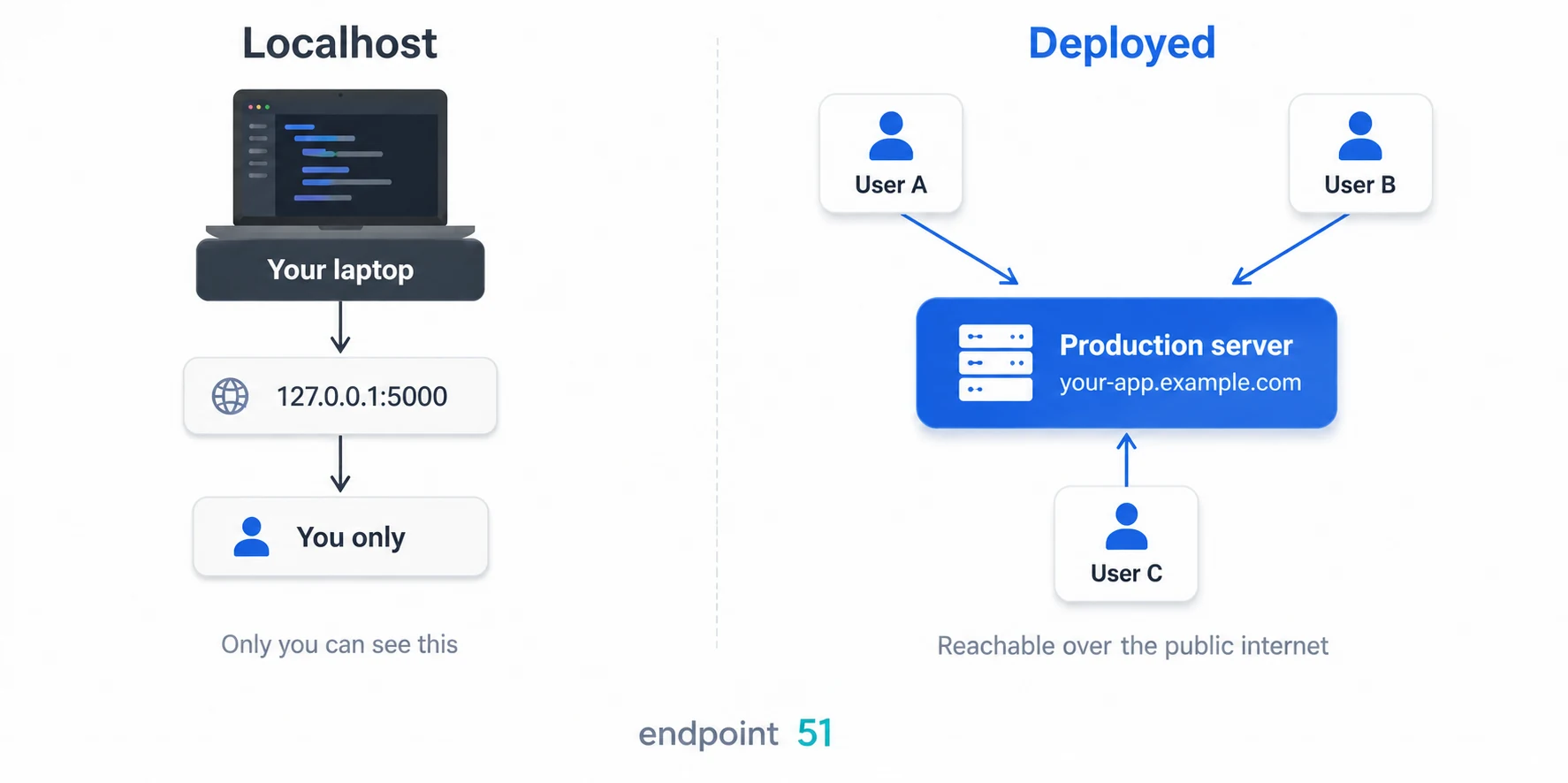
What is the difference between hosting and deployment?
Hosting answers where does the app run? Deployment answers how does this version of the app get there and start running? The two often happen together, but they are not interchangeable. You can host an app locally without deploying it to a public production environment.
When you run a Flask or FastAPI app locally, you are proving something useful: the code starts, the routes work, and the browser can talk to your app. But all of that is still happening on your own machine. Your laptop is acting as both the host and the first user.
That is why local hosting feels so close to deployment. The app is real. The browser is real. The responses are real. But the environment is still private, temporary, and designed around you.
- The loopback address is private. Other devices cannot reach the app through
localhoston your computer. - Your machine is temporary. Close the terminal or shut the laptop and the app disappears.
- Your environment is personal. File paths, secrets, and installed packages may only work on your setup.
- Your server is usually a development server. It is designed to help you build, not to face real traffic from the public internet.
Hosting vs deployment in one sentence
Hosting provides the environment where an app runs; deployment puts a particular version of the app into that environment and starts it. Almost every piece of deployment tooling helps with one of those two responsibilities.
The three things a first public deployment adds
For our first public deployment, we will move from a development server on your laptop to an app other people can use. That introduces three practical requirements.
- A host that stays available. Your app stops depending on your laptop and runs on a server or platform that can keep serving it after you close your own computer.
- A production application server. Instead of relying on a development server, production usually uses something like Gunicorn, Uvicorn, or Waitress to run the app.
- A public route to your app. Users need a URL, open network access, and usually HTTPS. A platform or reverse proxy often handles much of that for you.
We are going to walk through all three using one tiny Flask app. That keeps the ideas concrete. You will see the local version first, then the production pieces, then the deployment options that wrap around them.
The small web app we will use
We will use a small Flask app that returns a short message at the home page. With your virtual environment active, install Flask with python -m pip install Flask. Save the following as app.py at your project root.
from flask import Flask

app = Flask(__name__)


@app.route("/")
def home():
    return "<h1>Hello from my web app</h1>"


if __name__ == "__main__":
    app.run(debug=True)
If you run this file and open the browser, the app works. That is a real success. But it is still only step one. The app is available to you because your own browser is talking to your own computer.
What localhost really means
A lot of beginner confusion comes from the word localhost. It sounds like a public address. It feels like a website. But it is just a special name that points back to the same machine you are already on.
From the project root, with your virtual environment active, run either command below. Flask will start the local development server and print its address.
python app.py
# or
flask run
After that, Flask might show you something like this:
Running on http://127.0.0.1:5000
127.0.0.1 is the loopback address. It means "this same computer." So when your browser opens that address, it is not traveling across the internet to some distant server. It is simply talking back to your own machine. localhost does not mean your app is public. It means your browser is speaking to a server running on the same computer you are sitting in front of.
127.0.0.1 and 0.0.0.0 are not the same thing
127.0.0.1 means "listen only for requests from this same machine." 0.0.0.0 means "listen on all network interfaces this machine has." You do not normally open http://0.0.0.0 in a browser. You bind a production application server to 0.0.0.0 so traffic from a platform, container port, or reverse proxy can reach the process.
What does local deployment mean?
Local deployment means setting up a version of an app to run on your own computer or a local server. For example, you might install and start a packaged app on an office machine. That describes where you deploy it; it does not tell you whether it is for development or everyday production use.
The same distinction applies to a private company service. It can be a production deployment even when only employees can reach it. Public internet access is a separate decision.
Why development servers are not production servers
Flask's development server and FastAPI's development mode give you quick feedback while building. You can change code and have the server reload it. That convenience is useful locally, but it is not the configuration you want for production.
When people rely on the app, the server process needs to start consistently, stay running, and handle requests reliably. That applies to public websites and private internal tools. Flask's production guidance makes the same distinction: use a production application server even if the app serves only one person.
- Gunicorn is a common production application server for WSGI apps like Flask and Django.
- Waitress is another production WSGI server, often appreciated for its simplicity.
- Uvicorn is a common production application server for ASGI apps like FastAPI.
With Flask, you replace its built-in development server with a production server. FastAPI can use Uvicorn in both environments, with different settings. You do not need to memorise WSGI and ASGI yet. The important decision is how the application server is configured and managed for production use.
The same rule applies to helpful development switches. Flask's debugger and FastAPI or Uvicorn's reload mode are there to speed up local work. They should be off in production, including private deployments.
The main deployment options
Once you understand the application server, the next question is where the app should live. For beginners, there are three main paths.
- Managed platforms. Services such as Render and Railway commonly build from a connected repository and handle much of the surrounding infrastructure. Container-oriented platforms such as Fly.io use their own deployment tooling but remove much of the server administration as well.
- A VPS you manage yourself. You rent a Linux server, install Python and your dependencies, run the app with a production server, and often place something like Nginx or Caddy in front of it.
- Containers. With Docker, you package the app and its environment together. You still need somewhere to run the container, but the packaging becomes much more portable and predictable.
A good beginner rule: start with a managed platform first. It teaches the deployment flow without forcing you to become a Linux administrator on day one.
Here is how the main options compare at a glance. The right pick depends less on price and more on how much of the server you want to manage yourself.
| Option | Type | What you manage | Deploy by | Best for |
|---|---|---|---|---|
| Render | Managed platform | Just your app and a start command | Connecting a Git repo | A straightforward first deploy |
| Railway | Managed platform | Just your app and a start command | Connecting a Git repo | Fast setup and quick prototypes |
| Fly.io | Managed, container-based | Your app, packaged as a container | A Dockerfile or fly launch |
Running close to users in several regions |
| VPS (your own Linux server) | Self-managed | The whole box: OS, Python, application server, proxy, updates | SSH in and set it up yourself | Full control once you are comfortable with Linux |
| Docker | Packaging, not a host | Your app's image (you still choose where it runs) | Building an image, running it on any host | Portable, reproducible environments |
Free tiers and pricing change often, so check each provider's current terms before committing.
Keep the layers separate
Flask or FastAPI defines the application. Gunicorn, Waitress, or Uvicorn runs it. A platform or VPS gives it somewhere to live. A reverse proxy such as Nginx or Caddy can route web traffic to it. Docker packages the application but does not host it by itself. Once you know which responsibility a tool owns, the vocabulary becomes much less intimidating.
A simple first deployment flow
Let us choose the least overwhelming path: a small Flask app deployed on a managed platform. The exact fields vary between providers, but the responsibilities are the same.
- Build the app locally. Confirm it works on your own machine first.
- Prepare it for production. Declare the dependencies, add a production application server, and keep secrets out of the repository.
- Connect the code to a platform. The platform creates a fresh environment and installs the dependencies.
- Configure how it starts. Supply the start command, required environment variables, and the host or port settings the provider expects.
- Test the public URL. Open the URL and inspect the deployment logs if the app does not respond.
The app code barely changed. The real difference was the environment around it: a public machine, a production application server, and a platform that exposes the app to the web.
For a step-by-step version of exactly this flow, with pinned dependencies and a start command you can copy, see our hands-on guide to deploying a Flask app.
What changes when your app goes public
Our public app depends on its hosting environment, a running process, and a route from the internet. When something fails, check each production responsibility in turn instead of changing code at random.
- Build logs: Did the platform install every package from
requirements.txtorpyproject.toml? - Start logs: Did the application server start, or did it crash before serving requests?
- Import path: Does
app:appmatch the module name and Flask application object? - Port binding: Is the process listening on the host and port the platform expects?
- Environment variables: Are required secrets, API keys, and database URLs configured outside the source code?
- Debug and reload: Are development-only options off?
- Storage: If the app writes files, are you using persistent storage or an external service?
Debug mode and a disappearing filesystem
Two production surprises bite beginners hardest. Leaving debug=True on a public app can expose an interactive console capable of executing Python on the server. And on many managed platforms the filesystem is ephemeral, so files written to local disk, including uploads, can vanish on a restart or redeploy.
What a successful first public deployment proves
Starting the app and checking its public URL does not prove every feature works. It verifies the foundations of this deployment:
- Your code can start outside your laptop.
- Your dependencies can be installed in a fresh environment.
- Your startup command works.
- Your environment variables are configured correctly.
- Your app can answer requests from real users on the public internet.
That is why first deployment feels so important. It is the moment your project stops being only a local exercise and becomes a public application. Every time you move an app toward production, ask the same three questions: where is it running, what is running it, and how are users reaching it? If you can answer all three clearly, the deployment architecture will stop feeling mysterious.
To place those three questions inside the wider journey through processes, ports, DNS, HTTPS, containers, CI/CD, and monitoring, follow the map of how software gets from a laptop to production.
Checkpoint quiz
Test your understanding with these questions. If you can answer confidently, you have mastered the material.
What is the difference between hosting and deployment?
Hosting provides the environment where an application runs. Deployment releases a particular version into that environment and starts it. You can deploy to a local machine, a private server, or a public platform, and deploy new versions without changing the host.
What does localhost actually mean?
localhost is a special name that points back to the same computer you are already using. It does not mean your app is public. It means your browser is communicating with a server process running on your own machine.
What is the difference between 127.0.0.1 and 0.0.0.0?
127.0.0.1 listens only for requests from the same machine. 0.0.0.0 tells the server process to listen on all available network interfaces, which is often needed inside containers, managed platforms, or machines behind a reverse proxy.
Why is flask run not the same thing as production deployment?
Because it starts Flask's development server for building and testing. Production needs a suitable application server, such as Gunicorn or Waitress, with development debugging disabled. That applies whether the app is public or private.
What is the difference between a framework and a deployment platform?
A framework like Flask or FastAPI defines your routes and application logic. A platform such as Render or Railway gives your app somewhere to run and handles much of the infrastructure around it. Its network configuration determines who can reach the app.
What does Gunicorn, Waitress, or Uvicorn do?
These packages are application servers: they launch your Python web app and serve requests in production. They are not hosting companies and do not provide the machine on which the app runs.