6. Production error handling
The features in Section 5 work when every Spotify call returns 200, every track payload has the fields you expect, and the SQLite file is never locked by another process. Production isn't that. This section bolts the Chapter 9 patterns onto the Music Time Machine: categorise errors, retry transient failures, preserve partial snapshot progress, and log what happened in a way that's actionable a week later.
The categoriser, the backoff loop, and the partial-success pattern are all things you saw in Chapter 9 against the weather API. Re-applying them here against a different provider with different error shapes is the test of whether the patterns generalised. Spoiler: they did. By the end of this section, every Spotify call in the application is wrapped in the same retry harness, and every database operation tolerates the lock contention you'll hit the moment two scripts run at once.
Error categories for the Music Time Machine
The Music Time Machine encounters four distinct categories of errors. Each category requires a different handling strategy.
| Category | Examples | Strategy |
|---|---|---|
| Transient Failures | Network timeout, Spotify 503 (service unavailable), database locked | Retry with exponential backoff |
| Authorization Failures | Expired OAuth token, invalid credentials, insufficient scopes | Re-authenticate or prompt user to update permissions |
| Rate Limiting | Spotify 429 (too many requests) | Honour Retry-After header, exponential backoff |
| Data Errors | Malformed track payloads, empty snapshots, corrupt database | Log error, continue with partial data, or skip gracefully |
Chapter 9 covered these patterns in detail. This section shows how to apply them to the specific failures the Music Time Machine encounters during OAuth flows, API calls, database operations, and snapshot generation.
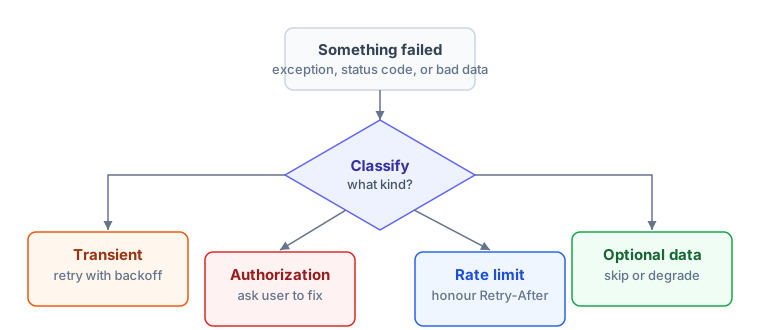
Every branch logs what happened so the next debugging session starts with evidence.
Implementing retry logic
Transient failures resolve themselves if you wait and retry. Network hiccups last seconds. Spotify's servers recover from overload within minutes. Database locks release when competing transactions complete. The solution is exponential backoff with jitter.
import time
import random
from spotipy.exceptions import SpotifyException
import requests

class MusicTimeMachineError(Exception):
    """Base exception for Music Time Machine errors"""
    pass

class TransientError(MusicTimeMachineError):
    """Temporary error that might resolve with retry"""
    pass

class AuthorizationError(MusicTimeMachineError):
    """OAuth or permission error requiring user action"""
    pass

class RateLimitError(MusicTimeMachineError):
    """Hit Spotify's rate limit"""
    def __init__(self, message, retry_after=None):
        super().__init__(message)
        self.retry_after = retry_after

def retry_with_backoff(func, max_attempts=3, base_delay=1.0):
    """
    Retry a function with exponential backoff and jitter

    Args:
        func: Function to retry (should take no arguments, use lambda if needed)
        max_attempts: Maximum number of retry attempts
        base_delay: Initial delay in seconds (doubles each retry)

    Returns:
        Function result if successful

    Raises:
        Last exception if all retries fail
    """
    last_exception = None

    for attempt in range(max_attempts):
        try:
            return func()

        except (requests.Timeout, requests.ConnectionError) as e:
            last_exception = TransientError(f"Network error: {e}")
            error_type = "network timeout"

        except SpotifyException as e:
            headers = e.headers or {}

            if e.http_status == 429:
                # Rate limit - check for Retry-After header
                retry_after = headers.get('Retry-After')
                if retry_after:
                    wait_time = int(retry_after)
                    last_exception = RateLimitError(
                        f"Rate limited (attempt {attempt + 1}, Retry-After: {wait_time}s)",
                        retry_after=wait_time
                    )
                    print(f"Rate limited. Waiting {wait_time} seconds as requested...")
                    time.sleep(wait_time)
                    continue
                else:
                    last_exception = RateLimitError("Hit rate limit without Retry-After header")
                    error_type = "rate limit"

            elif e.http_status in (500, 502, 503, 504):
                # Server errors are transient
                last_exception = TransientError(f"Spotify server error: {e.http_status}")
                error_type = "server error"

            elif e.http_status in (401, 403):
                # Authorization errors don't benefit from retry
                raise AuthorizationError(f"Authorization failed: {e.msg}")

            else:
                # Other errors are not transient
                raise

        except Exception as e:
            # Unknown error - don't retry
            raise

        # Calculate backoff with jitter
        if attempt < max_attempts - 1:
            delay = base_delay * (2 ** attempt)
            jitter = random.uniform(0, delay * 0.1)  # 0-10% jitter
            wait_time = delay + jitter

            print(f"Attempt {attempt + 1} failed ({error_type}). Retrying in {wait_time:.1f}s...")
            time.sleep(wait_time)

    # All retries exhausted
    raise last_exception
What just happened: categorising errors
The retry logic categorises errors as they occur. Network timeouts and 5xx server errors are transient (retry makes sense). 429 rate limits get special handling (honour the Retry-After header). 401/403 authorisation errors skip retry entirely because they require user action.
The exponential backoff formula doubles the wait time between failed attempts. With max_attempts=3, this helper sleeps after the first two failures: roughly 1s, then 2s, plus jitter. The third failure raises the final error instead of sleeping again. Jitter adds 0-10% randomness to prevent thundering herd problems (thousands of clients retrying at exactly the same time and overwhelming the server again).
Custom exception types (TransientError, AuthorizationError, RateLimitError) let calling code distinguish between failure modes and respond appropriately. A TransientError after 3 retries tells the user "Spotify is having problems, try again later." An AuthorizationError tells them "re-authorise the application."
Wrapping Spotify API calls
Now that you have retry logic, wrap every Spotify API call with it. This transforms fragile direct API calls into robust operations that handle transient failures automatically.
# Fragile: crashes on network hiccup or server error
def create_monthly_snapshot_fragile(sp, conn):
    playlist_name = "Monthly Top Tracks"
    top_tracks = sp.current_user_top_tracks(limit=50, time_range='short_term')['items']

    for track in top_tracks:
        save_track(conn, track)

    track_uris = [f"spotify:track:{track['id']}" for track in top_tracks]
    # If this fails, you lose all the work above
    playlist = sp.current_user_playlist_create(name=playlist_name, public=False)
sp.playlist_add_items(playlist['id'], track_uris)from datetime import datetime
from errors import (
AuthorizationError,
RateLimitError,
TransientError,
retry_with_backoff,
)
from monthly_snapshots import save_track
def create_monthly_snapshot_robust(sp, conn):
"""Create monthly snapshot with error handling"""
playlist_name = "Monthly Top Tracks"
month_year = datetime.now().strftime('%B %Y')
try:
# Fetch tracks with retry
top_tracks = retry_with_backoff(
lambda: sp.current_user_top_tracks(limit=50, time_range='short_term')['items']
)
# Save to database
for track in top_tracks:
save_track(conn, track)
conn.commit()
# Create playlist with retry
playlist = retry_with_backoff(
lambda: sp.current_user_playlist_create(
name=playlist_name,
public=False,
description=f"My top tracks from {month_year}"
)
)
# Add tracks with retry
track_uris = [f"spotify:track:{track['id']}" for track in top_tracks]
retry_with_backoff(
lambda: sp.playlist_add_items(playlist['id'], track_uris)
)
return playlist['external_urls']['spotify'], len(top_tracks)
except AuthorizationError as e:
print(f"\n[ERROR] Authorization Error: {e}")
print("Please re-run the application to re-authorise with Spotify.")
print("Delete the .cache file if you need to reset OAuth completely.\n")
return None, 0
except TransientError as e:
print(f"\n[ERROR] Temporary Error: {e}")
print("Spotify's servers might be experiencing issues.")
print("Please try again in a few minutes.\n")
return None, 0
except RateLimitError as e:
print(f"\n[ERROR] Rate Limit Error: {e}")
print("You've made too many requests to Spotify's API.")
print("Wait a few minutes before trying again.\n")
return None, 0
except Exception as e:
print(f"\n[ERROR] Unexpected Error: {e}")
print("Something went wrong. Please check your internet connection")
print("and make sure Spotify's API is accessible.\n")
return None, 0What just happened: three-part error messages
Each error handler prints a three-part message: (1) what went wrong, (2) why it matters, (3) what to do about it. This is the pattern from Chapter 9. Users see helpful guidance instead of technical stack traces.
Authorisation errors: Explain that OAuth tokens expired and tell users to re-run the application (Spotipy handles re-authorisation automatically) or delete .cache for a full reset.
Transient errors: Acknowledge the problem is temporary and suggest waiting a few minutes. No user action needed beyond retry.
Rate limit errors: Explain they made too many requests and need to slow down. This is user behaviour modification, not technical debugging.
Handling database errors
SQLite databases can encounter errors: the database file gets locked when another process writes to it, disk space runs out, or the schema doesn't match expectations. Production code anticipates these failures.
import json
import sqlite3
import time

from errors import MusicTimeMachineError

def safe_database_operation(conn, operation_func, max_attempts=3):
    """
    Execute a database operation with retry on lock errors

    Args:
        conn: SQLite connection
        operation_func: Function that performs database operations
        max_attempts: Maximum retry attempts for lock errors

    Returns:
        Result of operation_func

    Raises:
        sqlite3.Error if operation fails after retries
    """
    for attempt in range(max_attempts):
        try:
            result = operation_func(conn)
            conn.commit()
            return result

        except sqlite3.OperationalError as e:
            if "database is locked" in str(e).lower():
                if attempt < max_attempts - 1:
                    wait_time = 0.5 * (2 ** attempt)  # 0.5s, then 1s with max_attempts=3
                    print(f"Database locked. Retrying in {wait_time}s...")
                    time.sleep(wait_time)
                    continue
                else:
                    raise MusicTimeMachineError(
                        "Database is locked by another process. "
                        "Close other applications using the database and try again."
                    )
            else:
                # Other operational errors (disk full, corrupted database)
                raise MusicTimeMachineError(f"Database error: {e}")

        except sqlite3.IntegrityError as e:
            # Constraint violations (foreign key, unique, etc.)
            raise MusicTimeMachineError(f"Data integrity error: {e}")

        except sqlite3.DatabaseError as e:
            # Malformed database, schema errors
            raise MusicTimeMachineError(
                f"Database structure error: {e}. "
                "You might need to rebuild the database from schema.sql"
            )

def save_track_safe(conn, track):
    """Save track with error handling"""
    def operation(conn):
        conn.execute("""
            INSERT INTO tracks (
                track_id, name, artist_name, album_name,
                duration_ms, album_image_url, spotify_url, raw_json
            ) VALUES (?, ?, ?, ?, ?, ?, ?, ?)
            ON CONFLICT(track_id) DO UPDATE SET
                name            = excluded.name,
                artist_name     = excluded.artist_name,
                album_name      = excluded.album_name,
                duration_ms     = excluded.duration_ms,
                album_image_url = excluded.album_image_url,
                spotify_url     = excluded.spotify_url,
                raw_json        = excluded.raw_json
        """, (
            track['id'],
            track['name'],
            track['artists'][0]['name'],
            track['album']['name'],
            track['duration_ms'],
            track['album']['images'][0]['url'] if track['album']['images'] else None,
            track['external_urls']['spotify'],
            json.dumps(track)
        ))

    safe_database_operation(conn, operation)
SQLite lock behaviour
SQLite locks the entire database file during writes. If process A is writing and process B tries to write, process B gets "database is locked" and must wait. This is normal SQLite behaviour, not an error.
The retry logic waits with exponential backoff (0.5s, then 1s with the default max_attempts=3) for the lock to release. For a single-user application like the Music Time Machine, locks release quickly (milliseconds to seconds). If the lock persists after 3 attempts, something else is wrong (another program opened the database file, or the application crashed mid-transaction).
SQLite's locking is why you separate read-heavy operations (analytics, queries) from write-heavy operations (taking snapshots). You can have multiple simultaneous readers, but writers block everyone.
Graceful degradation
Some operations can partially succeed even when individual records fail. During a monthly snapshot, Spotify may return 50 tracks, but one track might have malformed display data or a database write might hit an unexpected constraint. The application should save the usable tracks, report what it skipped, and avoid losing the whole snapshot over one bad row.
def save_snapshot_tracks_robust(conn, tracks, snapshot_date, time_range):
    """Save a snapshot while reporting per-track failures."""
    successful = 0
    failed = []

    for rank, track in enumerate(tracks, start=1):
        try:
            save_track(conn, track)
            conn.execute("""
                INSERT OR IGNORE INTO snapshots (track_id, snapshot_date, time_range, rank)
                VALUES (?, ?, ?, ?)
            """, (track['id'], snapshot_date, time_range, rank))
            successful += 1

        except (sqlite3.Error, KeyError) as e:
            failed.append((track.get('id', 'unknown'), str(e)))
            continue

    conn.commit()

    print(f"[OK] Saved {successful} tracks to this snapshot")
    if failed:
        print(f"[WARN] Skipped {len(failed)} tracks with malformed data")
        print("       See music_time_machine.log for details")

    return successful, failed
What just happened: partial success pattern
The function saves each track independently and continues when one row fails. That keeps the useful part of the snapshot instead of turning one malformed record into a total failure.
The function returns both the success count and a list of failed track IDs. Calling code can log the failures, show a short warning to the user, and decide whether the result is good enough. For a monthly snapshot, 48 saved tracks are much better than zero saved tracks.
Logging for debugging
Print statements work for development. Production applications need structured logging that records what happened, when it happened, and what context was relevant. Python's logging module provides this capability.
import logging
from datetime import datetime

from errors import AuthorizationError, TransientError, retry_with_backoff
from safe_database_operation import save_track_safe

# Configure logging
logging.basicConfig(
    level=logging.INFO,
    format='%(asctime)s - %(name)s - %(levelname)s - %(message)s',
    handlers=[
        logging.FileHandler('music_time_machine.log'),
        logging.StreamHandler()  # Also print to console
    ]
)

logger = logging.getLogger('MusicTimeMachine')

def create_monthly_snapshot_with_logging(sp, conn):
    """Create monthly snapshot with comprehensive logging"""
    logger.info("Starting monthly snapshot creation")

    try:
        # Fetch tracks
        logger.info("Fetching top tracks from Spotify")
        top_tracks = retry_with_backoff(
            lambda: sp.current_user_top_tracks(limit=50, time_range='short_term')['items']
        )
        logger.info(f"Fetched {len(top_tracks)} tracks successfully")

        # Save to database
        logger.info("Saving tracks to database")
        for i, track in enumerate(top_tracks):
            save_track_safe(conn, track)
            if (i + 1) % 10 == 0:
                logger.debug(f"Saved {i + 1}/{len(top_tracks)} tracks")

        conn.commit()
        logger.info("Database commit successful")

        # Record snapshot rows (one per track in this capture)
        logger.info("Recording snapshot rows")
        snapshot_date = datetime.now().strftime('%Y-%m-%d')
        for rank, track in enumerate(top_tracks, start=1):
            conn.execute("""
                INSERT OR IGNORE INTO snapshots (track_id, snapshot_date, time_range, rank)
                VALUES (?, ?, ?, ?)
            """, (track['id'], snapshot_date, 'short_term', rank))
        conn.commit()

        # Create playlist
        logger.info("Creating Spotify playlist")
        month_year = datetime.now().strftime('%B %Y')
        playlist_name = f"Currently Obsessed - {month_year}"

        playlist = retry_with_backoff(
            lambda: sp.current_user_playlist_create(
                name=playlist_name,
                public=False
            )
        )
        logger.info(f"Created playlist: {playlist['id']}")

        # Add tracks
        track_uris = [f"spotify:track:{track['id']}" for track in top_tracks]
        retry_with_backoff(
            lambda: sp.playlist_add_items(playlist['id'], track_uris)
        )
        logger.info(f"Added {len(track_uris)} tracks to playlist")

        logger.info("Monthly snapshot completed successfully")
        return playlist['external_urls']['spotify'], len(top_tracks)

    except AuthorizationError as e:
        logger.error(f"Authorization failed: {e}")
        return None, 0

    except TransientError as e:
        logger.warning(f"Transient error (after retries): {e}")
        return None, 0

    except Exception as e:
        logger.exception(f"Unexpected error during snapshot: {e}")
        return None, 0
Log levels and when to use them
DEBUG: Detailed information for diagnosing problems (saved 10/50 tracks). Only visible when debugging is enabled.
INFO: General progress messages (started snapshot, fetched tracks, created playlist). Always visible in production.
WARNING: Something unexpected but recoverable happened (transient error after retries, partial data saved).
ERROR: Something failed and user action is required (authorisation failed, database corrupted).
logger.exception(): Not a separate log level; it logs at ERROR level and includes the full stack trace. Use it in exception handlers for complete debugging context.
2026-05-03 14:32:15 - MusicTimeMachine - INFO - Starting monthly snapshot creation
2026-05-03 14:32:15 - MusicTimeMachine - INFO - Fetching top tracks from Spotify
2026-05-03 14:32:17 - MusicTimeMachine - INFO - Fetched 50 tracks successfully
2026-05-03 14:32:17 - MusicTimeMachine - INFO - Saving tracks to database
2026-05-03 14:32:19 - MusicTimeMachine - INFO - Database commit successful
2026-05-03 14:32:19 - MusicTimeMachine - INFO - Creating Spotify playlist
2026-05-03 14:32:20 - MusicTimeMachine - INFO - Created playlist: 3cEYpjA8bZ0Iex
2026-05-03 14:32:21 - MusicTimeMachine - INFO - Added 50 tracks to playlist
2026-05-03 14:32:21 - MusicTimeMachine - INFO - Monthly snapshot completed successfully
Logs get written to both music_time_machine.log and the console. When something goes wrong, check the log file for detailed context. The timestamps show exactly when each step completed and how long operations took.
Production-ready error handling pattern
Here's the complete pattern that combines retry logic, graceful degradation, user-friendly messages, and logging:
import logging

from errors import (
    AuthorizationError,
    MusicTimeMachineError,
    RateLimitError,
    TransientError,
    retry_with_backoff,
)

logger = logging.getLogger('MusicTimeMachine')

def production_ready_feature(sp, conn, feature_name):
    """
    Template for production-ready feature implementation

    Demonstrates: retry logic, error categorization, logging,
    graceful degradation, user-friendly messages
    """
    logger.info(f"Starting {feature_name}")

    try:
        # Step 1: Fetch data with retry
        logger.info("Fetching data from Spotify")
        data = retry_with_backoff(
            lambda: sp.some_spotify_method(),
            max_attempts=3
        )
        logger.info(f"Fetched {len(data)} items")

        # Step 2: Process data with graceful degradation
        logger.info("Processing data")
        processed_data = []
        successful = 0
        failed = 0

        for item in data:
            try:
                # Process individual item and keep the result
                processed_data.append(process_item(conn, item))
                successful += 1
            except Exception as e:
                # Log failure but continue processing
                logger.warning(f"Failed to process item: {e}")
                failed += 1

        conn.commit()
        logger.info(f"Processed {successful} items successfully, {failed} failed")

        # Step 3: Create output with retry
        logger.info("Creating output")
        result = retry_with_backoff(
            lambda: create_output(sp, processed_data),
            max_attempts=3
        )
        logger.info(f"{feature_name} completed successfully")

        # Step 4: User-friendly success message
        print(f"\n[OK] {feature_name} completed successfully")
        print(f"[OK] Processed {successful} items")
        if failed > 0:
            print(f"[WARN] {failed} items could not be processed (see log for details)")

        return result

    # Each arm logs at the appropriate level, then shows a short user message.
    # The full three-part messages live in create_monthly_snapshot_robust above;
    # a real feature reuses those rather than repeating them in every handler.
    except AuthorizationError as e:
        logger.error(f"Authorization failed: {e}")
        print("\n[ERROR] Authorisation expired -- re-run to re-authorise.")
        return None

    except TransientError as e:
        logger.warning(f"Transient error after retries: {e}")
        print("\n[ERROR] Temporary problem -- please try again shortly.")
        return None

    except RateLimitError as e:
        logger.warning(f"Rate limit hit: {e}")
        print("\n[ERROR] Rate limited -- wait a few minutes and retry.")
        return None

    except MusicTimeMachineError as e:
        logger.error(f"Application error: {e}")
        print(f"\n[ERROR] {e}")
        return None

    except Exception as e:
        logger.exception(f"Unexpected error: {e}")
        print("\n[ERROR] Unexpected error -- check music_time_machine.log.")
        return None
The complete pattern
This template demonstrates every production error handling technique: (1) wrap external calls with retry logic, (2) process items individually with graceful degradation, (3) log everything at appropriate levels, (4) categorise errors and handle each category appropriately, and (5) reuse the three-part user messages you wrote for the robust version rather than repeating them in every handler.
Every feature in the Music Time Machine should follow this pattern. The pattern adds complexity (more lines of code, more exception handlers), but it transforms fragile scripts into reliable applications. The first time your application recovers automatically from a network hiccup, you'll appreciate the investment.
Building a diagnostic toolkit
When your Music Time Machine fails, you need to know why. Is the OAuth token expired? Is the database schema wrong? Is Spotify's API down? Is your network connection broken? Integrated systems have multiple failure points. Professional developers build diagnostic tools to isolate problems quickly.
The diagnostic script tests each component independently: database connectivity, schema validation, OAuth token freshness, and API accessibility. Run this when something breaks and you'll know exactly where to look. It's long and you only read it when something is wrong, so it's tucked behind a toggle.
Show diagnose.py in full (run-when-broken reference script)
"""
diagnose.py - System diagnostic tool for Music Time Machine

Run this script when something breaks. It tests each system component
independently and reports exactly what's working and what's not.

Usage: python diagnose.py
"""

import sqlite3
import os
import sys
from pathlib import Path
from dotenv import load_dotenv
import spotipy
from spotipy.oauth2 import SpotifyOAuth

load_dotenv()

def check_database():
    """Test database connectivity and schema."""
    print("\n" + "="*60)
    print("DATABASE DIAGNOSTICS")
    print("="*60)

    db_path = Path("music_time_machine.db")

    # Check if database file exists
    if not db_path.exists():
        print("[ERROR] Database file not found")
        print(f"   Expected: {db_path.absolute()}")
        print("   Action: Run the database setup script first")
        return False

    print(f"[OK] Database file exists: {db_path.absolute()}")

    # Test connection
    try:
        conn = sqlite3.connect(db_path)
        cursor = conn.cursor()
        print("[OK] Database connection successful")
    except Exception as e:
        print(f"[ERROR] Cannot connect to database: {e}")
        return False

    # Verify schema
    required_tables = ['tracks', 'snapshots', 'schema_version']

    cursor.execute("""
        SELECT name FROM sqlite_master
        WHERE type='table'
    """)
    existing_tables = [row[0] for row in cursor.fetchall()]

    schema_valid = True
    for table in required_tables:
        if table in existing_tables:
            print(f"[OK] Table exists: {table}")

            # Check row count
            cursor.execute(f"SELECT COUNT(*) FROM {table}")
            count = cursor.fetchone()[0]
            print(f"  -> Contains {count} rows")
        else:
            print(f"[ERROR] Missing table: {table}")
            schema_valid = False

    # Check for required track columns
    cursor.execute("PRAGMA table_info(tracks)")
    columns = [row[1] for row in cursor.fetchall()]

    required_columns = ['track_id', 'name', 'artist_name', 'album_name', 'duration_ms', 'spotify_url']
    for col in required_columns:
        if col in columns:
            print(f"[OK] Column exists: {col}")
        else:
            print(f"[ERROR] Missing column: {col}")
            schema_valid = False

    conn.close()

    if schema_valid:
        print("\n[OK] Database schema is valid")
    else:
        print("\n[ERROR] Database schema has issues")
        print("   Action: Run schema.sql or the database setup script")

    return schema_valid

def check_oauth():
    """Test OAuth configuration and token validity."""
    print("\n" + "="*60)
    print("OAUTH DIAGNOSTICS")
    print("="*60)

    # Check for credentials
    client_id = os.getenv('SPOTIPY_CLIENT_ID')
    client_secret = os.getenv('SPOTIPY_CLIENT_SECRET')
    redirect_uri = os.getenv('SPOTIPY_REDIRECT_URI')

    creds_valid = True

    if client_id:
        print(f"[OK] Client ID found: {client_id[:8]}...")
    else:
        print("[ERROR] SPOTIPY_CLIENT_ID not set")
        creds_valid = False

    if client_secret:
        print(f"[OK] Client Secret found: {client_secret[:8]}...")
    else:
        print("[ERROR] SPOTIPY_CLIENT_SECRET not set")
        creds_valid = False

    if redirect_uri:
        print(f"[OK] Redirect URI: {redirect_uri}")
    else:
        print("[ERROR] SPOTIPY_REDIRECT_URI not set")
        creds_valid = False

    if not creds_valid:
        print("\n[ERROR] OAuth credentials incomplete")
        print("   Action: Set environment variables or create .env file")
        return False

    # Check for token cache
    cache_path = Path(".cache")
    if cache_path.exists():
        print(f"[OK] Token cache exists: {cache_path}")
    else:
        print("[WARN] No token cache found (will require login)")

    # Test token validity
    try:
        scope = "user-top-read playlist-modify-public playlist-modify-private"
        auth_manager = SpotifyOAuth(
            client_id=client_id,
            client_secret=client_secret,
            redirect_uri=redirect_uri,
            scope=scope
        )

        token_info = auth_manager.get_cached_token()

        if token_info:
            print("[OK] Valid token found in cache")

            # Check if token is expired
            import time
            expires_at = token_info.get('expires_at', 0)
            now = int(time.time())

            if expires_at > now:
                remaining = expires_at - now
                print(f"  -> Token valid for {remaining // 60} minutes")
            else:
                print("[WARN] Token expired (will auto-refresh)")
        else:
            print("[WARN] No cached token (will require login)")

    except Exception as e:
        print(f"[ERROR] OAuth error: {e}")
        return False

    print("\n[OK] OAuth configuration is valid")
    return True

def check_api_access():
    """Test actual API connectivity."""
    print("\n" + "="*60)
    print("API DIAGNOSTICS")
    print("="*60)

    try:
        scope = "user-top-read playlist-modify-public playlist-modify-private"
        auth_manager = SpotifyOAuth(scope=scope)
        sp = spotipy.Spotify(auth_manager=auth_manager)

        # Test with simple API call
        print("Testing API connection...")
        user = sp.current_user()

        print(f"[OK] Successfully connected to Spotify API")
        print(f"  -> Authenticated as: {user['display_name']}")
        print(f"  -> User ID: {user['id']}")

        # Test top tracks endpoint
        print("\nTesting top tracks endpoint...")
        top_tracks = sp.current_user_top_tracks(limit=5, time_range='short_term')
        track_count = len(top_tracks['items'])
        print(f"[OK] Retrieved {track_count} top tracks")

        print("\n[OK] All API endpoints accessible")
        return True

    except spotipy.exceptions.SpotifyException as e:
        print(f"[ERROR] Spotify API error: {e}")

        if e.http_status == 401:
            print("   -> Authentication failed")
            print("   Action: Delete .cache and re-authenticate")
        elif e.http_status == 429:
            print("   -> Rate limit exceeded")
            print("   Action: Wait 60 seconds and try again")
        else:
            print(f"   -> HTTP {e.http_status}")

        return False

    except Exception as e:
        print(f"[ERROR] Unexpected error: {e}")
        print("   Action: Check network connection")
        return False

def run_full_diagnostic():
    """Run all diagnostic checks."""
    print("\n" + "="*60)
    print("MUSIC TIME MACHINE - SYSTEM DIAGNOSTICS")
    print("="*60)

    results = {
        'database': check_database(),
        'oauth': check_oauth(),
        'api': check_api_access()
    }

    print("\n" + "="*60)
    print("DIAGNOSTIC SUMMARY")
    print("="*60)

    for component, status in results.items():
        status_icon = "[OK]" if status else "[ERROR]"
        print(f"{status_icon} {component.upper()}: {'PASS' if status else 'FAIL'}")

    all_pass = all(results.values())

    if all_pass:
        print("\n[OK] All systems operational")
        print("  Your Music Time Machine should work correctly")
    else:
        print("\n[ERROR] System has issues")
        print("  Review the diagnostics above for specific problems")

    print("="*60 + "\n")

    return all_pass

if __name__ == "__main__":
    success = run_full_diagnostic()
    sys.exit(0 if success else 1)
How to use this diagnostic
Save this as diagnose.py in your project directory. When something breaks, run it:
python diagnose.py
The script tests each component independently and tells you exactly what's wrong. Common scenarios:
- Database fails, OAuth passes: Your database schema is wrong or corrupted. Re-run the setup script.
- OAuth fails, database passes: Your credentials are missing or wrong. Check your .env file.
- OAuth passes, API fails: Your token is invalid or Spotify's API is down. Delete .cache and re-authenticate.
- Everything fails: Check your network connection or verify Spotify's API status.
Professional debugging practice
This diagnostic script demonstrates a professional debugging approach: isolate each system component and test it independently. When debugging integrated systems, developers often waste hours checking the wrong component.
"My app doesn't work" becomes "Database connection successful, OAuth valid, but API returns 429", which immediately tells you the problem is rate limiting, not credentials or schema issues.
Building diagnostic tools early saves debugging time later. When you deploy in Chapter 20, you'll add health check endpoints that run similar diagnostics automatically. Start building these habits now.
When production error handling isn't worth it
Not every project needs production-grade error handling. The Music Time Machine does because it runs repeatedly over months, depends on external services, and stores valuable accumulated data. But for single-use scripts or internal developer tools, simpler error handling is fine.
Use production error handling when
- Application runs unattended or on a schedule
- Users are non-technical (can't debug stack traces)
- External APIs are unreliable or rate-limited
- Data loss would be costly (months of accumulated snapshots)
- Application has 100+ users who can't file detailed bug reports
Skip production error handling when
- Script runs once then exits (migration scripts, data exports)
- Users are developers who understand stack traces
- Failures are acceptable (prototype, proof of concept)
- Development speed matters more than reliability
- You're the only user and can debug problems immediately
The Music Time Machine crosses the threshold where production error handling becomes worthwhile. You'll run it monthly for years. Network issues and API hiccups are inevitable. Accumulated data is valuable. Users deserve helpful messages instead of cryptic exceptions. The investment in robust error handling pays off.