Chapter 16: Building the Spotify Music Time Machine
1. Project vision and scope
The Music Time Machine turns your Spotify account into a personal listening archive. It captures the music you are playing now, stores it in SQLite, and uses that history to rediscover old favourites, create playlists, and show how your taste changes over time.
Music Time Machine
Spotify is excellent at keeping you listening. It recommends new songs, new mixes, new playlists, but it mostly points forward. This project will give you a way to build a long-term memory of what you used to love.
Firstly, Spotify gives you access to your listening data via an API. By calling the API, your app can pull your current top tracks and artists, playlist data, track metadata, album artwork, Spotify URLs, and stable identifiers for creating playlists.
The Music Time Machine captures that data over time. Every time you run the script, it captures your current top tracks and saves them in a local database. Over time, that database becomes a personal archive of your listening history. The app can then query that archive to surface forgotten gems, create dated playlists, and show how your taste has evolved.
Here are the app's three main features:
| Feature | What it does |
|---|---|
| Forgotten Gems | Surfaces tracks you loved 90-365 days ago that have dropped out of your recent listening. |
| Currently Obsessed | Archives your current top tracks into a dated monthly snapshot and playlist. Rerunning it on the same day does not create duplicates. |
| Musical Evolution | Aggregates your saved snapshots into turnover, taste-shift, and top-artist trends over time. |
What is Spotipy?
Spotipy is a lightweight, easy-to-use Python library that acts as a wrapper for the official Spotify Web API. It allows developers to write Python code to interact with Spotify's massive music catalog and user accounts. Spotipy simplifies the process of making API calls, handling authentication, and managing responses, making it easier for developers to create applications that can access Spotify's features and data.
In this project we will use Spotipy for three jobs: authenticate your app with OAuth, fetch your current Spotify data, and create playlists with tracks in them.
We will write the app's behaviour (what to fetch, what to store, which playlists to build) and Spotipy will handle the lower-level API details for us. Now let's see how the app works.
The Music Time Machine loop
Every feature in this chapter follows the same loop: authenticate with Spotify, capture a snapshot of your current listening, save that snapshot in SQLite, then use the growing history to generate playlists and analysis.
The loop below runs clockwise: call the API, take a snapshot, save it in memory, and run the feature scripts.
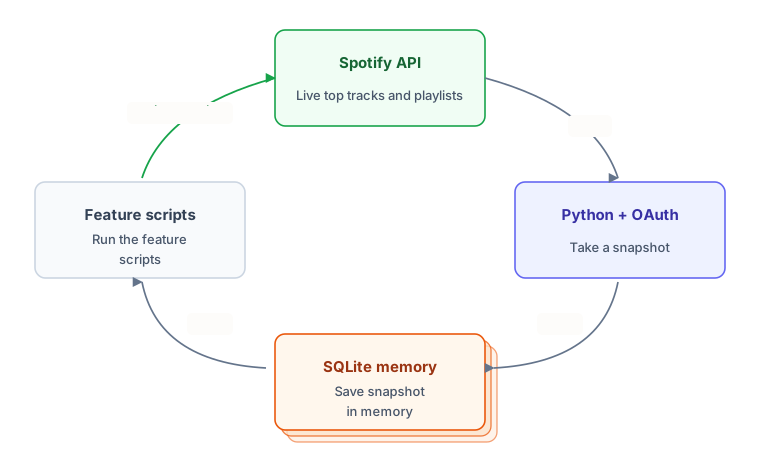
Because the snapshots accumulate, the app becomes more useful the longer you run it. The first snapshot can create a playlist. A year of snapshots can show how your taste changed.
What you will build
Chapter 16 moves through the project one layer at a time:
quick_start.py: authenticate with Spotify and create your first playlist.schema.sql: create thetracksandsnapshotstables.forgotten_gems.py: find older favourites that have disappeared from recent listening.monthly_snapshots.py: archive your current top tracks into a dated playlist.analytics.py: aggregate saved snapshots into turnover, diversity, and evolution queries.errors.py: wrap Spotify calls with categorised errors and retry logic.tests/: test the app with mocks, fixtures, and in-memory databases.
The technical work builds naturally. First you prove that Spotify OAuth works. Then you learn the shape of Spotify's data. After that you design the database, build the playlist features, add defensive error handling, and test the app without calling the live API.
How this chapter fits the book
This is the first chapter where several earlier skills become one application. OAuth gives you permissioned access. SQLite gives the app memory. API error handling makes the app more reliable. Tests let you change the code without repeatedly hitting Spotify.
It also gives you a portfolio project with real tradeoffs to explain: minimal OAuth scopes, dated snapshots, cached raw API payloads, retry logic around provider calls, and tests that use mocks instead of live API requests.
Four later chapters build on this codebase. Chapter 17 introduces Flask and renders your first real page from the database. Chapter 18 turns that into the full Music Time Machine dashboard, with charts, browser login, and a playlist manager. Chapter 19 grows the testing into a full pytest suite, and Chapter 20 deploys the whole stack to a public URL.
Privacy and data control
The Music Time Machine stores listening snapshots, playlist metadata, cached track payloads, and Spotify credentials. That data can reveal routines and identity, so keep the project narrow and local by default.
- Collect only what the app needs. Store the fields the features use, such as track ID, name, artist, raw payload, and timestamps. Leave the rest out.
- Request only the scopes you need. The app asks for
user-top-read,playlist-modify-public, andplaylist-modify-private. Do not request extra scopes just in case. - Keep local data under user control. Snapshots live in a SQLite file on your machine. To delete your history, delete the file. To stop syncing, stop running the script.
- Treat tokens as credentials. Spotipy caches the access token in a
.cachefile beside the script. Add.cacheand.envto.gitignorebefore either file exists.
Do not upload your real database to a public repository. Use anonymised sample data when demoing the project. If you later host this as a web app, you would also need deletion tools, export tools, clear account controls, and a published privacy policy.
By the end of the chapter, you will have more than a Spotify script. You will have an app that logs in, stores listening history, creates playlists, handles API failures, and can be tested without touching the live Spotify API.