4. Database schema design
A bad schema makes simple features complicated; a good schema makes complex features fall out of straightforward SELECT statements. We'll start with the wrong approach (one massive denormalised table), watch it collapse under the queries the features need, then build the two-table design: tracks (entities) and snapshots (time-stamped events). The split is the whole chapter's architecture in miniature, separating what something is from when you observed it.
The schema we land on looks obvious in retrospect. The justification, why snapshots are events not rows on tracks, why a composite primary key beats a synthetic one, why we cache the raw Spotify payload alongside the normalised columns, is the part you'll be asked to defend in interviews. Section 4's job is to make every design call here something you've explained out loud at least once.
The naive approach (don't do this)
Here's what seems obvious at first: create one table that stores everything about every track you fetch from Spotify.
CREATE TABLE everything (
    id INTEGER PRIMARY KEY AUTOINCREMENT,
    track_id TEXT,
    track_name TEXT,
    artist_name TEXT,
    album_name TEXT,
    duration_ms INTEGER,
    snapshot_date TEXT,
    time_range TEXT,
    rank INTEGER
    -- ... every field for every track for every snapshot
);
This design has serious problems:
- Massive data duplication. If "Karma Police" appears in 12 monthly snapshots, you store the track name, artist, album, and duration 12 times. The database grows unnecessarily large and updates become complex (change one field, update 12 rows).
- No clear primary key. What uniquely identifies a row? It's not the track_id (same track appears multiple times). It's not the snapshot_date (multiple tracks per snapshot). You end up with an auto-increment ID that doesn't represent anything meaningful.
- Awkward queries. Finding forgotten gems requires complex GROUP BY logic to identify tracks that appeared in old snapshots but not recent ones. Every query fights the schema.
- Update anomalies. If track metadata changes after a song appears in 10 snapshots, you either update 10 rows or accept inconsistent data across snapshots.
The fundamental mistake: mixing two concerns. Tracks are entities (things that exist independently). Snapshots are events (points in time when you captured data). Storing them in one table conflates entity with event.
The correct approach: two tables
The Music Time Machine needs two tables, each with a clear purpose:
| Table | Purpose | Primary key |
|---|---|---|
tracks |
Stores track metadata (name, artist, album, duration) plus the cached raw payload | track_id (Spotify ID) |
snapshots |
Records when tracks appeared in your top tracks | (track_id, snapshot_date, time_range) composite key |
This design stores each track once in the tracks table. The snapshots table creates the many-to-many relationship between tracks and dates: the same track can appear in multiple snapshots, and each snapshot contains multiple tracks.
tracks can point to many dated rows in snapshots.
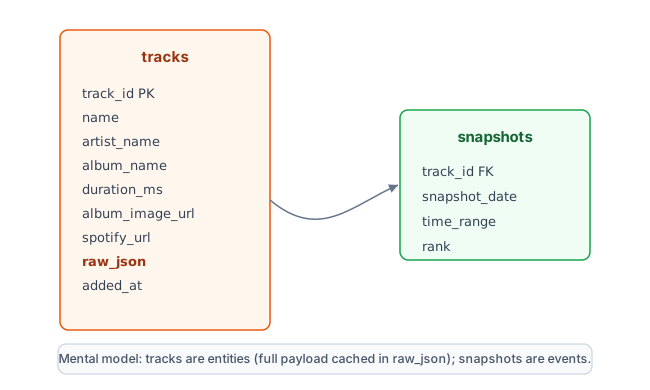
Read the schema from left to right. A track appears once in tracks. Every monthly capture writes many rows into snapshots, one row per track observed on that date.
The tracks table
The tracks table stores metadata for every track you've encountered. Each track appears exactly once, identified by its Spotify ID.
CREATE TABLE tracks (
    track_id TEXT PRIMARY KEY,      -- Spotify's track ID (unique identifier)
    name TEXT NOT NULL,              -- Track title
    artist_name TEXT NOT NULL,       -- Primary artist (denormalised for simplicity)
    album_name TEXT NOT NULL,        -- Album title (denormalised)
    duration_ms INTEGER NOT NULL,    -- Track length in milliseconds
    album_image_url TEXT,            -- Album cover URL (for display)
    spotify_url TEXT,                -- Direct link to track in Spotify
    raw_json TEXT,                   -- Full Spotify track object, cached as a JSON string
    added_at TIMESTAMP DEFAULT CURRENT_TIMESTAMP  -- When we first encountered this track
);- track_id as primary key. Uses Spotify's ID directly. This prevents duplicate tracks and makes lookups instant. When you fetch top tracks from Spotify and get the same song again, you don't create a new row. You just reference the existing track_id in your snapshots table.
- Denormalised artist and album. Stores artist_name and album_name as text rather than foreign keys to separate artist and album tables. This is deliberate denormalisation. You sacrifice a bit of storage space (storing "Radiohead" multiple times) for simpler queries (no joins needed to display track information).
- Optional display fields. The album_image_url and spotify_url fields aren't strictly necessary but make the application more polished. You can show album art in the web interface and link directly to tracks in Spotify.
- raw_json keeps the whole payload. Spotify's track object has 20-plus fields; you only normalise a handful into columns. Storing the full object as a JSON string means any field you didn't break out (disc number, release date, external IDs) is still there if you need it later, with no second API call. It costs a little space and stays out of the way of your column queries. When you migrate to PostgreSQL in Chapter 25, this is the column that becomes a queryable
JSONBdocument. - added_at timestamp. Records when you first encountered this track. This isn't the same as when you listened to it (that's in snapshots), but it's useful for analytics ("I discovered 47 new artists this year").
import json
import sqlite3

def save_track(conn, track):
    """Save a track to the database (insert or ignore if exists)"""
    conn.execute("""
        INSERT OR IGNORE INTO tracks (
            track_id, name, artist_name, album_name,
            duration_ms, album_image_url, spotify_url, raw_json
        ) VALUES (?, ?, ?, ?, ?, ?, ?, ?)
    """, (
        track['id'],
        track['name'],
        track['artists'][0]['name'],      # First artist only
        track['album']['name'],
        track['duration_ms'],
        track['album']['images'][0]['url'] if track['album']['images'] else None,
        track['external_urls']['spotify'],
        json.dumps(track)                 # Full payload, cached for later
    ))

# Usage: fetch tracks from Spotify and save them
top_tracks = sp.current_user_top_tracks(limit=50)['items']

with sqlite3.connect('music_time_machine.db') as conn:
    conn.execute("PRAGMA foreign_keys = ON")
    for track in top_tracks:
        save_track(conn, track)
    conn.commit()

print(f"Saved {len(top_tracks)} tracks to database")
INSERT OR IGNORE pattern
The INSERT OR IGNORE statement attempts to insert a track. If the track_id already exists (because you encountered this track in a previous snapshot), SQLite ignores the insert without raising an error. This is safer than checking "does this track exist?" before every insert.
This pattern has a subtle tradeoff: it won't update existing tracks. For most fields (name, artist, album), this is fine because they rarely change. When you do need to refresh a track's details, Section 5 upgrades save_track to an UPSERT (ON CONFLICT ... DO UPDATE) and explains why INSERT OR REPLACE is the wrong tool here.
The snapshots table
The snapshots table records when tracks appeared in your top tracks. This is the historical record that enables forgotten gems discovery, trend analysis, and musical evolution tracking.
CREATE TABLE snapshots (
    track_id TEXT NOT NULL,          -- References tracks(track_id)
    snapshot_date DATE NOT NULL,     -- When this snapshot was taken
    time_range TEXT NOT NULL CHECK(time_range IN ('short_term', 'medium_term', 'long_term')),
    rank INTEGER NOT NULL CHECK(rank >= 1 AND rank <= 50),
    PRIMARY KEY (track_id, snapshot_date, time_range),
    FOREIGN KEY (track_id) REFERENCES tracks(track_id) ON DELETE CASCADE
);

-- Index for time-based queries (critical for performance)
CREATE INDEX idx_snapshots_date ON snapshots(snapshot_date);
CREATE INDEX idx_snapshots_track_date ON snapshots(track_id, snapshot_date);- Composite primary key. The combination of (track_id, snapshot_date, time_range) uniquely identifies a row. The same track can appear in multiple snapshots, and you can take multiple snapshots per day (one per time range). But each specific combination appears only once.
- Rank field. Stores the track's position in your top tracks (1 for your most-played track, 50 for the least-played in that snapshot). This enables analytics like "which tracks consistently rank high?" and "how quickly do songs rise and fall?"
- Indexes for performance. The two indexes dramatically speed up time-based queries. Finding tracks from the last 30 days becomes instant instead of scanning every row. The second index optimises queries that filter by both track_id and date (like "when did I first hear this track?").
One catch worth knowing, because it trips up almost everyone the first time: SQLite enforces foreign keys per connection, not per database file, and the enforcement is off by default. The snapshots foreign key and its ON DELETE CASCADE only fire on a connection that has run PRAGMA foreign_keys = ON. Setting it once inside schema.sql isn't enough; that only covers the connection that built the schema. So every script in this project runs conn.execute("PRAGMA foreign_keys = ON") right after opening the database, and you'll see that line in the snippets below. (It makes a good interview answer, too: the constraint is declared in the schema, but enforcement is a per-connection runtime setting.)
from datetime import date

def create_snapshot(conn, sp, time_range='short_term'):
    """
    Fetch current top tracks and save as a snapshot
    Returns number of tracks saved
    """
    # Fetch top tracks from Spotify
    top_tracks = sp.current_user_top_tracks(limit=50, time_range=time_range)['items']
    today = date.today().isoformat()

    # Save tracks to tracks table first
    for track in top_tracks:
        save_track(conn, track)  # INSERT OR IGNORE

    # Save snapshot records
    for rank, track in enumerate(top_tracks, start=1):
        conn.execute("""
            INSERT OR IGNORE INTO snapshots (track_id, snapshot_date, time_range, rank)
            VALUES (?, ?, ?, ?)
        """, (track['id'], today, time_range, rank))

    conn.commit()
    return len(top_tracks)

# Usage: create monthly snapshot
with sqlite3.connect('music_time_machine.db') as conn:
    conn.execute("PRAGMA foreign_keys = ON")
    count = create_snapshot(conn, sp, time_range='short_term')
    print(f"Created snapshot with {count} tracks")
What just happened
The create_snapshot() function demonstrates the schema design in action. First, it saves all tracks to the tracks table (INSERT OR IGNORE means existing tracks are skipped). Then it records which tracks appeared in this snapshot.
Notice the separation of concerns: track metadata lives in tracks, while the historical record of "this track was in my top 50 on this date" lives in snapshots. This separation prevents data duplication and enables efficient queries.
If you run this function monthly for a year, you accumulate 12 snapshots with roughly 600 snapshot records (50 tracks × 12 months, though many tracks repeat across months). But you only store each unique track once in the tracks table.
Querying the schema
A good schema makes common queries simple. Here are the queries that power Music Time Machine features:
-- Tracks that appeared 90-365 days ago but not in last 30 days
SELECT t.track_id, t.name, t.artist_name
FROM tracks t
JOIN snapshots s ON t.track_id = s.track_id
WHERE s.snapshot_date BETWEEN date('now', '-365 days') AND date('now', '-90 days')
  AND t.track_id NOT IN (
      SELECT track_id FROM snapshots
      WHERE snapshot_date >= date('now', '-30 days')
  )
GROUP BY t.track_id
ORDER BY MAX(s.snapshot_date) DESC
LIMIT 25;
This query finds tracks you loved 3-12 months ago but haven't heard recently. The index on snapshot_date makes both the date filter and the subquery fast.
-- Listening diversity by month
SELECT
    strftime('%Y-%m', s.snapshot_date) AS month,
    COUNT(DISTINCT s.track_id) AS tracks,
    COUNT(DISTINCT t.artist_name) AS unique_artists
FROM snapshots s
JOIN tracks t ON s.track_id = t.track_id
WHERE s.time_range = 'short_term'
GROUP BY month
ORDER BY month;
This aggregation query shows how your musical taste evolves over time. The index on snapshot_date makes the date filtering efficient, even with thousands of snapshot records.
Schema enables simple queries
Notice how straightforward these queries are. Finding forgotten gems is a simple NOT IN subquery. Evolution tracking is standard GROUP BY aggregation.
The naive single-table design would require complex DISTINCT clauses, multiple nested subqueries, and GROUP BY logic to deduplicate tracks. The two-table design eliminates that complexity. Each query maps directly to a feature concept.
The complete schema
Here's the complete schema creation script. Save this as schema.sql and run it to initialise your database:
-- Music Time Machine Database Schema
-- SQLite 3 compatible

-- Enable foreign key constraints (disabled by default in SQLite)
PRAGMA foreign_keys = ON;

-- Track metadata (plus the full Spotify payload cached as JSON)
CREATE TABLE IF NOT EXISTS tracks (
    track_id TEXT PRIMARY KEY,
    name TEXT NOT NULL,
    artist_name TEXT NOT NULL,
    album_name TEXT NOT NULL,
    duration_ms INTEGER NOT NULL,
    album_image_url TEXT,
    spotify_url TEXT,
    raw_json TEXT,
    added_at TIMESTAMP DEFAULT CURRENT_TIMESTAMP
);

-- Historical snapshots of top tracks
CREATE TABLE IF NOT EXISTS snapshots (
    track_id TEXT NOT NULL,
    snapshot_date DATE NOT NULL,
    time_range TEXT NOT NULL CHECK(time_range IN ('short_term', 'medium_term', 'long_term')),
    rank INTEGER NOT NULL CHECK(rank >= 1 AND rank <= 50),
    PRIMARY KEY (track_id, snapshot_date, time_range),
    FOREIGN KEY (track_id) REFERENCES tracks(track_id) ON DELETE CASCADE
);

-- Indexes for performance
CREATE INDEX IF NOT EXISTS idx_snapshots_date ON snapshots(snapshot_date);
CREATE INDEX IF NOT EXISTS idx_snapshots_track_date ON snapshots(track_id, snapshot_date);
CREATE INDEX IF NOT EXISTS idx_tracks_artist ON tracks(artist_name);

-- Schema version tracking (for future migrations)
CREATE TABLE IF NOT EXISTS schema_version (
    version INTEGER PRIMARY KEY,
    applied_at TIMESTAMP DEFAULT CURRENT_TIMESTAMP
);

-- INSERT OR IGNORE so re-running init_db.py is safe (the row already exists)
INSERT OR IGNORE INTO schema_version (version) VALUES (1);import sqlite3
def initialize_database(db_path='music_time_machine.db'):
"""Create database and tables from schema"""
conn = sqlite3.connect(db_path)
# Read and execute schema
with open('schema.sql', 'r') as f:
schema_sql = f.read()
conn.executescript(schema_sql)
conn.commit()
conn.close()
print(f"Database initialised at {db_path}")
# Initialise on first run
if __name__ == '__main__':
initialize_database()
Run this to create your database. Re-running it is harmless: every CREATE TABLE uses IF NOT EXISTS, and the version row uses INSERT OR IGNORE, so a second run is a no-op rather than a crash. The schema includes CHECK constraints to validate data (time_range must be one of three values, rank must be 1-50), foreign key constraints to maintain relationships, and a schema_version table for future migrations.
Schema evolution and migrations
Databases evolve. Three months from now, you might realise you need a new field or table. Instead of deleting your database and losing accumulated data, you write a migration that transforms the existing schema.
The schema_version table tracks which migrations have been applied. Each migration increments the version number and records when it ran.
-- Migration 002: Add genre tracking
-- Check current version first
SELECT MAX(version) FROM schema_version;

-- If version is 1, run this migration
ALTER TABLE tracks ADD COLUMN primary_genre TEXT;

-- Record that migration 2 was applied
INSERT INTO schema_version (version) VALUES (2);
You won't need migrations immediately, but knowing the pattern exists prevents panic when you realise your schema needs to change. Chapter 15 covered migrations in detail. The key point: migrations let schemas evolve without data loss.
Why these design decisions matter
Every schema decision involved tradeoffs. Here's the reasoning behind each choice:
- Two tables instead of one. Separating tracks from snapshots prevents data duplication and enables efficient queries. The cost is a JOIN, but SQLite handles it efficiently with proper indexes. The benefit is storage efficiency and query simplicity.
- Denormalised artist and album names. Storing artist_name and album_name as text (rather than foreign keys to separate tables) trades storage space for query simplicity. For a personal music tracker with thousands of tracks, the redundancy is negligible and queries become much simpler (no need to JOIN artists and albums just to display track information).
- Composite primary key for snapshots. The combination (track_id, snapshot_date, time_range) uniquely identifies a snapshot record. This design naturally prevents duplicate snapshots and makes time-based queries efficient. An auto-increment ID would work but wouldn't add value.
- Indexes on date fields. The Music Time Machine runs time-based queries constantly (tracks from last 30 days, tracks from 90-365 days ago, monthly aggregations). Without indexes, these queries scan every row. With indexes, SQLite can jump directly to relevant date ranges instead of doing a full table scan.
Professional database design is about understanding your access patterns and optimising for them. The Music Time Machine queries snapshots by date constantly, so date indexes are critical. It rarely queries by artist name, so that index is optional (but included for completeness).