5. Building the three features
With OAuth working and the schema from Section 4 in place, the features fall out as read-write patterns over the database plus carefully scoped Spotify calls. Forgotten Gems and Currently Obsessed create playlists from your top-track snapshots, while Musical Evolution Analytics turns those snapshots into turnover rates, monthly diversity, and artist trends.
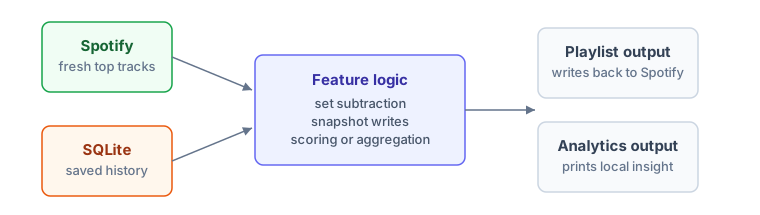
The pattern under all three features is the same shape: fetch a small slice of fresh data from Spotify, combine it with the historical context already in the database, apply the feature's logic, and write the result back, either as a Spotify playlist or as a set of analytics records. The database provides memory (what you listened to months ago); Spotify provides the current state (what you're listening to right now). Your code bridges the two. We'll build each feature end-to-end, with complete working code, before pulling them together in main.py at the end of the section.
The feature files in this section are importable modules: they define functions, but they do not create the authenticated sp client themselves. Keep building them file by file, then run the menu-driven music_time_machine.py at the end of the section. That final script creates the Spotify client, opens the database connection, and calls these functions with the right dependencies.
A shared helper: publishing a playlist
Two of the three features end the same way: create a private playlist, add a list of track URIs, and hand back the public URL. Rather than repeat that block in each file, write it once in a small playlist_utils.py and import it everywhere. Each feature still builds its own track list; only the Spotify write is shared.
def publish_playlist(sp, name, track_uris, description=""):
    """Create a private playlist, add the given tracks, and return its public URL.

    Shared by Forgotten Gems and Currently Obsessed. Each
    feature builds its own track_uris list, then calls this to do the write.
    Note there is no sp.current_user() call: current_user_playlist_create
    already targets the authenticated account, so the user id isn't needed.
    """
    playlist = sp.current_user_playlist_create(
        name=name,
        public=False,
        description=description
    )
    sp.playlist_add_items(playlist['id'], track_uris)
    return playlist['external_urls']['spotify']
Feature 1: Forgotten Gems
Forgotten Gems answers a simple question: which songs did you love months ago but haven't heard recently? This feature demonstrates set operations, time-based database queries, and the power of accumulated historical data.
The algorithm compares two sets of tracks. Old favourites are tracks that appeared in snapshots 90-365 days ago (roughly 3 months to 1 year back). Recent listens are tracks from the last 30 days. Forgotten gems are the difference: old favourites minus recent listens.
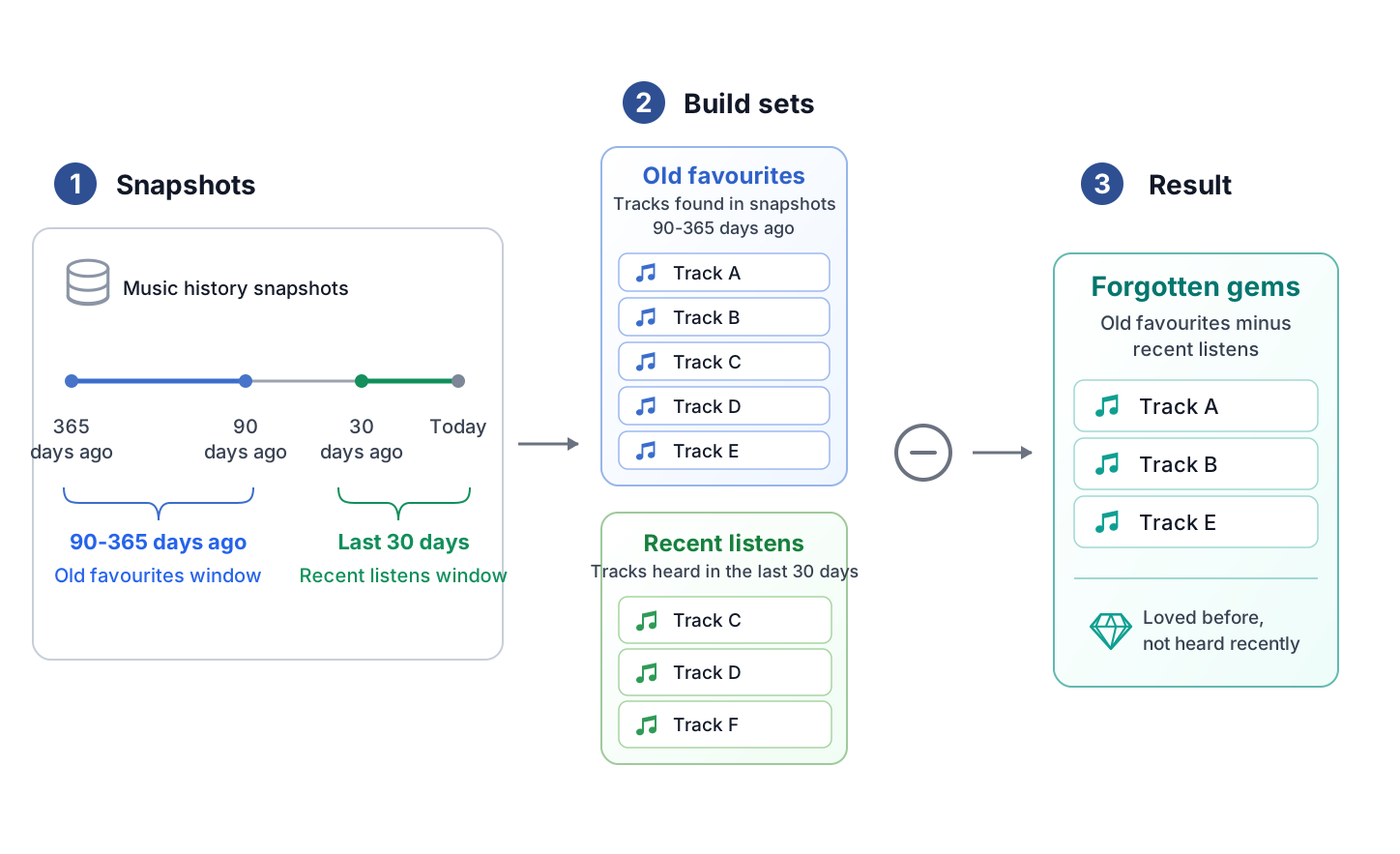
Now translate that set operation into code. The function below uses SQL to build the old-favourites set, removes anything seen in the recent-listens window with a NOT IN subquery, then hands the remaining tracks to the shared playlist helper. Save this as forgotten_gems.py next to playlist_utils.py:
import sqlite3
from datetime import date, timedelta

from playlist_utils import publish_playlist

def find_forgotten_gems(conn, limit=25, now=None):
    """
    Find tracks you loved months ago but haven't heard recently.

    Args:
        conn: SQLite database connection
        limit: Maximum number of tracks to return
        now: Reference date for the 90/365-day window. Defaults to today;
             tests pass a fixed date here to make assertions deterministic.

    Returns:
        List of (track_id, name, artist_name, album_name) tuples
    """
    if now is None:
        now = date.today()

    window_start = (now - timedelta(days=365)).isoformat()
    window_end = (now - timedelta(days=90)).isoformat()
    recent_cutoff = (now - timedelta(days=30)).isoformat()

    cursor = conn.execute("""
        SELECT t.track_id, t.name, t.artist_name, t.album_name
        FROM tracks t
        JOIN snapshots s ON t.track_id = s.track_id
        WHERE s.time_range = 'short_term'
          AND s.snapshot_date BETWEEN ? AND ?
          AND t.track_id NOT IN (
              SELECT track_id FROM snapshots
              WHERE time_range = 'short_term'
                AND snapshot_date >= ?
          )
        GROUP BY t.track_id
        ORDER BY MAX(s.snapshot_date) DESC
        LIMIT ?
    """, (window_start, window_end, recent_cutoff, limit))

    return cursor.fetchall()

def create_forgotten_gems_playlist(sp, conn):
    """
    Create a playlist of forgotten gems in user's Spotify account

    Args:
        sp: Authenticated Spotipy client
        conn: SQLite database connection

    Returns:
        Playlist URL if successful, None otherwise
    """
    # Find forgotten tracks
    forgotten = find_forgotten_gems(conn, limit=25)

    if not forgotten:
        print("No forgotten gems found. This feature needs at least 3 months of history.")
        print("Keep taking monthly snapshots and check back later!")
        return None

    # Build the playlist and write it to Spotify
    playlist_name = f"Forgotten Gems - {date.today().strftime('%B %Y')}"
    track_uris = [f"spotify:track:{track[0]}" for track in forgotten]
    url = publish_playlist(
        sp, playlist_name, track_uris,
        description="Tracks I loved months ago but haven't heard recently - rediscovered by Music Time Machine"
    )

    # Display results
    print(f"\n[OK] Created playlist: {playlist_name}")
    print(f"[OK] Added {len(forgotten)} forgotten gems")
    print(f"[OK] Playlist URL: {url}\n")

    print("Your forgotten gems:")
    for i, (track_id, name, artist, album) in enumerate(forgotten, 1):
        print(f"  {i}. {name} - {artist}")

    return url

# This module is imported by music_time_machine.py, which creates the
# authenticated Spotify client and opens the database connection.
What just happened: the query logic
The SQL query does the heavy lifting. It finds tracks that appeared in snapshots between 90 and 365 days ago, then excludes any tracks that also appeared in the last 30 days. The NOT IN subquery performs the set subtraction.
GROUP BY t.track_id: Collapses the result to one row per track, even when a track appears in several old snapshots, so an explicit DISTINCT would be redundant here.
ORDER BY MAX(s.snapshot_date): Orders results by when you last heard each track. This surfaces tracks you stopped listening to more recently (maybe 3 months ago) before tracks from 10 months ago.
The now parameter: Defaults to date.today() so the query works today, tomorrow, and a year from now without modification. The reason it's a parameter rather than a hard-coded date.today() call is testability. Section 7 of this chapter passes a fixed date here so the 90/365-day window calculations are deterministic, and the fuller pytest suite in Chapter 19 builds on the same idea; the function under test never has to be told what "today" means by mocking the clock.
You will run this feature through the menu program at the end of the section. Once music_time_machine.py wires it in, the output looks like this:
[OK] Created playlist: Forgotten Gems - May 2026
[OK] Added 25 forgotten gems
[OK] Playlist URL: https://open.spotify.com/playlist/3cEYpjA8bZ0Iex...

Your forgotten gems:
  1. Fake Plastic Trees - Radiohead
  2. Dissolve - Absofacto
  3. The Less I Know The Better - Tame Impala
  4. Midnight City - M83
  5. Electric Feel - MGMT
  6. Such Great Heights - The Postal Service
  7. Little Talks - Of Monsters and Men
  ...
  25. Float On - Modest Mouse

Open in Spotify: https://open.spotify.com/playlist/3cEYpjA8bZ0Iex...
This feature gets more valuable over time. With 3 months of history, you find a few forgotten tracks. With a year of history, you rediscover dozens. With 2+ years, you surface songs you completely forgot you loved.
Why this works better than Spotify's recommendations
Spotify's algorithm recommends new music based on what you listen to now. It pushes you toward discovery. Forgotten Gems does the opposite: it pulls from your own historical preferences, not algorithmic predictions.
These aren't songs Spotify thinks you'll like. They're songs you provably loved (they appeared in your top tracks for weeks or months), but fell out of rotation. The database remembers what Spotify's algorithm ignores: your past preferences.
Feature 2: Currently Obsessed (monthly snapshots)
Currently Obsessed captures monthly snapshots of your musical identity. Every time you run this feature, it fetches your current top 50 tracks and saves them with today's date. Over time, these snapshots become a musical diary: "What was I listening to in March 2026?" becomes a question your database can answer.
This feature is simpler than Forgotten Gems because it doesn't require complex queries. It just fetches, stores, and creates a dated playlist. But it's foundational because every other feature depends on having historical snapshots accumulated over time.
import json
from datetime import date

from playlist_utils import publish_playlist

def save_track(conn, track):
    """Save a track, updating its metadata in place if it already exists."""
    conn.execute("""
        INSERT INTO tracks (
            track_id, name, artist_name, album_name,
            duration_ms, album_image_url, spotify_url, raw_json
        ) VALUES (?, ?, ?, ?, ?, ?, ?, ?)
        ON CONFLICT(track_id) DO UPDATE SET
            name            = excluded.name,
            artist_name     = excluded.artist_name,
            album_name      = excluded.album_name,
            duration_ms     = excluded.duration_ms,
            album_image_url = excluded.album_image_url,
            spotify_url     = excluded.spotify_url,
            raw_json        = excluded.raw_json
    """, (
        track['id'],
        track['name'],
        track['artists'][0]['name'],
        track['album']['name'],
        track['duration_ms'],
        track['album']['images'][0]['url'] if track['album']['images'] else None,
        track['external_urls']['spotify'],
        json.dumps(track)
    ))

def create_monthly_snapshot(sp, conn, time_range='short_term'):
    """
    Create a monthly snapshot of current top tracks

    Args:
        sp: Authenticated Spotipy client
        conn: SQLite database connection
        time_range: 'short_term' (last 4 weeks), 'medium_term' (6 months), or 'long_term' (several years)

    Returns:
        Tuple of (playlist_url, track_count)
    """
    # Check if we already took a snapshot today
    today = date.today().isoformat()
    cursor = conn.execute("""
        SELECT COUNT(*) FROM snapshots
        WHERE snapshot_date = ? AND time_range = ?
    """, (today, time_range))

    if cursor.fetchone()[0] > 0:
        print(f"Already took a {time_range} snapshot today.")
        print("Monthly snapshots are designed to run once per month.")
        return None, 0

    # Fetch top tracks from Spotify
    print(f"Fetching your top {time_range} tracks...")
    top_tracks = sp.current_user_top_tracks(limit=50, time_range=time_range)['items']

    # Save tracks to database
    for track in top_tracks:
        save_track(conn, track)

    # Save snapshot records
    for rank, track in enumerate(top_tracks, start=1):
        conn.execute("""
            INSERT OR IGNORE INTO snapshots (track_id, snapshot_date, time_range, rank)
            VALUES (?, ?, ?, ?)
        """, (track['id'], today, time_range, rank))

    conn.commit()

    # Create dated playlist in Spotify
    month_year = date.today().strftime('%B %Y')
    playlist_name = f"Currently Obsessed - {month_year}"
    track_uris = [f"spotify:track:{track['id']}" for track in top_tracks]
    url = publish_playlist(
        sp, playlist_name, track_uris,
        description=f"My top tracks from {month_year} - captured by Music Time Machine"
    )

    # Display results
    print(f"\n[OK] Snapshot saved: {len(top_tracks)} tracks from {today}")
    print(f"[OK] Created playlist: {playlist_name}")
    print(f"[OK] Playlist URL: {url}\n")

    print("Your current top tracks:")
    for i, track in enumerate(top_tracks[:10], 1):
        print(f"  {i}. {track['name']} - {track['artists'][0]['name']}")
    if len(top_tracks) > 10:
        print(f"  ... and {len(top_tracks) - 10} more")

    return url, len(top_tracks)

# Imported by music_time_machine.py, which passes in its own client and
# connection. Run directly, the block below builds both and takes a snapshot.
if __name__ == '__main__':
    import sqlite3
    from dotenv import load_dotenv
    import spotipy
    from spotipy.oauth2 import SpotifyOAuth

    load_dotenv()
    sp = spotipy.Spotify(auth_manager=SpotifyOAuth(
        scope="user-top-read playlist-modify-public playlist-modify-private"
    ))
    with sqlite3.connect('music_time_machine.db') as conn:
        conn.execute("PRAGMA foreign_keys = ON")
        create_monthly_snapshot(sp, conn)
What just happened: snapshot protection
The function checks if you already took a snapshot today before fetching from Spotify. This prevents accidental duplicate snapshots if you run the script twice in one day. Monthly snapshots work best when they're actually monthly (or at least weekly).
Refreshing track metadata safely. This is the same save_track from Section 4, with one change: instead of INSERT OR IGNORE we now refresh a track's stored details when they change (a remaster, a corrected title, fresh artwork). The obvious tool, INSERT OR REPLACE, is a trap here. SQLite implements REPLACE by deleting the conflicting row and inserting a new one, and because snapshots carries ON DELETE CASCADE on track_id, that delete would take the track's entire snapshot history with it -- the exact data this project exists to accumulate. An UPSERT (ON CONFLICT(track_id) DO UPDATE) updates the row in place: the metadata refreshes and the snapshots are untouched. Snapshots reference tracks by ID rather than duplicating metadata, which keeps the update cheap, but it is the UPSERT, not the reference-by-ID, that protects the history from REPLACE's delete.
From this point on, the UPSERT version in monthly_snapshots.py is the version the project imports. The earlier INSERT OR IGNORE version was useful for learning the first persistence pattern; the final app needs the metadata-refresh behaviour. The if __name__ == '__main__': guard at the bottom keeps the file usable both ways: imported as a module (the guard's block never runs), or run directly from the command line, where it builds its own Spotify client and database connection and takes a snapshot on the spot.
Rank field: Stores each track's position in your top 50. Track #1 is your most-played song this month. This enables analytics like "which tracks consistently rank in my top 10 across multiple months?"
You will run this feature through the same menu program at the end of the section. Once it is wired in, a successful monthly snapshot looks like this:
Fetching your top short_term tracks...

[OK] Snapshot saved: 50 tracks from 2026-05-03
[OK] Created playlist: Currently Obsessed - May 2026
[OK] Playlist URL: https://open.spotify.com/playlist/7dGJo6EpROf...

Your current top tracks:
  1. Creep - Radiohead
  2. Karma Police - Radiohead
  3. No Surprises - Radiohead
  4. High and Dry - Radiohead
  5. Street Spirit (Fade Out) - Radiohead
  6. The Less I Know The Better - Tame Impala
  7. Elephant - Tame Impala
  8. Borderline - Tame Impala
  9. Let It Happen - Tame Impala
  10. New Person, Same Old Mistakes - Tame Impala
  ... and 40 more

Come back next month for another snapshot!
After 3+ months, you'll have enough history for Forgotten Gems.
Set a monthly reminder to run this script. The accumulation happens slowly, but after 6 months you have a rich historical dataset. After a year, you can see how your taste evolved across seasons. After 2 years, you have genuine long-term trend data that reveals patterns you didn't know existed.
Automation tip
You can automate monthly snapshots with a cron job (Linux/Mac) or Task Scheduler (Windows). Schedule the script to run on the first day of each month. Add error handling (covered in Section 6) so failures get logged instead of breaking silently.
For now, manual execution works fine. Run it monthly, maybe when you pay rent or when you get your monthly Spotify Wrapped summary. The consistency matters more than the exact automation.
Optional aside: snapshots vs streaming history
You can skip this aside and continue to Feature 3 if you want to stay in the build flow. The Currently Obsessed feature uses snapshots, calling sp.current_user_top_tracks() to capture what Spotify considers your favourites over a calculated time period (approximately 4 weeks for short_term, 6 months for medium_term, and several years for long_term). This approach is robust and beginner-friendly.
Why snapshots work: Run the script once a month, and it captures that month's favourites perfectly. Miss a month? No problem, the data is still there next time you run it. Spotify calculates your top tracks continuously, so the endpoint always returns current results regardless of when you last called it. This is ideal for manual execution and learning.
For production deployments (Chapter 20), you might want streaming history instead, using sp.current_user_recently_played() with cursor-based pagination. This captures every individual listening event in chronological order, giving you complete play-by-play history rather than calculated summaries.
Why streaming history is different: The recently_played endpoint only returns the last 50 tracks. If you listen to 60 songs and then run the script, the first 10 are lost forever. This approach requires automated, frequent syncing (hourly or more often) to avoid gaps. Miss a sync window, lose data permanently.
Snapshots (current approach)
- Forgiving: Run monthly, works perfectly
- Manual-friendly: No automation required
- Summary data: Top tracks over a period
- No data loss: Spotify maintains the calculation
Streaming History (advanced)
- Comprehensive: Captures every play
- Automation-required: Must run hourly or more
- Granular data: Individual listening events with timestamps
- Data loss risk: Miss a sync = permanent gaps
When to graduate to streaming history: After deploying your application in Chapter 20 with automated background jobs (cron tasks or scheduled workers), you can switch to recently_played with cursor pagination. The automation ensures you never miss a sync window, and the granular data enables advanced analytics like "listening patterns by hour of day" or "skip rate analysis."
For now, snapshots provide everything you need: monthly playlists, forgotten gems detection, and historical comparisons. They work reliably without automation, which makes them perfect for learning. Production features can come later, after you understand the deployment infrastructure that makes them viable.
Think of it this way: snapshots are photographs you take monthly. Streaming history is a video camera running 24/7. The photograph approach works great until you need frame-by-frame analysis. Start with snapshots, graduate to streaming when you have the infrastructure to support it.
Feature 3: Musical Evolution Analytics
Musical Evolution Analytics transforms your accumulated snapshots into insights about how your taste changes over time. This feature demonstrates database aggregation, time-series analysis, and the value of historical data.
The analytics include track turnover rates (how many favourites are new compared with the previous snapshot), artist diversity metrics, and top-artist trends. These aren't features you use daily. They're insights you check every few months to see patterns emerge.
def get_monthly_trends(conn):
    """Distinct tracks and artists per month (short-term snapshots)."""
    cursor = conn.execute("""
        SELECT
            strftime('%Y-%m', s.snapshot_date) AS month,
            COUNT(DISTINCT s.track_id) AS unique_tracks,
            COUNT(DISTINCT t.artist_name) AS unique_artists
        FROM snapshots s
        JOIN tracks t ON s.track_id = t.track_id
        WHERE s.time_range = 'short_term'
        GROUP BY month
        ORDER BY month
    """)
    return [
        {'month': month, 'unique_tracks': tracks, 'unique_artists': artists}
        for month, tracks, artists in cursor.fetchall()
    ]


def get_consistent_artists(conn, limit=10):
    """Artists ranked by how many monthly snapshots they appear in."""
    cursor = conn.execute("""
        SELECT t.artist_name,
               COUNT(DISTINCT s.snapshot_date) AS appearances
        FROM tracks t
        JOIN snapshots s ON t.track_id = s.track_id
        WHERE s.time_range = 'short_term'
        GROUP BY t.artist_name
        ORDER BY appearances DESC, t.artist_name
        LIMIT ?
    """, (limit,))
    return [
        {'artist_name': artist, 'appearances': appearances}
        for artist, appearances in cursor.fetchall()
    ]


def analyze_musical_evolution(conn):
    """
    Generate analytics about musical taste evolution over time

    Args:
        conn: SQLite database connection

    Returns:
        Dictionary containing various analytics metrics
    """
    analytics = {}

    # Total unique tracks and artists
    cursor = conn.execute("SELECT COUNT(DISTINCT track_id) FROM tracks")
    analytics['total_tracks'] = cursor.fetchone()[0]

    cursor = conn.execute("SELECT COUNT(DISTINCT artist_name) FROM tracks")
    analytics['total_artists'] = cursor.fetchone()[0]

    # Number of snapshots taken
    cursor = conn.execute("""
        SELECT COUNT(DISTINCT snapshot_date) FROM snapshots
        WHERE time_range = 'short_term'
    """)
    analytics['snapshot_count'] = cursor.fetchone()[0]

    # Date range of data
    cursor = conn.execute("""
        SELECT MIN(snapshot_date), MAX(snapshot_date)
        FROM snapshots WHERE time_range = 'short_term'
    """)
    min_date, max_date = cursor.fetchone()
    analytics['date_range'] = (min_date, max_date)

    # Track turnover rate: how many tracks appear in one snapshot but not the next
    cursor = conn.execute("""
        WITH consecutive_snapshots AS (
            SELECT snapshot_date,
                   LAG(snapshot_date) OVER (ORDER BY snapshot_date) as prev_date
            FROM (SELECT DISTINCT snapshot_date FROM snapshots
                  WHERE time_range = 'short_term')
        ),
        turnover_by_snapshot AS (
            SELECT cs.snapshot_date,
                   COUNT(DISTINCT s1.track_id) as current_tracks,
                   COUNT(DISTINCT CASE WHEN s2.track_id IS NULL THEN s1.track_id END) as new_tracks
            FROM consecutive_snapshots cs
            JOIN snapshots s1 ON s1.snapshot_date = cs.snapshot_date
                              AND s1.time_range = 'short_term'
            LEFT JOIN snapshots s2 ON s2.snapshot_date = cs.prev_date
                                   AND s2.track_id = s1.track_id
                                   AND s2.time_range = 'short_term'
            WHERE cs.prev_date IS NOT NULL
            GROUP BY cs.snapshot_date
        )
        SELECT AVG(CAST(new_tracks AS FLOAT) / current_tracks * 100)
        FROM turnover_by_snapshot
    """)
    result = cursor.fetchone()[0]
    analytics['avg_turnover_pct'] = result if result else 0

    # Listening diversity by month, and the artists you return to most
    analytics['monthly_trends'] = get_monthly_trends(conn)
    analytics['top_artists'] = get_consistent_artists(conn)

    return analytics

def display_analytics(analytics):
    """Pretty-print analytics results"""
    print("\n" + "="*60)
    print("MUSICAL EVOLUTION ANALYTICS")
    print("="*60 + "\n")

    # Overview
    print("Overview")
    print(f"  Total unique tracks discovered: {analytics['total_tracks']}")
    print(f"  Total unique artists: {analytics['total_artists']}")
    print(f"  Snapshots taken: {analytics['snapshot_count']}")

    if analytics['date_range'][0]:
        print(f"  Data spans: {analytics['date_range'][0]} to {analytics['date_range'][1]}")
    print()

    # Turnover rate
    if analytics['avg_turnover_pct'] > 0:
        print("Track Turnover Rate")
        print(f"  Average: {analytics['avg_turnover_pct']:.1f}% of tracks change between snapshots")
        if analytics['avg_turnover_pct'] < 20:
            print("  -> You stick with favourites for a long time")
        elif analytics['avg_turnover_pct'] > 40:
            print("  -> You discover and rotate through music quickly")
        else:
            print("  -> You balance discovering new music with replaying favourites")
        print()

    # Monthly trends
    if analytics['monthly_trends']:
        print("Monthly Trends")
        print("  Month      Tracks  Artists")
        print("  " + "-"*30)
        for row in analytics['monthly_trends']:
            print(f"  {row['month']}    {row['unique_tracks']:>6}  {row['unique_artists']:>7}")
        print()

    # Top artists
    if analytics['top_artists']:
        print("Most Consistent Artists")
        print("  (Artists who appeared in the most monthly snapshots)")
        for i, row in enumerate(analytics['top_artists'], 1):
            print(f"  {i:2}. {row['artist_name']:<40} {row['appearances']} months")
        print()

    print("="*60 + "\n")

# This module is imported by music_time_machine.py, which opens the database
# connection and passes it to the analytics functions.============================================================
MUSICAL EVOLUTION ANALYTICS
============================================================
Overview
Total unique tracks discovered: 487
Total unique artists: 142
Snapshots taken: 8
Data spans: 2025-10-01 to 2026-05-03
Track Turnover Rate
Average: 32.4% of tracks change between snapshots
-> You balance discovering new music with replaying favourites
Monthly Trends
Month Tracks Artists
------------------------------
2025-10 50 38
2025-11 50 41
2025-12 50 39
2026-01 50 42
2026-02 50 44
2026-03 50 40
2026-04 50 43
2026-05 50 45
Most Consistent Artists
(Artists who appeared in the most monthly snapshots)
1. Radiohead 8 months
2. Tame Impala 7 months
3. Arctic Monkeys 6 months
4. The Strokes 6 months
5. MGMT 5 months
6. Foster The People 5 months
7. Phoenix 5 months
8. Two Door Cinema Club 4 months
9. Vampire Weekend 4 months
10. alt-J 4 months
============================================================What just happened: complex aggregation
The track turnover calculation uses a window function (LAG) to compare consecutive snapshots. For each snapshot, it counts how many tracks are new compared to the previous month, then averages those percentages across all snapshots.
A 30% turnover rate means about 15 of your top 50 tracks change each month. Low turnover (under 20%) suggests you replay favourites extensively. High turnover (over 40%) suggests you constantly discover and rotate through new music.
The monthly trends query shows how much variety appears in each snapshot: how many distinct tracks and artists show up by month. Some months may be dominated by a few artists; others spread across a wider range. The data reveals patterns you might not consciously notice.
Analytics features become more valuable as your dataset grows. With 3 months of data, the insights are interesting. With 12 months, they reveal seasonal patterns. With 24+ months, they show genuine long-term evolution in your musical taste.
Bringing it all together
You now have three working features. Each demonstrates different technical concepts, but they all follow the same architecture: combine Spotify's API (current state) with your database (historical memory), apply logic that bridges the two, and produce useful outputs.
Here's a simple command-line interface that lets users choose which feature to run:
"""
Music Time Machine - Command Line Interface
Your personal music history tracker and playlist generator
"""
import os
import sqlite3
from dotenv import load_dotenv
import spotipy
from spotipy.oauth2 import SpotifyOAuth

# The pieces you built across this chapter, each in its own file
from init_db import initialize_database
from monthly_snapshots import create_monthly_snapshot
from forgotten_gems import create_forgotten_gems_playlist
from analytics import analyze_musical_evolution, display_analytics

# Load environment variables
load_dotenv()

# Initialise Spotify client
scope = "user-top-read playlist-modify-public playlist-modify-private"
sp = spotipy.Spotify(auth_manager=SpotifyOAuth(scope=scope))

# Database connection
DB_PATH = 'music_time_machine.db'

def display_menu():
    """Display main menu"""
    print("\n" + "="*60)
    print("MUSIC TIME MACHINE")
    print("="*60)
    print("\n1. Create monthly snapshot (Currently Obsessed)")
    print("2. Find Forgotten Gems")
    print("3. View Analytics")
    print("4. Exit")
    print()

def main():
    """Main application loop"""
    # Ensure database exists
    if not os.path.exists(DB_PATH):
        print("Initializing database...")
        initialize_database(DB_PATH)

    while True:
        display_menu()
        choice = input("Select an option (1-4): ").strip()

        with sqlite3.connect(DB_PATH) as conn:
            conn.execute("PRAGMA foreign_keys = ON")
            if choice == '1':
                create_monthly_snapshot(sp, conn)

            elif choice == '2':
                create_forgotten_gems_playlist(sp, conn)

            elif choice == '3':
                analytics = analyze_musical_evolution(conn)
                display_analytics(analytics)

            elif choice == '4':
                print("\nThanks for using Music Time Machine!")
                print("Keep taking monthly snapshots to build your musical history.\n")
                break

            else:
                print("Invalid choice. Please select 1-4.")

        if choice != '4':
            input("\nPress Enter to continue...")

if __name__ == '__main__':
    main()
Notice the imports at the top: music_time_machine.py doesn't redefine anything. It pulls the feature functions in from the files you built across this section (monthly_snapshots.py, forgotten_gems.py, analytics.py) and wires them to a menu, calling initialize_database() on first run so a fresh clone creates its schema before the menu appears. The result is a simple menu-driven interface: users select a feature by number, the application executes it, then returns to the menu. This pattern works well for command-line tools that perform discrete actions rather than running continuously.
What's next
These three features form the core of the Music Time Machine. In Chapter 17 you'll learn Flask and render your first page from this database; Chapter 18 builds the full dashboard with interactive charts, browser login, and a playlist manager. Chapter 20 then deploys the entire application to production with a live URL.
But the command-line version you've built here is already useful. You can run it monthly, accumulate data, and generate playlists. The database grows richer over time, and the features become more valuable. This is the foundation everything else builds on.