How it works
-
Checks what's overdue
Each day or week, the automation checks Xero or another accounting system for overdue invoices. It also looks for recent payments, credits, disputes and payment arrangements.
-
Updates the report and drafts reminder emails
The automation updates the report and drafts emails for invoices due a reminder. It holds invoices with a dispute or payment arrangement for review.
-
Your team reviews and sends the reminder
Your team checks the balance, sends the email and marks it as sent in the report. On each scheduled run, the automation rechecks balances for unsent drafts and flags any changes.
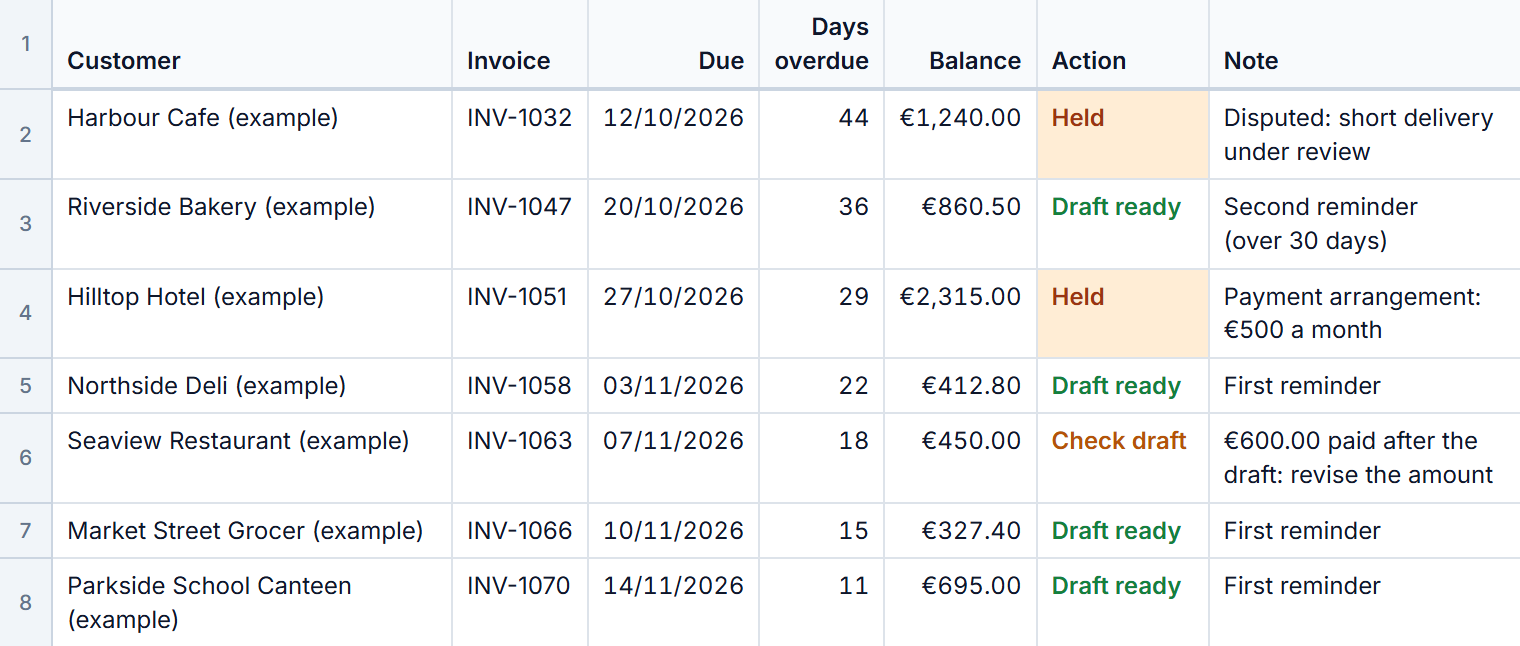
Overdue invoice report
The spreadsheet shows who owes what, which drafts are ready to review, and which invoices are on hold or need a draft checked.

Draft reminder email
For each overdue invoice that’s ready to chase, the automation drafts an email from your approved template.
Draft
- To
- Riverside Bakery <accounts@riversidebakery.example>
- Subject
- Second reminder: invoice INV-1047, €860.50 overdue
Engagement process
-
Free first conversation
We’ll start by email or on a short call. Tell me how you chase invoices today, where you record disputes and payment arrangements, and who sends reminders.
-
Fixed quote for an agreed scope
I’ll send a fixed quote once we agree your reminder rules and where the report and drafts will go. The automation runs on a schedule in your own accounts. The quote explains where it will run and any ongoing software costs.
-
Build, test and hand over
I’ll build the automation using read-only accounting access where your system supports it. Before handover, we’ll test the report and drafts together on a routine overdue invoice, a disputed invoice and a part-payment.