
What had to work beyond my laptop
Briefing Engine reads news feeds, asks Claude how well each new article matches a reader's interests, and emails that reader a short briefing of the best ones. On my laptop, the application had everything it needed without my arranging it. In document 3's walkthrough, Python runs the pipeline on a local Windows computer, Postgres stores the articles and scores, and Mailpit, a test inbox on the same computer, catches the email, all within reach of one terminal. That closeness is what makes the local version a good place to learn the application, and it is exactly what the cloud takes away.
By the time I deployed it, Briefing Engine ran as two long-running programs. Its API accepted requests to manage a reader's preferences and feeds, and its worker checked the schedule and did the fetching, scoring, writing and sending. They coordinated through the same PostgreSQL database. To run on Amazon Web Services, or AWS, with nobody at a keyboard, everything the laptop had supplied by default had to be provided on purpose: somewhere to keep both programs running, a database they could reach, permission to send real email and a public address through which a reader could set up a briefing.
The local checks had gone as far as they could. The container image built, the Terraform definitions passed validation and 223 tests passed, with stand-ins for AWS commands in the script tests. That justified trying the real account, but a stand-in only behaves the way its author expects. None of them could show a login expiring during a plan review, or Windows' credential store handling a login token from Amazon's image registry, and two of the three problems that followed were exactly those.
I ran the account steps and approved each cloud change in my own terminal. Claude Code reviewed the plans, investigated the output I pasted back and wrote the fixes, which were reviewed and merged before the next attempt. The failures below came from those attempts; the successful email came from the live deployment on 16 November.
A deployment I could afford to take down
A database, running containers and a public entry point keep costing money while nobody is using them. For an early demonstration, most of the hours a cloud environment spends running would answer no question at all. So the real requirement was to create the environment when I needed it and remove it afterwards, without losing the parts of the setup that are slow to recreate.
That meant sorting the infrastructure by how hard each part is to rebuild. The base layer kept what would be useful from one demonstration to the next: the place to store container images, the email-sending setup, the HTTPS certificate and the records of what each layer has created. The demo layer held what a particular session needed and could be rebuilt cheaply: the running application, its database and its network.
Terraform is what made two layers workable. It describes infrastructure in files, compares that description with what exists in the account and proposes the difference. A plan shows what it intends to create, change or remove, and an apply carries out the approved changes. Each layer keeps its own record of the resources it manages, called its state, so destroying the demo can't touch anything that belongs to the base.
Three scripts follow the layers: bootstrap.ps1 creates the base, demo-up.ps1 brings up a demo on top of it, and demo-down.ps1 removes the demo when the session is over, leaving the certificate, email configuration and stored application image ready for next time.
The database shows the price of this choice. Each demo starts with a fresh database, and taking the demo down destroys it without a final snapshot. My ongoing reading history stays in the local database, so nothing of mine is lost, but an environment built this way can only prove and demonstrate the deployment. Keeping real readers' history would need a different decision about data.
That lifecycle was designed before the first apply. The first obstacle came while the base was being created, before there was any demo to bring up: keeping the deployment tools signed in long enough to do their work.
A valid login became an expired set of keys
The first run of bootstrap.ps1 stopped part-way with ExpiredToken. Three DNS records had been created at Cloudflare, the service managing the domain's address records, but none of the AWS resources had. The time I'd spent reviewing the Terraform plan had outlasted the credentials Terraform was using.
That was puzzling, because the login itself was still valid. The account used aws login, an interactive sign-in that lets local tools obtain temporary credentials, and two lifetimes were involved: the login could last up to twelve hours, but the keys issued from it lasted fifteen minutes and had to be renewed.
The renewal was broken by common.ps1, the shared script that every deployment script loads to set up its AWS session. It had copied the current keys into environment variables, settings inherited by programs launched from that terminal, so Terraform received a snapshot of keys with a fixed expiry and no route back to the login that could supply the next set.
Another attempt expired during planning, for a related reason. Bootstrap was clearing Terraform's working folder each time, which forced a fresh download of the large AWS provider, the plugin Terraform uses to talk to AWS. The download used up much of the same fifteen-minute window before any resources could be created.
The fix restored the missing route. The shared script now clears stale keys and points the tools instead at briefing-admin, the named AWS profile that aws login signs in, so compatible tools can ask that profile for renewed credentials for as long as the login remains valid. This is the renewal behaviour described in AWS's local-development login documentation.
A provider cache now also keeps downloaded plugins between runs, still checked against the project's lockfile checksums. With no needless download and keys that renew, a careful plan review could take as long as it needed. The next attempt got all the way through resource creation, where a different check stopped it.
The resources were there, but the state check said no
This time bootstrap created all 25 base resources and copied Terraform's state into Amazon S3, AWS's object storage service. Then the script reported that the remote copy didn't match the local one.
A failed state check deserves to be taken seriously, because the state is what connects Terraform's definitions to particular resources in the account. If a definition describes a database, the state records which database Terraform manages. Without it, Terraform would no longer know that the resources it had just created were its own. The state is deployment bookkeeping, separate from the articles and preferences inside the application's database; HashiCorp explains the relationship in its Terraform state guide.
Bootstrap had a small ordering problem to solve. The state was meant to live in an S3 bucket, but creating that bucket was itself part of bootstrap, so the first apply had to record its work locally and then move the state into the bucket it had just made. Before deleting the local copy, the script checked that the remote one was complete.
The check compared the state's lineage and serial, metadata identifying its history and revision number. In this migration, with Terraform 1.17, the destination was given a new lineage and its serial started again, and the check read those changes as evidence of a bad copy.
Comparing the local backup with the remote state showed the same resources and outputs in both. Outputs are values Terraform exposes for later use, such as the address of an image repository. The migration had kept everything the next deployment needed. The check had asked whether the copy had the same history, when the question that mattered was whether it had the same contents.
The replacement check compares resources and outputs instead, and a later base-layer plan reported no changes, which supported the conclusion that the remote state matched the deployed base. Keeping the local copy until the check passed is what made the failure recoverable. The lesson was specific: a verification should test the information you need to keep, not a property that usually travels with it.
Docker built the image, then failed to store its login
With the base in place, the application itself had to get into AWS, and AWS can't run code from a folder on my laptop. It runs containers from images. A Docker image packages the application, its Python environment and the files needed to start it, and a container is a running instance created from one. The same Briefing Engine image can start as the API, the worker or a short-lived administrative command.
So the image had to travel. Docker Desktop built it on the Windows computer, and it then had to be pushed to Amazon ECR, short for Elastic Container Registry, the repository AWS would fetch it from when starting containers. ECR's role is explained in AWS's registry overview.
The push never started. Docker has to log in to ECR before it can push, and that login failed with the unhelpful message The stub received bad data, which investigation traced to Windows Credential Manager rejecting ECR's long login token. The build had succeeded; what failed was storing the credential needed to upload it.
Docker's configuration file names the credential store it uses, so the obvious fix was to give Docker a temporary, empty configuration folder. That didn't work at first. Docker could still find the Windows credential-helper program and fall back to it, the automatic helper discovery described in its login documentation. Changing the configuration alone couldn't stop Docker reaching for the store that was failing.
The helper sits in the same folder as docker.exe, so push-image.ps1, the script that builds and pushes the image, hides it by taking that folder off the search path for the login and push, alongside the temporary configuration. Both changes had knock-on effects to manage. The script has to call Docker by its full path, and it keeps the address of the current Docker engine so it can still find the image it has just built. The token travels through standard input, and afterwards the script restores its settings and tries to remove the temporary credential file.
That is a workaround for the Windows setup I observed, and it briefly stores the credential outside the operating system's protected store, which is why it lives in one narrowly scoped script instead of changing every Docker login. The image reached ECR under the commit tag 416ea6b8c734, which gave the deployment a traceable version to run.
Running containers were only the next checkpoint
The demo plan proposed adding 46 resources, with nothing to change or destroy. Most of them weren't the application at all: a resource can be a network rule or a domain record as well as a database, and the count covered all the infrastructure the two programs needed around them. After approval, creation completed and demo-up.ps1 could prepare the application.
Each part of the demo met one of the needs the laptop had covered by default. Amazon ECS kept the API and the worker running as two separate services. Fargate supplied the computing capacity for their containers, so there was no virtual server of my own to maintain, though I still had to choose their memory, permissions and network access; AWS's Fargate documentation describes that division of responsibility. The database ran on Amazon RDS, AWS's managed database service, using PostgreSQL 17. It had no public address, so only the application tasks inside the deployment's network could reach it. A load balancer gave the API its public HTTPS entry point. The worker needed none, because it never receives requests; it collects its work from the shared database.
demo-up.ps1 creates and demo-down.ps1 destroys. Dashed boxes are services the demo uses but does not create.Running containers weren't yet a working application, because the new database had no tables. So demo-up.ps1 ran briefing migrate as a one-off administrative task, then restarted the API and worker against the completed schema. It is the same preparation the local guide does from PowerShell, but here it had to run inside AWS, the only place the private database could be reached from.
ECS then reported both services stable. That only means the containers had started and stayed up, so the deployment also waited for /readyz, an API endpoint that checks the database can be reached and has the expected schema. An external check received HTTP 200, meaning success, from that endpoint, from the lighter /healthz check and from the interactive documentation at /docs.
The public address, the application and the database now worked together, but the database was still empty, so nothing yet showed that the application could do its job. That needed a real reader to set up a briefing and receive it.
The first reader exposed one more assumption
I created the reader's account and an API key through one-off administrative tasks inside AWS, then used them as the first reader. The key lets a reader make authenticated requests, calls the application can tie to that account, and I entered it through the Authorize control in /docs, the browser interface for trying the API.
Before testing anything that depended on the account, I checked the account itself. GET /v1/me returns the account behind the key, and it immediately showed a placeholder email address copied from the instructions. This version had no endpoint for changing an email address, so I created another account with the real recipient. Checking identity first meant the wrong address was caught as a setup mistake, instead of turning up later looking like a mail problem.
Giving setup time to finish
The account was also given a deliberately late send time of 23:55. Setup was happening in the evening, so with the default morning time that day's briefing would already have been due. The worker could then have started building as soon as the first feed was subscribed, while the reader was still adding others.
The scheduler allows builds from five minutes before the configured time, and delivery follows as soon as an edition is ready. A send time of 23:55 moved that window well away from the setup, so I could finish configuring, inspect the scores and then ask for the first edition explicitly.
An earlier fix already makes a build wait briefly for relevant fetching and scoring, which prevents empty editions when jobs start together. That wait couldn't replace the late send time, because it covers only work that already exists. It can't know that a person is about to add another feed, so once the existing work is ready, the build goes ahead. The scheduling reference explains the limits.
Two feeds produced very different results
I created an ai-news profile favouring practical AI work, with a minimum score of 6 and space for up to eight articles, then subscribed it to Simon Willison's weblog and Ethan Mollick's One Useful Thing. The worker began processing both feeds without a separate fetch command.
Simon Willison's feed supplied 30 entries. Twenty-one fell within the profile's seven-day age window, and the worker scored them in batches of ten, ten and one, for $0.0022.
One Useful Thing supplied 20 entries, but none of them passed the age window in that run, so its absence from the email was explained before relevance scoring was even involved. A feed can be fetched successfully and still contribute nothing, which is why looking at each stage is more useful than treating every missing source as a delivery failure.
The API returned eight articles scoring at least 6. With those results visible, I requested a briefing. The worker selected all eight and used the write-up model to produce a headline, an introduction and short descriptions, including a group of related Datasette stories.
The message reached Gmail
At 19:22:50, delivery through Amazon SES, the Simple Email Service, succeeded on its first attempt, and the message arrived in Gmail from the project's own domain. SES did the job Mailpit had stood in for during local testing.
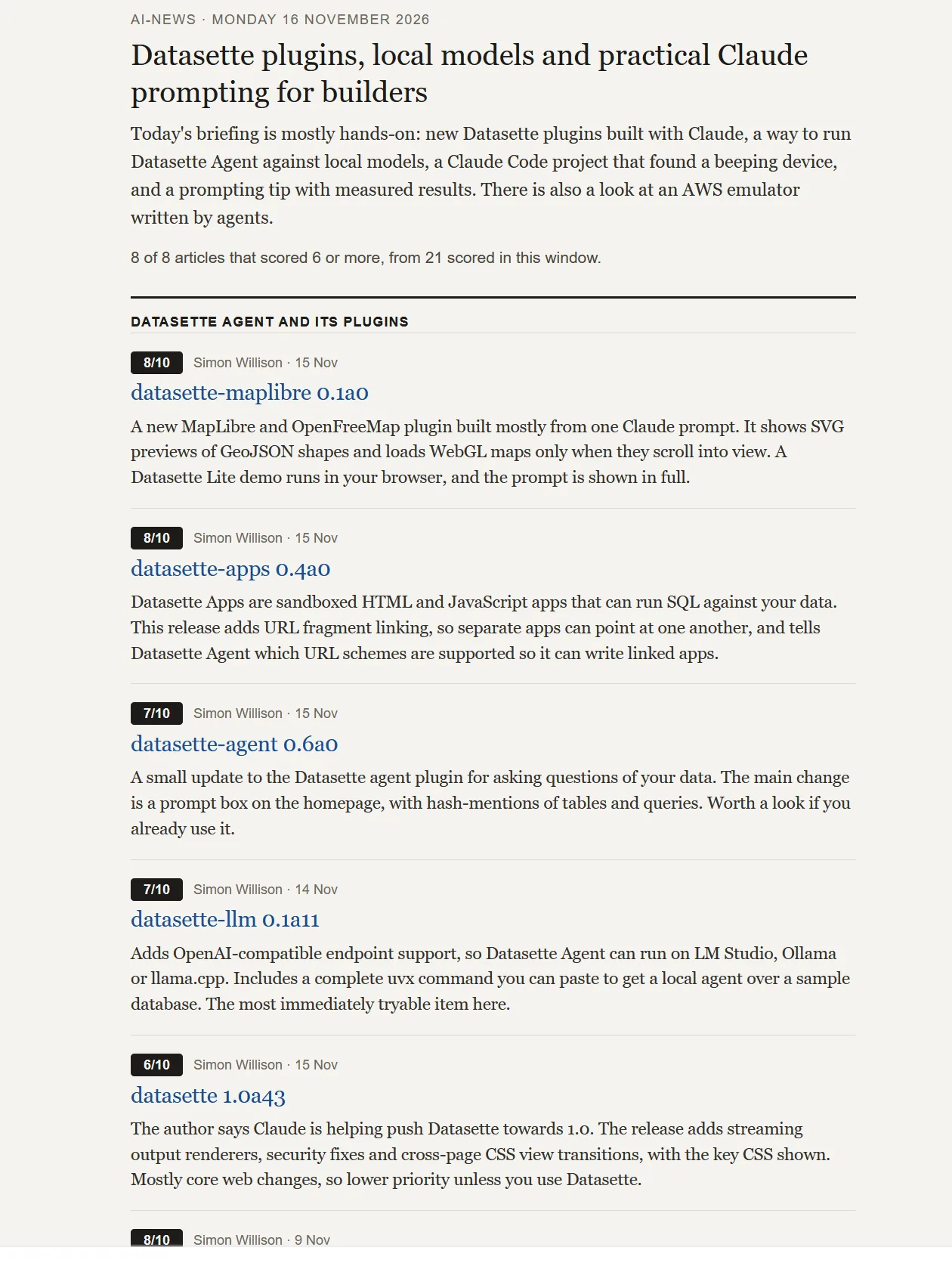
Two details in the briefing were worth checking. The summary said how many articles had been scored and how many selected, and the description of the lowest-scoring item shown noted that it was mainly relevant to Datasette users. Both let the reader see where the selection drew its line and judge whether an item earns its space.
The account was still in the SES sandbox, which only delivers to verified addresses, so the recipient had to be verified first. The run therefore showed delivery to that one inbox. Opening the service to other readers is a separate step.
Taking it down was part of the demonstration
Once the email had arrived, the demo layer was destroyed. That removed the application services, the public load balancer and the disposable database, and left the base for another session. The next demonstration can reuse the stored image and the domain configuration, then start again with a new database and a new reader.
This is the opposite of stopping the local containers in document 3, which keeps their data. The cloud teardown removes the database on purpose, with no final snapshot. That kept a disposable demonstration cheap, and it is the first thing that would have to change before the service could be trusted with readers' history.
What the run proved was a chain, with each link tested by the one after it: the infrastructure could be created, a versioned image could start, the API could set up a reader, the worker could process feeds, and a written briefing could reach Gmail. The three problems behind the failed attempts also left reusable fixes for credential renewal, state verification and registry login.
A single email can't show whether the service would keep working. Before it could be a dependable service for other people, it would need monitoring that alerts someone when something fails, wider email-sending access with bounce handling, and a plan for keeping data. Long-term availability and recovery under sustained use weren't tested.
The most personal question was left open too: whether the selected articles would be consistently worth reading. The planned shadow week would run Briefing Engine alongside Horizon, the news aggregator I already used, and compare the emails, costs and delivery. One successful email gave that comparison somewhere to start.
Handing deployment to GitHub
Every deployment so far had run from my laptop. I built the image, pushed it and approved each change in my own terminal. That works for one person, but it ties every release to one machine and one login. The next step moved routine deployment to GitHub Actions, GitHub's service for running jobs when code changes, and made the code public at simonoconnordev/briefing-engine. Claude Code wrote the workflows; I set up the repository settings and secrets, and I approve each deploy.
GitHub still had to reach AWS, and I didn't want long-lived AWS keys stored in it. Instead, each job asks GitHub for an OIDC token, a short signed statement of which repository and which kind of job is running, and exchanges it for temporary AWS credentials. AWS accepts the exchange only for a role, a named set of AWS permissions, that trusts that exact statement. The deploy role trusts only jobs in a GitHub environment called production, which waits for my approval and accepts only the main branch. Those rules live in GitHub's settings, so editing a workflow file can't skip them.
I wanted a merge to main to become a deploy without my laptop being involved, but I didn't want every merge reaching AWS without my seeing it. So the deploy job waits. The tests run first, and then nothing happens until I approve the job in GitHub. What it does next depends on whether there is anything to deploy to. With the demo down there's no service to update, so it stores the image for that commit in ECR and stops; the next demo-up.ps1 finds it already there. With the demo up, it migrates the database, moves the API and worker onto the new image and checks /readyz, as demo-up.ps1 does. It does that without Terraform, which its role can't run, by registering a copy of each service's task definition with only the image changed.
Infrastructure changes needed a different safeguard: I wanted to see what a change would do before it was merged, not after. So a second workflow runs a Terraform plan on every pull request that touches the infrastructure. A plan only needs to read the account, so this job's role is read-only. AWS's standard read-only policy would still have let it read the application's secrets from SSM Parameter Store, where they are kept, and a job that runs on pull requests has no reason to see those, so the role explicitly denies it.
Making the repository public changed what those jobs could safely print. Anyone can read a public repository's workflow logs, and Terraform's output includes the AWS account ID and the verified email recipients. The plan job therefore writes Terraform's output to files and puts only the list of resources that would change into its summary. The deploy job masks the account ID, and the role addresses, which contain it, are stored as GitHub secrets.
The first pull request then failed the plan checks for both layers with Not authorized to perform sts:AssumeRoleWithWebIdentity. The roles trusted tokens whose subject began repo:simonoconnordev/briefing-engine, the form GitHub's guides show. This repository's tokens used GitHub's immutable form instead, which adds the permanent numeric IDs of the owner and the repository: repo:simonoconnordev@195565840/briefing-engine@1460610921. The roles were waiting for a statement GitHub never made for this repository.
The immutable form is the better one to trust. If the repository were deleted and re-created under the same name, the new one would have different IDs and couldn't inherit the roles. I changed both roles to trust that subject, applied the base layer, and the rerun checks passed. Like the three earlier failures, this one was out of reach of the local checks: only a real token from GitHub showed what it contained.
After the merge, the first deploy waited for my approval, then pushed the image 8b363add89d2, named after the merge commit. The demo was down, so the job stopped there, as intended, and the deploy after the next merge did the same. The rollout half, which migrates the database and replaces the running tasks, hasn't run yet; its first real test will come the next time a demo is up.
Deployment reference and evidence
The sections below hold the detail behind the deployment story: what each service did, the commands I ran, where the fixes live and how the first run unfolded. The commands follow this project's setup; they are not a general AWS setup guide.
The services and what each one did
| Service or term | Role in this deployment |
|---|---|
| Docker Desktop | Built the application image on Windows and pushed it to the registry. |
| ECR | Stored the container image under a commit-based tag so the cloud tasks could retrieve the intended version. |
| ECS and Fargate | ECS managed the API and worker services; Fargate supplied their container compute. An administrative task ran once and exited. |
| RDS | Hosted PostgreSQL, including readers, articles, jobs and editions. The demo used a small single-availability-zone database. RDS for PostgreSQL documentation. |
| Load balancer and ACM | The load balancer received public requests. AWS Certificate Manager supplied the HTTPS certificate used at that entry point. |
| VPC and security groups | The Virtual Private Cloud defined the deployment's network. Security groups controlled permitted connections between the load balancer, tasks and database. |
| S3 and Terraform state | S3 stored Terraform's resource records. These records are distinct from a backup of the application's database. |
| SSM and Secrets Manager | SSM Parameter Store held the application secrets. RDS managed its database password through Secrets Manager. |
| IAM roles | Identity and Access Management roles gave tasks permission to use particular AWS services. The worker sent email through SES using its task role. |
| SES | Delivered the email to a verified real recipient. Domain-authentication records supported sending from the project's domain. |
| Cloudflare DNS | Held the domain's address and verification records. Terraform updated those records alongside the AWS resources. |
| CloudWatch | Collected task logs. Logs were available during the demo; alerting was still outstanding. |
The network spanned two availability zones, but the database itself was single-zone. Tasks had public addresses for outbound access, with inbound traffic restricted by security groups. Omitting a NAT gateway, which would otherwise have given tasks without public addresses their outbound access, reduced the running infrastructure; it did not make the database publicly accessible.
The operator's deployment sequence
The repository's infrastructure runbook has the full sequence. It expects PowerShell 7, Docker Desktop, the AWS CLI with aws login support, Terraform and access to the configured AWS account and Cloudflare domain. The region was eu-west-1, Ireland. These commands create chargeable cloud resources and need your own account, domain and verified recipient.
Establish the base and its secrets
From the repository root, authenticate with the profile used by the scripts. On a first setup, copy infra\base\terraform.tfvars.example to infra\base\terraform.tfvars and replace its example domain and recipient. If that file already exists from an earlier setup, keep it. The Cloudflare token needs Zone Read and DNS Edit for that domain; the local .env supplies it and the Anthropic key.
aws login --profile briefing-admin
.\infra\scripts\bootstrap.ps1
.\infra\scripts\put-secrets.ps1
Bootstrap shows a Terraform plan for review before its apply. It creates the base and migrates the state. The second script, put-secrets.ps1, creates the application secret parameters in SSM Parameter Store, taking the Anthropic key from .env. SES emails each recipient address a verification link; follow it before testing delivery.
Bring up the demo and create its reader
.\infra\scripts\demo-up.ps1This checks the required secrets, prepares the image, applies the demo plan, migrates the database, restarts the services and waits for readiness. Review the plan before approving. Then use a real verified address in the following examples:
.\infra\scripts\run-admin.ps1 create-user you@example.com "Your Name" --timezone Europe/Dublin --send-time 23:55
.\infra\scripts\run-admin.ps1 -Secret create-key you@example.com laptop
The create-key command prints an application API key. -Secret tells the script to delete the task's CloudWatch log stream after successfully reading and displaying the output. It reports a failure if it cannot read or delete that stream. The key still appears in the terminal, so keep that window private.
Open the deployed /docs address printed by demo-up.ps1 and enter that key through the Authorize control. Check GET /v1/me, create a profile with POST /v1/profiles and subscriptions with POST /v1/subscriptions, inspect scores through GET /v1/articles, then request the first edition with POST /v1/briefings. The interactive documentation supplies the request schemas.
Remove the disposable demo
The following command destroys the demo database without a final snapshot. Use it only when its data is disposable. Terraform lists the resources to remove and asks for approval; the base resources remain.
.\infra\scripts\demo-down.ps1Stopping work in the terminal does not stop AWS charges. The base can still incur storage or usage charges after the demo is removed. Left running, the demo layer was estimated at about $65 a month.
Where the deployment fixes live
Credential renewal: infra/scripts/common.ps1
Use-AwsSession clears old credential environment variables, selects the named profile and checks that AWS can identify the caller. Provider caching is configured in the same shared script. This excerpt shows the profile selection; the function's cleanup and error handling surround it.
    $env:AWS_PROFILE = $script:AwsProfile
    $env:AWS_REGION = $script:Region
    $env:AWS_DEFAULT_REGION = $script:Region
    & aws sts get-caller-identity --query Account --output text *> $null
State verification: infra/scripts/bootstrap.ps1
The comparison keeps resources and outputs and leaves out the identity metadata that migration changes. -Depth 100 prevents PowerShell's JSON conversion from replacing deeply nested values with shortened representations. It is written for this migration, not as a general comparison of state files.
    $json = { param($s) ConvertTo-Json -InputObject @($s.resources, $s.outputs) -Depth 100 -Compress }
    (& $json $A) -eq (& $json $B)
Registry authentication: infra/scripts/push-image.ps1
The script gives the login and push a temporary Docker configuration, removes Docker's helper directory from their search path and preserves the engine connection in DOCKER_HOST. It restores the previous environment in finally and attempts temporary-folder cleanup. Cleanup errors are ignored, so a credential file can occasionally be left behind.
ECR's token is valid for twelve hours, and Docker receives it with --password-stdin. AWS documents that authentication path in its ECR registry-authentication guide. The temporary configuration file holds the token encoded rather than encrypted, which is the cost of bypassing Windows Credential Manager.
OIDC trust: infra/base/github.tf
Both roles build their trusted subject from github_oidc_subject, a base-layer variable that defaults to this repository's immutable subject. A fork, or the code pushed to a new repository, needs that variable set to its own subject, which gh api repos/<owner>/<name>/actions/oidc/customization/sub returns.
  for_each = {
    deploy = "${var.github_oidc_subject}:environment:production"
    plan   = "${var.github_oidc_subject}:pull_request"
  }
Timeline of the first email
The times come from the deployment's logs on 16 November 2026.
| Time | Event |
|---|---|
| 19:15:32 | Simon Willison's feed was subscribed. |
| 19:15:53 | The worker queued its fetch. |
| 19:15:54 | The fetch stored 30 entries; 21 passed the seven-day age window. |
| 19:16:07 | Three model calls had scored those 21 articles. Scoring cost: $0.0022. |
| 19:17:23 | One Useful Thing was subscribed. |
| 19:17:39 | Its fetch stored 20 entries; none passed the age window. |
| 19:22:49 | The requested build placed eight qualifying articles and generated the write-up. |
| 19:22:50 | SES delivery succeeded on the first attempt. |
Two of the scoring calls read 927 cached prompt tokens each, so prompt caching was already working on the first run.
The send-time behaviour that mattered during setup
A profile with subscriptions becomes eligible for an automatic build five minutes before its reader's local send time. The scheduler checks again between queue-processing cycles, with a nominal thirty-second interval. Queue work can make the interval longer.
A newly queued build can defer in fifteen-second steps while relevant fetch or score jobs are due within two minutes, up to ten minutes from the build job's original creation. It can proceed earlier as soon as that work is ready. This is protection for unfinished background work, not a ten-minute countdown for entering preferences.
A ready edition proceeds to delivery, so the configured time is not a strict embargo preventing earlier delivery. Using 23:55 moved the automatic build threshold to 23:50 for this demonstration, leaving time to inspect the feeds and request the edition manually.
The saved edition is keyed by reader, profile and local date. Later subscriptions do not rewrite that day's saved email. This normal behaviour avoids repeated daily sends; it does not eliminate the separate crash window between a provider accepting a message and the application recording success. SES replaces the supplied Message-ID, so that window remains relevant to duplicate delivery.
The implementation is in scheduler.py, build.py and delivery/deliver_job.py under src/briefing_engine. See document 2's map of the code for where each part lives.
Secrets and the limits of demo mode
A review before deployment found that Terraform-managed secret parameters could put decrypted values into state during refresh, even with ignore_changes. The design was corrected before the first apply.
The application keys were therefore written separately to SSM Parameter Store. Terraform used their names and identifiers rather than managing their values. RDS managed the database password in Secrets Manager, and ECS supplied secrets when tasks started. The worker used its IAM role to send through SES, without an SMTP password.
For a service left running longer, the runbook also flags database-password rotation: tasks would need to restart to receive the changed secret. The demo had short backup retention, no final database snapshot, logs without alarms, and no completed shadow-week comparison.
The SES sandbox allowed this verified-recipient test. Sending to a wider audience required production access and handling for bounces and complaints.
The GitHub workflows and their setup
| When | What runs |
|---|---|
| Any pull request | The test suite against a PostgreSQL 17 service container. |
Pull request changing infra/base or infra/demo | A Terraform plan of both layers with the read-only plan role. The job summary lists only the resources that would change. |
Push to main | The tests, then the deploy job, which waits for approval in the production environment and uses the deploy role. |
When the demo is up, a rollout registers a new revision of each task definition with only the image changed, runs briefing migrate as a one-off task on the worker's network, updates both services and waits for them to settle. It then confirms that ECS's circuit breaker didn't roll the deployment back and polls /readyz for up to three minutes.
The workflows are .github/workflows/ci.yml and .github/workflows/terraform-plan.yml. The rollout logic is in infra/ci/deploy.sh, and the two roles are in infra/base/github.tf. Every third-party action is pinned to a full commit SHA rather than a version tag, so a moved tag can't change what runs with the deploy role.
Setup was a one-off job in the repository's settings. The production environment has me as its required reviewer and main as its only branch. The two role addresses, the verified recipients and a Cloudflare token are stored as GitHub secrets; the domain and API address are variables. The plans get their own Cloudflare token that can only read DNS, because the one on my laptop can edit it. The runbook's GitHub Actions section lists the commands.
Sources, commits and the rest of the series
This account draws on the deployment's logs, the email screenshot, the project plan and the infrastructure runbook. Commands and code excerpts match the public repository at 8b363ad.
| Commit | Change |
|---|---|
5295277 | Use the renewable login profile and cache Terraform providers. |
a63319a | Compare state resources and outputs after migration. |
416ea6b | Use the temporary Docker configuration for ECR authentication. |
69f67d8 | Document the first reader's send-time behaviour. |
c8f3d0a | Record the completed first AWS demo in the plan and README. |
e77bab3 | Deploy through the production environment and plan Terraform on pull requests. |
0fdb118 | Trust GitHub's immutable OIDC subject. |
8b363ad | Merge pull request 1, the first change deployed through GitHub. |
Continue with document 1 for the project's decisions, document 2 for the feed-to-inbox explanation, or document 3 to run it locally with Mailpit.